
Best Practices: Capacity Management for Link Utilization
EdgeConnect Link Utilization using Orchestrator and ECOS REST APIs
To monitor the link utilization of EdgeConnect gateways we can do it in two ways. We can use the aggregate stats from the Orchestrator, or we can use the minute stats from the ECOS Rest APIs.
To begin we are assuming we have an Orchestrator and EdgeConnect appliances deployed. First we need to login into the Orchestrator to use the Swagger application. The Orchestrator performs the administrative tasks to manage and configure the Edgeconnect gateways. The Orchestrator has its own set of Rest APIs and the ECOS gateway has its own set of Rest APIs. In the document, we will cover both set APIs to monitor the link utilization and show examples.
To login to the Orchestrator there are several options but the recommendation is to create an API user and create an API key for the API user. There are examples provided in the HPE Aruba Networking Developer Hub for creating an API key and they can be accessed here API key examples. As for the EdgeConnect gateways you will need to login to each one individually to initiate the session, collect the data, then close the session.
Once logged in we can get an inventory of the EdgeConnect appliances deployed. To do this we can use the GET /appliances endpoint from the Orchestrator to get the appliances ID. The appliance ID is to be used later to pull the data from Orchestrator and the ECOS API endpoints. Notice the response body example below showing "id": "1.NE" for hostName SanFranSP01. We will use the id which is the nePk for the EdgeConnect gateway. We will use the nePK with the Rest API endpoints for both Orchestrator and ECOS. Lets proceed with the Orchestrator Rest API endpoint.
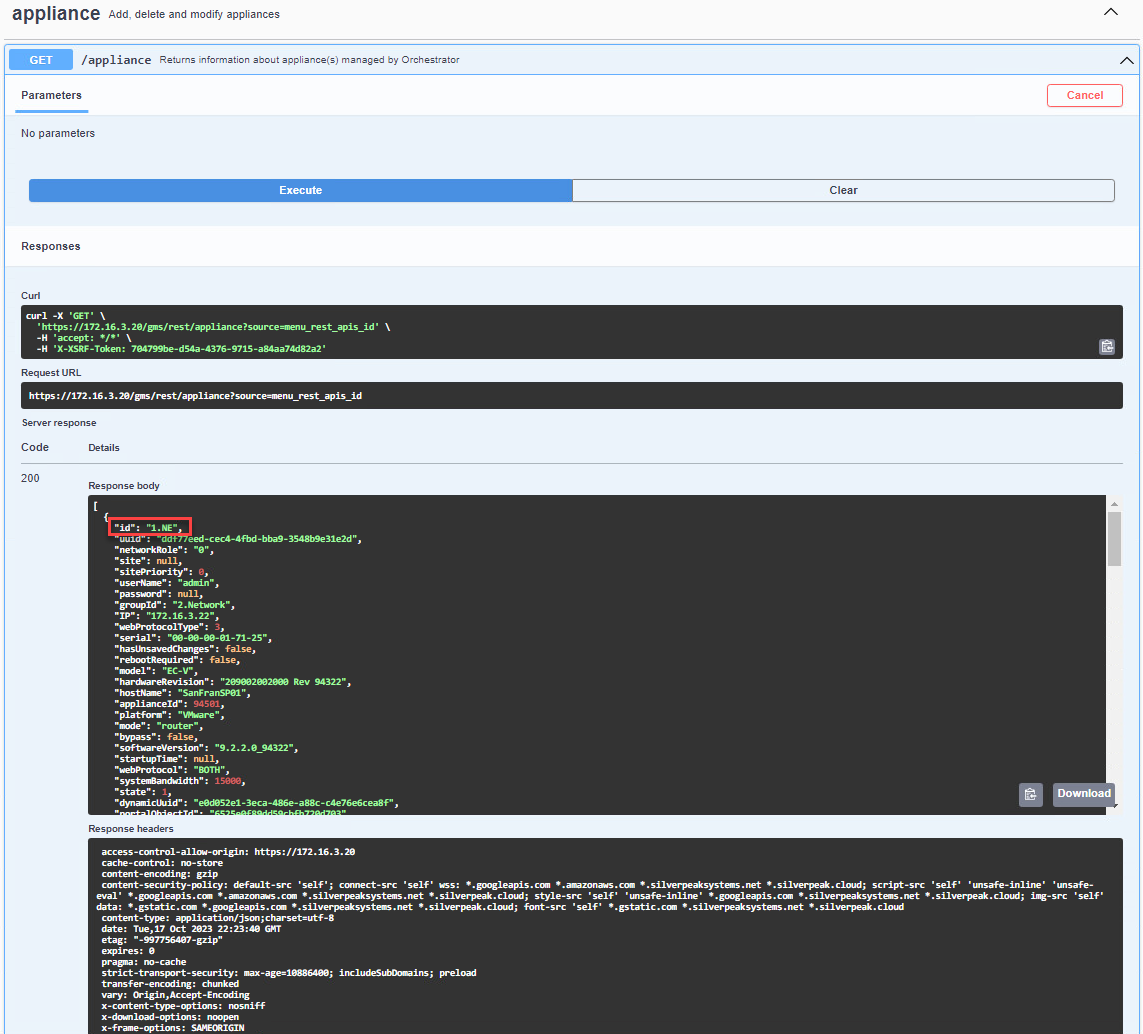
GET /appliance from swagger and in red it highlights the appliance id
Orchestrator Rest API endpoint /stats/aggregate/interface
The Orchestrator Rest API endpoint to use is the /stats/aggregate/interface.
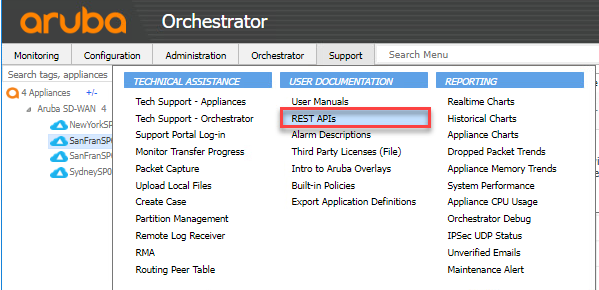
Login into the Orchestrator and select the Support > USER DOCUMENTATION select the REST APIs
When selecting the Rest APIs you will then see the documentation about the REST APIs provided by Orchestrator. The documentation we need is the aggregateStats which is the ECOS aggregate statistics Select the aggregateStats tag.
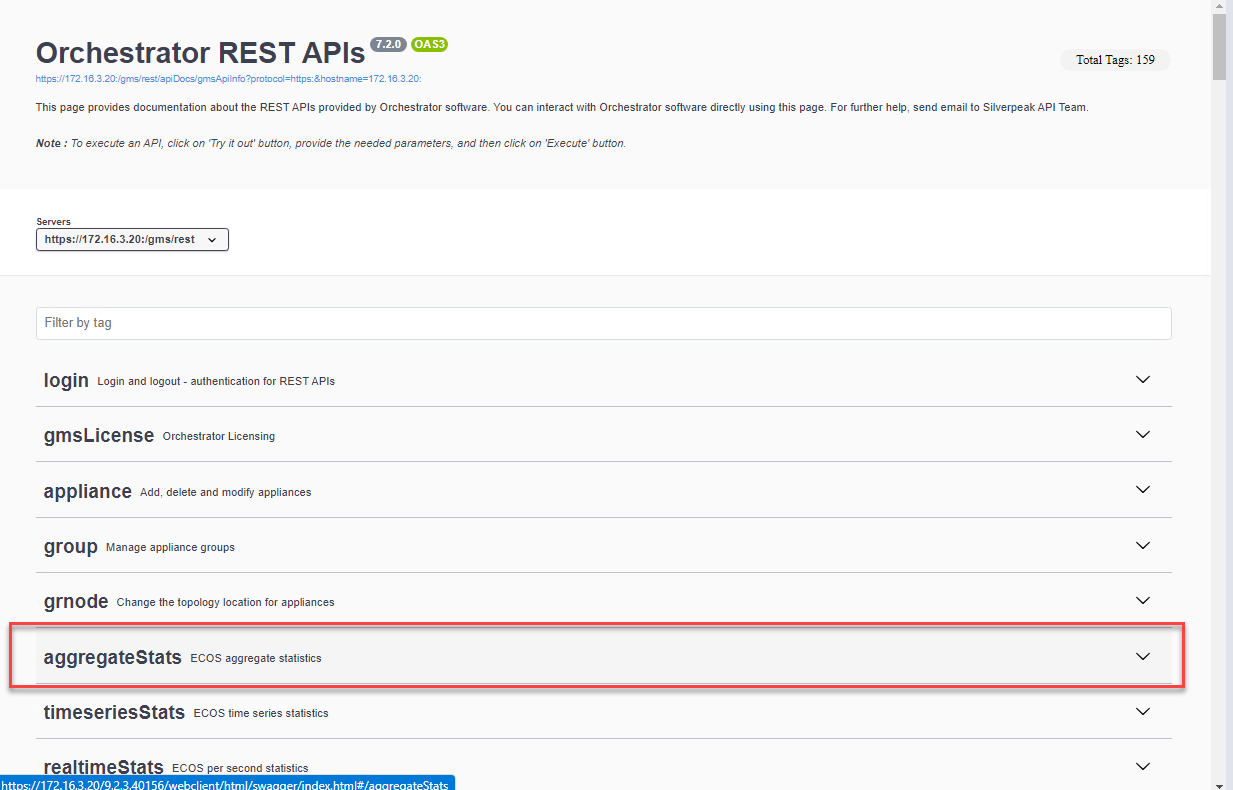
Selecting the aggregateStats tab expands the documentation. Select the the POST method for /stats/aggregate/interface
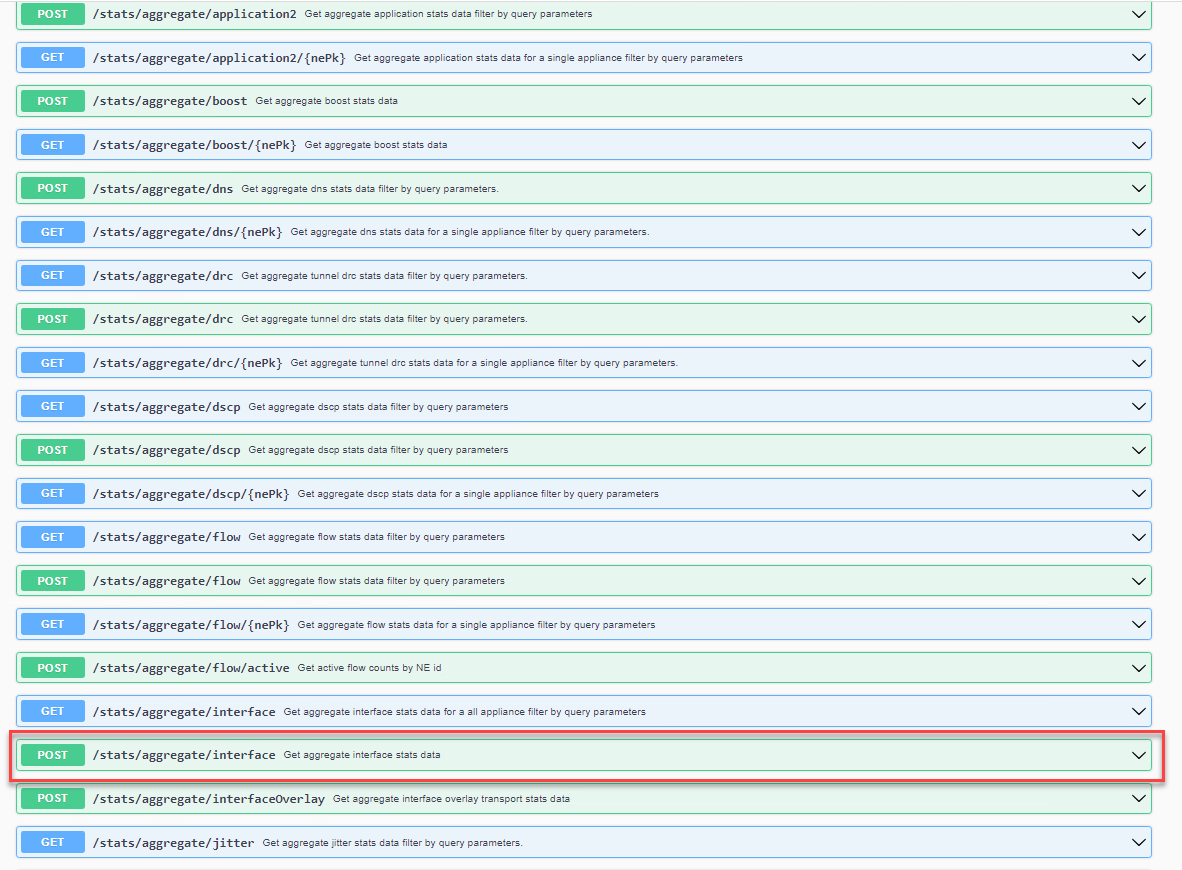
Once we expand the POST /stats/aggregate/interface documentation, we can try the API endpoint in swagger by selecting the Try it out button. Provide the required fields for the following:
- startTime
- endTime
- granularity
- trafficType
- format: leaving it with the dash will provide a JSON output or you can select csv
In the request body for ids "string" add the id of the appliances or appliances. For example, in our test case we use "1.NE" to get the aggregate stats for host SanFranSP01
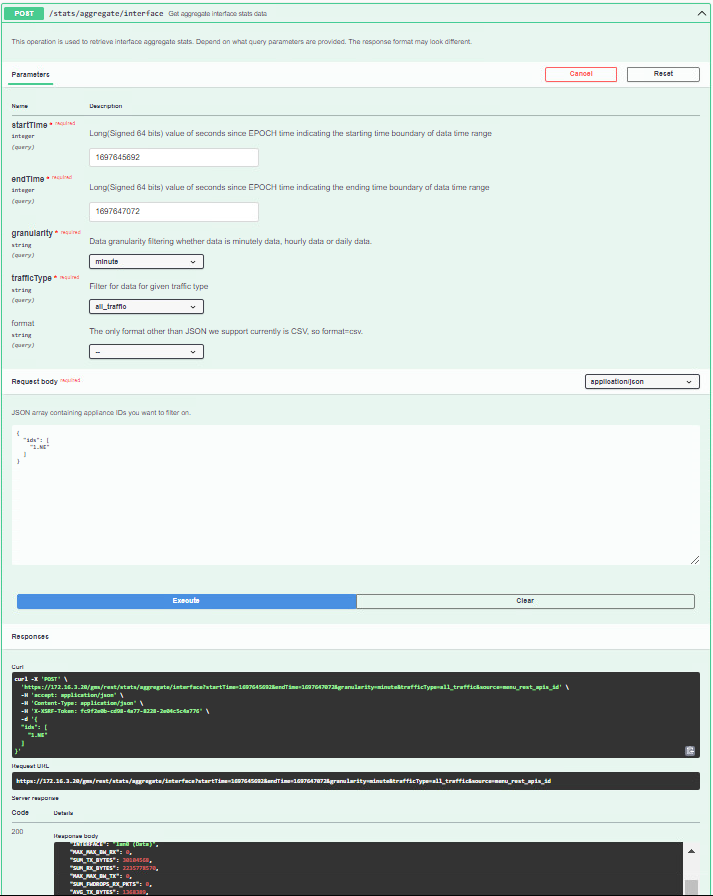
To derive some useful statistics, we can investigate the POST /stats/aggregate/interface endpoint. The JSON output file can help us find out the inbound and outbound bandwidth that was configured for the appliance during its deployment. This can be determined by analyzing the stats on the maximum bandwidth for RX and TX of the EdgeConnect appliances. It's important to note these fields report the configured bandwidth for the selected WAN interface, not the physical port speed or an appliance-wide bandwidth limit. As an example, in our test, the EC-XS used had a deployment inbound and outbound bandwidth set to 900,000 kbps (see the image below).
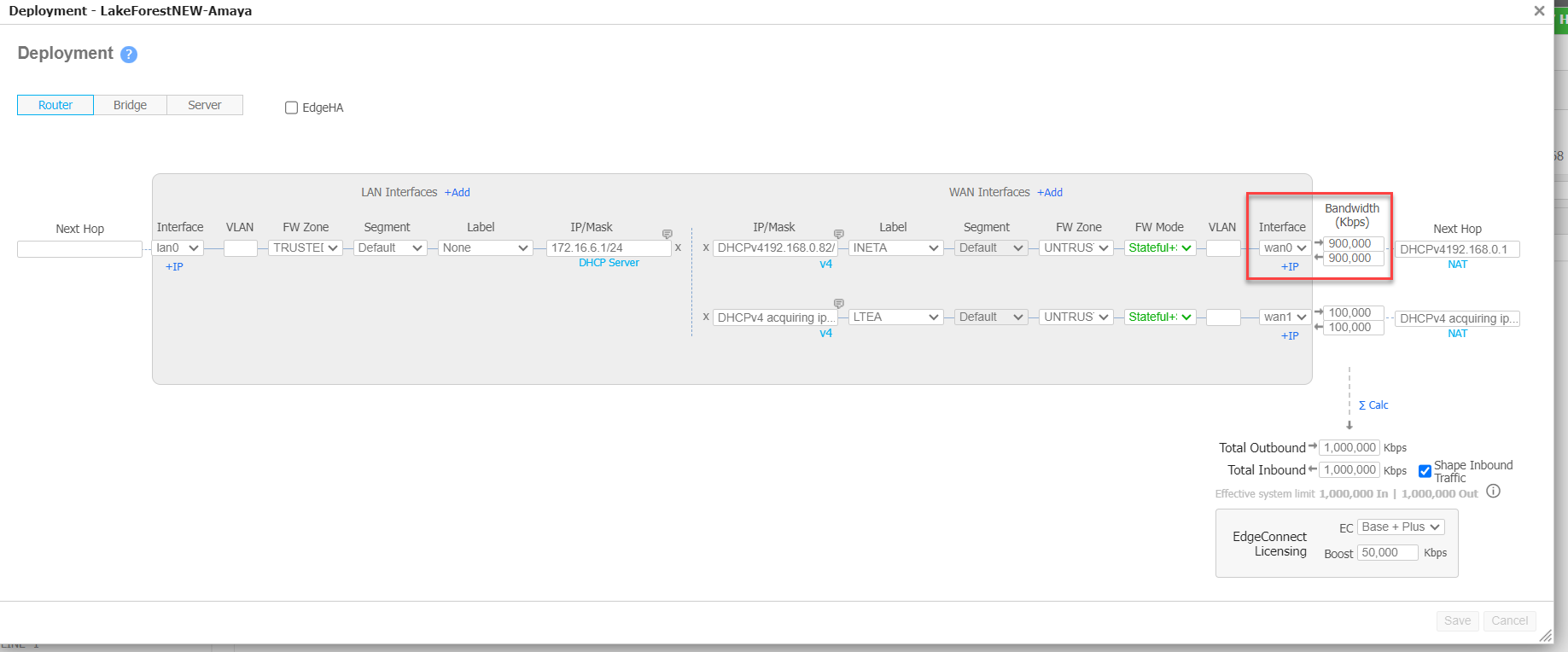
EC-XS deployed bandwidth of 900,000 kbps for inbound/outbound
A use case are Service Providers for example, they can provide EdgeConnect gateways with 10Gb interfaces, but the Service Provider could sell their customers a 900Mb link interface which is what is configured in the deployment page for example purposes. The aggregate stats AVG_MAX_BW_TX or AVG_MAX_BW_RX provides all the statistics for the deployed interface using the aggregate/interface endpoint.
In the example provided, we have a test case scenario where there is a single EdgeConnect appliance with a single LAN and WAN interface configured. The WAN interface was configured with 900,000 kbps (900 Mbps) inbound and 900,000 (900 Mbps) outbound. Utilization is calculated seperately for each direction. The second lnterface with label LTEA is not configured in the test setup for use.
There are two options when using the aggregate interface statistics. We can calculate the average using the AVG RX/TX Bytes or we can calculate the total BW used RX and TX using the SUM results for the time period specified.
Calculating Inbound Avg Utilization %
To calculate inbound average utilization per interface, we can use the POST /stats/aggregate/interface along with the following formula for the Inbound Avg Utilization %:
Inbound Avg Utilization (%) = (AVG_RX_BYTES × 8 × 100) / (multiplier × AVG_MAX_BW_RX × 1000)
Where
- AVG_RX_BYTES is the average number of received bytes per aggregation bucket within the queried time range.
- AVG_MAX_BW_RX is the average configured inbound bandwidth for the interface over the queried samples, in kilobits per second (kbps).
- multiplier is the duration of one aggregation bucket in seconds; 60 for minute granularity, 3600 for hourly granularity, or 86,400 for daily granularity.
- 8 converts bytes to bits; 1,000 converts kbps to bits per second.
Do not multiply the bucket duration by the number of hours or days in the query. For example, a 24-hour query using hourly granularity still uses a multiplier of 3,600.
Calculating Outbound Avg Utilization %
To calculate outbound average utilization per interface, we can use the POST /stats/aggregate/interface along with the following formula:
Outbound Avg Utilization (%) = (AVG_TX_BYTES × 8 × 100) / (multiplier × AVG_MAX_BW_TX × 1000)
Where:
- AVG_TX_BYTES is the average number of transmitted bytes per aggregation bucket within the queried time range.
- AVG_MAX_BW_TX is the average configured outbound bandwidth for the interface over the queried samples, in kilobits per second (kbps).
- multiplier is the duration of one aggregation bucket in seconds: 60 for minute granularity, 3,600 for hourly granularity, or 86,400 for daily granularity.
- 8 converts bytes to bits; 1,000 converts kbps to bits per second.
Do not multiply the bucket duration by the number of hours or days in the query. For example, a 24-hour query using hourly granularity still uses a multiplier of 3,600.
These calculations provide average inbound and outbound utilization for the selected interface and traffic type. In this example, the WAN interface is wan0 (INETA). A TRAFFIC_TYPE value of 4 represents all traffic.
In this example, an EC-XS appliance (nePk: 1856.NE) has one WAN interface, wan0 (INETA), configured with 900,000 kbps of inbound bandwidth and 900,000 kbps of outbound bandwidth, plus one LAN interface. We queried POST /stats/aggregate/interface for a 24-hour period from October 4 to October 5 using hourly granularity.
The response summarizes the returned hourly samples. AVG_RX_BYTES and AVG_TX_BYTES represent average byte counts per hourly bucket, so their utilization calculations use 3,600 seconds. SUM_RX_BYTES and SUM_TX_BYTES represent total bytes across the returned samples.
This table is specific to the hourly example. "Bytes per hourly bucket" describes the interval represented by the byte count, not an already calculated bytes-per-second rate.
| JSON field | Example value | Description | Unit |
|---|---|---|---|
nePk | 1856.NE | Appliance identifier | N/A |
SUM_TX_PKTS | 11585585 | Total transmitted packets across the returned samples | Packets |
MAX_OHEAD_RX_BYTES_MAX | 958672 | Maximum received-overhead byte count retained in the returned samples¹ | Bytes |
MAX_TX_PKTS_MAX | 18747 | Maximum transmitted-packet count retained in the returned samples¹ | Packets |
AVG_MAX_BW_RX | 900000 | Average configured inbound bandwidth for this interface across the returned samples | kbps (kilobits per second) |
MIN_TIMESTAMP | 1696438800 | Earliest sample timestamp included in the aggregation | Unix epoch seconds |
SUM_RX_PKTS | 23177992 | Total received packets across the returned samples | Packets |
AVG_MAX_BW_TX | 900000 | Average configured outbound bandwidth for this interface across the returned samples | kbps (kilobits per second) |
MAX_FWDROPS_TX_BYTES_MAX | 0 | Maximum outbound forward-drop byte count retained in the returned samples¹ | Bytes |
TRAFFIC_TYPE | 4 | Traffic category: 1 = optimized; 2 = passthrough-shaped; 3 = passthrough-unshaped; 4 = all traffic | N/A |
MAX_RX_PKTS_MAX | 92689 | Maximum received-packet count retained in the returned samples¹ | Packets |
MAX_FWDROPS_RX_PKTS_MAX | 0 | Maximum inbound forward-drop packet count retained in the returned samples¹ | Packets |
MAX_OHEAD_TX_PKTS_MAX | 31 | Maximum transmitted-overhead packet count retained in the returned samples¹ | Packets |
INTERFACE | wan0 (INETA) | Interface name and label | N/A |
MAX_MAX_BW_RX | 900000 | Highest configured inbound bandwidth for this interface across the returned samples | kbps (kilobits per second) |
SUM_TX_BYTES | 4131962601 | Total transmitted bytes across the returned samples | Bytes |
SUM_RX_BYTES | 23123407151 | Total received bytes across the returned samples | Bytes |
MAX_MAX_BW_TX | 900000 | Highest configured outbound bandwidth for this interface across the returned samples | kbps (kilobits per second) |
SUM_FWDROPS_RX_PKTS | 167 | Total inbound forward-drop packets across the returned samples | Packets |
AVG_TX_BYTES | 172165108.375 | Average transmitted byte count per hourly bucket | Bytes per hourly bucket |
MAX_RX_BYTES_MAX | 114216440 | Maximum received-byte count retained in the returned samples¹ | Bytes |
AVG_RX_BYTES | 963475297.9583 | Average received byte count per hourly bucket | Bytes per hourly bucket |
SUM_OHEAD_TX_PKTS | 720958 | Total transmitted-overhead packets across the returned samples | Packets |
MAX_TX_BYTES_MAX | 6960661 | Maximum transmitted-byte count retained in the returned samples¹ | Bytes |
SUM_FWDROPS_RX_BYTES | 0 | Total inbound forward-drop bytes across the returned samples | Bytes |
MAX_OHEAD_TX_BYTES_MAX | 10720 | Maximum transmitted-overhead byte count retained in the returned samples¹ | Bytes |
SUM_OHEAD_TX_BYTES | 113086640 | Total transmitted-overhead bytes across the returned samples | Bytes |
SUM_OHEAD_RX_BYTES | 1200707360 | Total received-overhead bytes across the returned samples | Bytes |
SUM_FWDROPS_TX_BYTES | 0 | Total outbound forward-drop bytes across the returned samples | Bytes |
SUM_OHEAD_RX_PKTS | 3048562 | Total received-overhead packets across the returned samples | Packets |
MAX_FWDROPS_RX_BYTES_MAX | 1240 | Maximum inbound forward-drop byte count retained in the returned samples¹ | Bytes |
MAX_OHEAD_RX_PKTS_MAX | 749 | Maximum received-overhead packet count retained in the returned samples¹ | Packets |
MAX_FWDROPS_TX_PKTS_MAX | 3 | Maximum outbound forward-drop packet count retained in the returned samples¹ | Packets |
MAX_TIMESTAMP | 1696521600 | Latest sample timestamp included in the aggregation | Unix epoch seconds |
¹ Peak fields: These are retained peak counts, not necessarily totals for an hourly bucket. Do not convert them to rates using the average-utilization multiplier without confirming their underlying measurement interval in the API documentation for the deployed version.
The response provides the values needed to calculate average inbound and outbound utilization for wan0 (INETA). Because this example uses hourly granularity, both AVG-based calculations use a multiplier of 3,600 seconds.
Calculating Inbound Average Utilization
Use the following formula:
Inbound Avg Utilization (%) = (AVG_RX_BYTES × 8 × 100) / (multiplier × AVG_MAX_BW_RX × 1000)
From the JSON Response:
-
AVG_RX_BYTES: 963,475,297.9583 bytes per hourly bucket
-
multiplier: 3,600 seconds per hourly bucket
-
AVG_MAX_BW_RX: 900,000 kbps
Substituting these values:
Inbound Avg Utilization (%) = (963475297.9583 × 8 × 100) / (3600 × 900000 × 1000) ≈ 0.238%
The average inbound traffic rate is approximately 2.141 Mbps, representing 0.238% of the configured 900 Mbps inbound bandwidth.
Calculating Outbound Average Utilization
Use the corresponding TX fields:
Outbound Avg Utilization (%) = (AVG_TX_BYTES × 8 × 100) / (multiplier × AVG_MAX_BW_TX × 1000)
From the JSON response:
-
AVG_TX_BYTES: 172,165,108.375 bytes per hourly bucket
-
multiplier: 3,600 seconds per hourly bucket
-
AVG_MAX_BW_TX: 900,000 kbps
Substituting these values:
Outbound Avg Utilization (%) = (172165108.375 × 8 × 100) / (3600 × 900000 × 1000) ≈ 0.043%
The average outbound traffic rate is approximately 0.383 Mbps, representing 0.043% of the configured 900 Mbps outbound bandwidth on wan0 (INETA).
Although the query spans 24 hours, these calculations use 3,600 seconds because the AVG byte values represent hourly buckets.
ECOS Minute Stats /stats/minuteRange and /stats/minuteStats
EdgeConnect appliances generate minute-level statistics and package them into archives named st2-<epoch-seconds>.tgz. Each archive contains statistics for a specific minute. These are interval statistics, not instantaneous real-time readings.
For frequent collection of detailed statistics, retrieve these archives directly from each appliance rather than repeatedly querying Orchestrator. This distributes the collection workload and avoids placing unnecessary load on Orchestrator.
Use GET /stats/minuteRange to discover the oldest and newest available minute timestamps. This endpoint reports the available range; it does not generate an archive. Retrieve an existing archive using GET /stats/minuteStats/{file}, where {file} is the complete filename, including .tgz.
An automated collector can poll every five minutes, but it must download all uncollected minute archives within the available range—not only the newest archive. Track successfully collected timestamps so that subsequent polls can resume without gaps or duplicate ingestion. Retrieve archives before they age out of the appliance’s retention window.
Authenticate directly to each appliance, download the required archives, and log out when collection is complete. Extract the archives and parse the statistics files appropriate to the deployed ECOS version and statistics-collector configuration.
The steps for initiating a session with the EdgeConnect gateways.
Log in directly to the appliance using the appliance using the credentials for each appliance we want to pull the stats file. In reality, the network operating team will have consistency across the deployed ECs in the SD-WAN fabric.
This will not work from the Orchestrator accessing the Appliance Manager for the EdgeConnect gateway.
Once we log in, we use the Swagger application. If you are unable to see the API documentation on Edgeconnect, then you will need to enable the api documentation from the EdgeConnect console using the CLI command: api docs enable
Once the docs have been enabled you will be able to return and log in to the Swagger application on the ECOS appliance. Go to Support > USER DOCUMENTATION > REST APIs
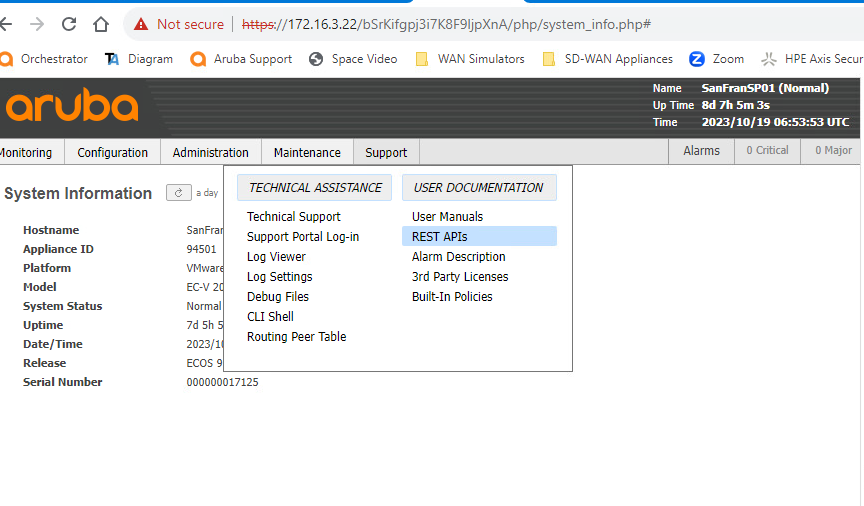
Use GET /stats/minuteRange to obtain the oldest and newest minute timestamps for which statistics archives are available on the appliance.
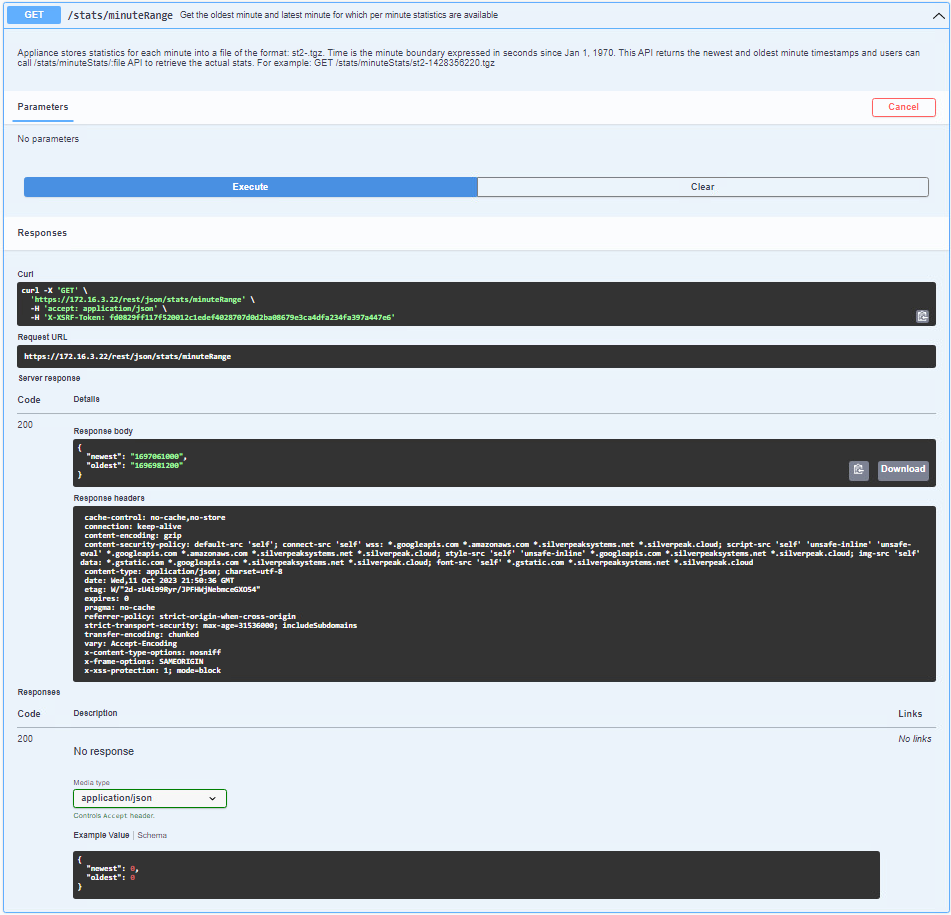
The response contains oldest and newest timestamps expressed in Unix epoch seconds. Select an available minute timestamp and request its archive using GET /stats/minuteStats/{file}.
For example, enter st2-1697061000.tgz in the file parameter. In Swagger, a successful response provides the archive for download. An automated collector should repeat this request for each uncollected minute, advancing the timestamp by 60 seconds.
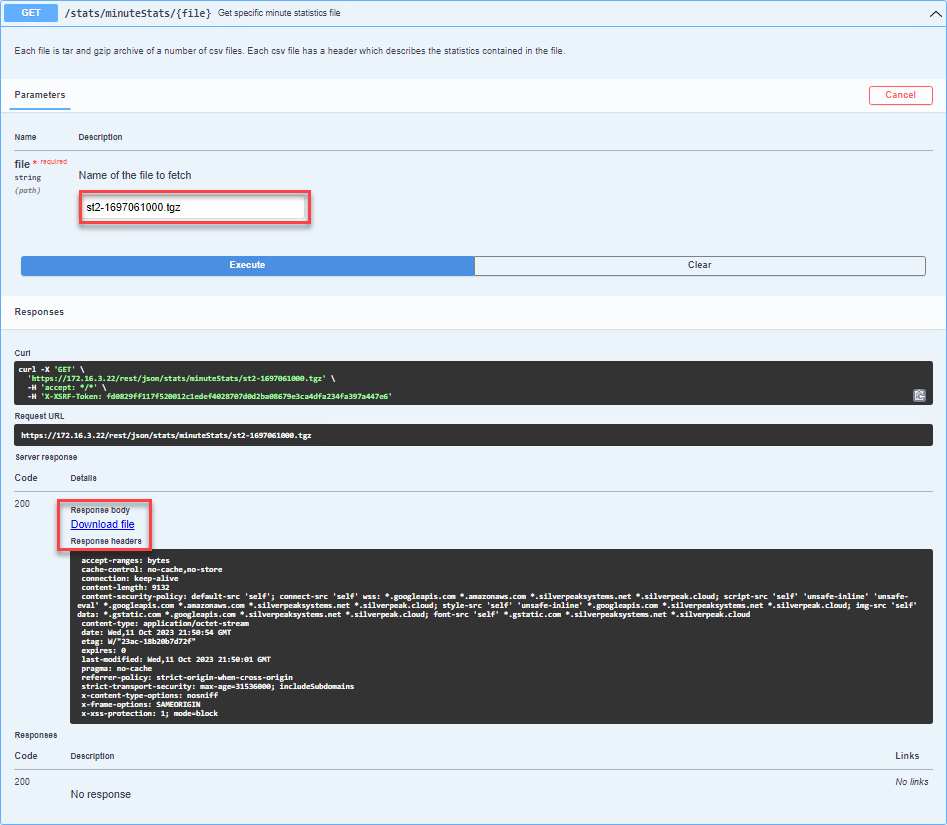
Save the downloaded archive using its standard filename, such as st2-1697061000.tgz. If Swagger or the browser adds a prefix or suffix to the filename, rename it before extraction.
From the directory containing the downloaded archive, run:
tar -xzf st2-1697061000.tgz
Inspect the extracted files and locate the interface statistics file appropriate to your ECOS version and statistics-collector configuration. The archive may contain both CSV and _v2.txt formats; the ECOS documentation identifies CSV files with the default statistics collector and _v2.txt files with the newer collector.
In this example, we use interface_v2.txt. Each interface record contains statistics for the one-minute reporting interval associated with its timestamp. Byte and packet fields represent counts during that interval—not cumulative counters since appliance startup. Do not subtract consecutive minute records to calculate traffic volume.
For utilization calculations, convert the interval’s byte count to bits and divide by 60 seconds to obtain an average rate in bits per second. Convert the corresponding configured bandwidth from kbps to bits per second by multiplying by 1,000 before calculating the percentage.
The following table describes the fields used in this example. Confirm the file layout against the statistics-column reference for the deployed ECOS version before building a parser.
Fields in interface_v2.txt
interface_v2.txtThe table below describes the fields shown in this example. Byte and packet counts apply to the one-minute reporting interval associated with the record’s timestamp.
| Field | Description | Unit |
|---|---|---|
| Orchestrator Appliance Key | Appliance identifier (nePk) used to associate the record with an EdgeConnect appliance | N/A |
| interface name | Interface associated with the statistics record, such as wan0 or wan1 | N/A |
| interface label id | Identifier of the interface’s assigned label; resolve it using the deployment’s label mapping rather than assuming fixed values | N/A |
| traffic type | Traffic category: 1 = optimized; 2 = passthrough-shaped; 3 = passthrough-unshaped; 4 = all traffic | N/A |
| bytes tx | Bytes transmitted during the reporting interval | Bytes |
| bytes rx | Bytes received during the reporting interval | Bytes |
| tx packets | Packets transmitted during the reporting interval | Packets |
| rx packets | Packets received during the reporting interval | Packets |
| overhead bytes tx | Transmitted overhead bytes recorded during the reporting interval | Bytes |
| overhead bytes rx | Received overhead bytes recorded during the reporting interval | Bytes |
| overhead packets tx | Transmitted overhead packets recorded during the reporting interval | Packets |
| overhead packets rx | Received overhead packets recorded during the reporting interval | Packets |
| firewall bytes tx | Transmit-direction firewall byte count recorded during the reporting interval | Bytes |
| firewall bytes rx | Receive-direction firewall byte count recorded during the reporting interval | Bytes |
| firewall packets tx | Transmit-direction firewall packet count recorded during the reporting interval | Packets |
| firewall packets rx | Receive-direction firewall packet count recorded during the reporting interval | Packets |
| max BW tx | Configured outbound bandwidth reported for the interface | kbps (kilobits per second) |
| max BW rx | Configured inbound bandwidth reported for the interface | kbps (kilobits per second) |
| timestamp | Timestamp identifying the minute statistics record | Unix epoch seconds |
Interpretation notes: TX and RX are relative to the interface. For a WAN interface, TX corresponds to outbound traffic and RX to inbound traffic. Use traffic type 4 for all traffic; do not add it to types 1–3. If the configured bandwidth is zero, utilization relative to that bandwidth is undefined—not 0%.
Confirm the exact column order and the accounting definitions of overhead and firewall fields against the statistics-column reference for the deployed ECOS version. Do not assume those fields should be added to the main byte counters.
Test Cases
The following three test cases demonstrate how to calculate WAN interface utilization using Orchestrator aggregate statistics and ECOS minute statistics.
The lab contains five EC-V appliances, but these tests use two: SanFranSP01 and SydneySP01. An iperf3 client behind SanFranSP01 sends traffic to an iperf3 server behind SydneySP01 using port 5201.
The test cases are labeled 2 Mbps, 10 Mbps, and 40 Mbps, representing the intended test traffic rates and not total data transferred. The measured interface rates are calculated from the returned byte counts and may differ from the intended test rates.
At SanFranSP01, wan0 (INET1) has configured inbound and outbound bandwidth of 10,000 kbps (10 Mbps), and wan1 (MPLS1) has 5,000 kbps (5 Mbps).
For each test, we examine aggregate statistics and an individual minute-statistics sample. Aggregate results describe the queried period, whereas each minute record describes one reporting interval. Their utilization percentages need not match exactly.
Topology
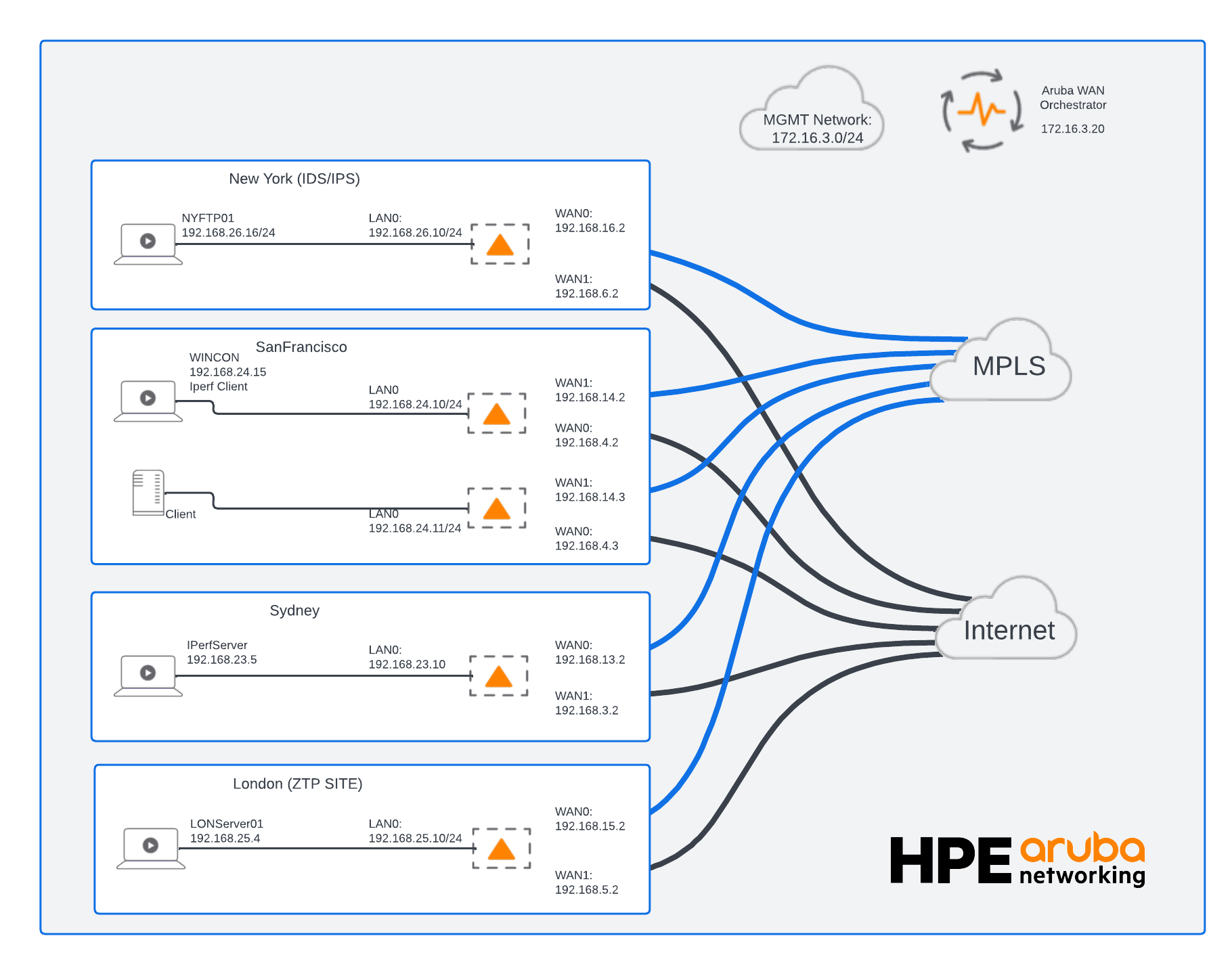
Topology for Test Cases
2 Mbps Test Case
This test uses an intended traffic rate of 2 Mbps from SanFranSP01 toward SydneySP01. We examine the received and transmitted byte counts on SanFranSP01’s wan0 (INET1) and wan1 (MPLS1) interfaces.
The aggregate calculations below use minute granularity, so the average byte counts are converted to bits per second using a 60-second divisor. Utilization is calculated separately for each interface and direction using its corresponding configured bandwidth.
Aggregate Stats Results
[
  {
    "SUM_TX_PKTS": 50838,
    "MAX_OHEAD_RX_BYTES_MAX": 0,
    "SUM_FWDROPS_TX_PKTS": 0,
    "MAX_TX_PKTS_MAX": 297,
    "AVG_MAX_BW_RX": 0,
    "SUM_RX_PKTS": 127377,
    "MIN_TIMESTAMP": 1697607720,
    "AVG_MAX_BW_TX": 0,
    "MAX_FWDROPS_TX_BYTES_MAX": 0,
    "TRAFFIC_TYPE": 4,
    "MAX_RX_PKTS_MAX": 305,
    "MAX_FWDROPS_RX_PKTS_MAX": 0,
    "MAX_OHEAD_TX_PKTS_MAX": 0,
    "INTERFACE": "lan0 (Data)",
    "MAX_MAX_BW_RX": 0,
    "SUM_TX_BYTES": 2981141,
    "SUM_RX_BYTES": 156619284,
    "MAX_MAX_BW_TX": 0,
    "SUM_FWDROPS_RX_PKTS": 0,
    "AVG_TX_BYTES": 298114,
    "MAX_RX_BYTES_MAX": 278126,
    "SUM_OHEAD_TX_PKTS": 0,
    "MAX_TX_BYTES_MAX": 268412,
    "AVG_RX_BYTES": 15661928,
    "nePk": "1.NE",
    "SUM_FWDROPS_RX_BYTES": 0,
    "MAX_OHEAD_TX_BYTES_MAX": 0,
    "SUM_OHEAD_TX_BYTES": 0,
    "SUM_OHEAD_RX_BYTES": 0,
    "IP": "172.16.3.22",
    "SUM_FWDROPS_TX_BYTES": 0,
    "SUM_OHEAD_RX_PKTS": 0,
    "MAX_FWDROPS_RX_BYTES_MAX": 0,
    "MAX_OHEAD_RX_PKTS_MAX": 0,
    "HOSTNAME": "SanFranSP01",
    "MAX_FWDROPS_TX_PKTS_MAX": 0,
    "MAX_TIMESTAMP": 1697608260
  },
  {
    "SUM_TX_PKTS": 97648,
    "MAX_OHEAD_RX_BYTES_MAX": 0,
    "SUM_FWDROPS_TX_PKTS": 0,
    "MAX_TX_PKTS_MAX": 250,
    "AVG_MAX_BW_RX": 10000,
    "SUM_RX_PKTS": 41365,
    "MIN_TIMESTAMP": 1697607720,
    "AVG_MAX_BW_TX": 10000,
    "MAX_FWDROPS_TX_BYTES_MAX": 0,
    "TRAFFIC_TYPE": 4,
    "MAX_RX_PKTS_MAX": 276,
    "MAX_FWDROPS_RX_PKTS_MAX": 0,
    "MAX_OHEAD_TX_PKTS_MAX": 0,
    "INTERFACE": "wan0 (INET1)",
    "MAX_MAX_BW_RX": 10000,
    "SUM_TX_BYTES": 112134468,
    "SUM_RX_BYTES": 5792577,
    "MAX_MAX_BW_TX": 10000,
    "SUM_FWDROPS_RX_PKTS": 0,
    "AVG_TX_BYTES": 11213446,
    "MAX_RX_BYTES_MAX": 272912,
    "SUM_OHEAD_TX_PKTS": 9019,
    "MAX_TX_BYTES_MAX": 199717,
    "AVG_RX_BYTES": 579257,
    "nePk": "1.NE",
    "SUM_FWDROPS_RX_BYTES": 0,
    "MAX_OHEAD_TX_BYTES_MAX": 0,
    "SUM_OHEAD_TX_BYTES": 1219088,
    "SUM_OHEAD_RX_BYTES": 1969984,
    "IP": "172.16.3.22",
    "SUM_FWDROPS_TX_BYTES": 0,
    "SUM_OHEAD_RX_PKTS": 14208,
    "MAX_FWDROPS_RX_BYTES_MAX": 0,
    "MAX_OHEAD_RX_PKTS_MAX": 0,
    "HOSTNAME": "SanFranSP01",
    "MAX_FWDROPS_TX_PKTS_MAX": 0,
    "MAX_TIMESTAMP": 1697608260
  },
  {
    "SUM_TX_PKTS": 48775,
    "MAX_OHEAD_RX_BYTES_MAX": 0,
    "SUM_FWDROPS_TX_PKTS": 0,
    "MAX_TX_PKTS_MAX": 90,
    "AVG_MAX_BW_RX": 5000,
    "SUM_RX_PKTS": 40243,
    "MIN_TIMESTAMP": 1697607720,
    "AVG_MAX_BW_TX": 5000,
    "MAX_FWDROPS_TX_BYTES_MAX": 0,
    "TRAFFIC_TYPE": 4,
    "MAX_RX_PKTS_MAX": 83,
    "MAX_FWDROPS_RX_PKTS_MAX": 0,
    "MAX_OHEAD_TX_PKTS_MAX": 0,
    "INTERFACE": "wan1 (MPLS1)",
    "MAX_MAX_BW_RX": 5000,
    "SUM_TX_BYTES": 56408416,
    "SUM_RX_BYTES": 5283632,
    "MAX_MAX_BW_TX": 5000,
    "SUM_FWDROPS_RX_PKTS": 0,
    "AVG_TX_BYTES": 5640841,
    "MAX_RX_BYTES_MAX": 11488,
    "SUM_OHEAD_TX_PKTS": 6427,
    "MAX_TX_BYTES_MAX": 99904,
    "AVG_RX_BYTES": 528363,
    "nePk": "1.NE",
    "SUM_FWDROPS_RX_BYTES": 0,
    "MAX_OHEAD_TX_BYTES_MAX": 0,
    "SUM_OHEAD_TX_BYTES": 906240,
    "SUM_OHEAD_RX_BYTES": 2157808,
    "IP": "172.16.3.22",
    "SUM_FWDROPS_TX_BYTES": 0,
    "SUM_OHEAD_RX_PKTS": 15825,
    "MAX_FWDROPS_RX_BYTES_MAX": 0,
    "MAX_OHEAD_RX_PKTS_MAX": 0,
    "HOSTNAME": "SanFranSP01",
    "MAX_FWDROPS_TX_PKTS_MAX": 0,
    "MAX_TIMESTAMP": 1697608260
  }
]
Inbound Average Bandwidth Utilization
This query uses minute granularity, so AVG_RX_BYTES represents the average received byte count per one-minute bucket.
Inbound Avg Utilization (%) = (AVG_RX_BYTES × 8 × 100) / (60 × AVG_MAX_BW_RX × 1000)
For the two WAN interfaces:
| Interface | AVG_RX_BYTES (bytes per minute bucket) | AVG_MAX_BW_RX (kbps) | Inbound utilization |
|---|---|---|---|
wan0 (INET1) | 579,257 | 10,000 | 0.77% |
wan1 (MPLS1) | 528,363 | 5,000 | 1.41% |
Substituting the values:
wan0: (579257 × 8 × 100) / (60 × 10000 × 1000) ≈ 0.77%
wan1: (528363 × 8 × 100) / (60 × 5000 × 1000) ≈ 1.41%
Both interfaces show low average inbound utilization during the queried period.
Outbound Average Bandwidth Utilization
Use the corresponding transmitted-byte and outbound-bandwidth fields:
Outbound Avg Utilization (%) = (AVG_TX_BYTES × 8 × 100) / (60 × AVG_MAX_BW_TX × 1000)
| Interface | AVG_TX_BYTES (bytes per minute bucket) | AVG_MAX_BW_TX (kbps) | Outbound utilization |
|---|---|---|---|
wan0 (INET1) | 11,213,446 | 10,000 | 14.95% |
wan1 (MPLS1) | 5,640,841 | 5,000 | 15.04% |
Substituting the values:
wan0: (11213446 × 8 × 100) / (60 × 10000 × 1000) ≈ 14.95%
wan1: (5640841 × 8 × 100) / (60 × 5000 × 1000) ≈ 15.04%
Both WAN interfaces average approximately 15% outbound utilization during the queried period. These averages are well below their configured bandwidth limits; they do not establish whether brief peaks occurred.
Minute Stats Results from interface_v2.txt
interface_v2.txtThe following records are from SanFranSP01 (nePk: 1.NE) at timestamp 1697607840, corresponding to October 18, 2023, at 05:44 UTC (October 17 at 22:44 UTC−07:00). Each record contains counts for its associated one-minute reporting interval.
Only the two WAN interface records and the fields needed for this example are shown.
| Appliance key | Interface | Interface label ID | Traffic type | bytes rx | bytes tx | max BW tx (kbps) | max BW rx (kbps) | timestamp |
|---|---|---|---|---|---|---|---|---|
1.NE | wan0 | 2 | 4 | 550179 | 11270621 | 10000 | 10000 | 1697607840 |
1.NE | wan1 | 1 | 4 | 532320 | 5668208 | 5000 | 5000 | 1697607840 |
Traffic type 4 represents all traffic. The interface label IDs are specific to this deployment.
Outbound Utilization for the Minute Sample
Convert the transmitted byte count to bits, divide by 60 seconds, and compare the resulting rate with the configured outbound bandwidth converted from kbps to bits per second:
Outbound Utilization (%) = (bytes tx × 8 × 100) / (60 × max BW tx × 1000)
WAN0 (INET1)
The record contains 11,270,621 transmitted bytes and a configured outbound bandwidth of 10,000 kbps.
Outbound Utilization (%) = (11270621 × 8 × 100) / (60 × 10000 × 1000) ≈ 15.03%
WAN1 (MPLS1)
The record contains 5,668,208 transmitted bytes and a configured outbound bandwidth of 5,000 kbps.
Outbound Utilization (%) = (5668208 × 8 × 100) / (60 × 5000 × 1000) ≈ 15.12%
Both interfaces averaged approximately 15% outbound utilization during this minute. These results are close to the aggregate averages, but they describe a single minute rather than the entire queried period. A minute average does not rule out shorter traffic peaks.
10 Mbps Test Case
This test uses an intended traffic rate of 10 Mbps from SanFranSP01 toward SydneySP01. We examine utilization on wan0 (INET1), configured at 10,000 kbps (10 Mbps), and wan1 (MPLS1), configured at 5,000 kbps (5 Mbps) in each direction.
The test label describes the intended application traffic rate—not the measured rate on each WAN interface. Calculate each interface’s utilization separately from its recorded byte counts and configured bandwidth.
The aggregate calculations below use minute granularity, so the average byte counts are converted to bits per second using a 60-second divisor.
Aggregate Stats Results
[
  {
    "SUM_TX_PKTS": 1029383,
    "MAX_OHEAD_RX_BYTES_MAX": 0,
    "SUM_FWDROPS_TX_PKTS": 0,
    "MAX_TX_PKTS_MAX": 664,
    "AVG_MAX_BW_RX": 0,
    "SUM_RX_PKTS": 3749143,
    "MIN_TIMESTAMP": 1697641860,
    "AVG_MAX_BW_TX": 0,
    "MAX_FWDROPS_TX_BYTES_MAX": 0,
    "TRAFFIC_TYPE": 4,
    "MAX_RX_PKTS_MAX": 1636,
    "MAX_FWDROPS_RX_PKTS_MAX": 0,
    "MAX_OHEAD_TX_PKTS_MAX": 0,
    "INTERFACE": "lan0 (Data)",
    "MAX_MAX_BW_RX": 0,
    "SUM_TX_BYTES": 54080128,
    "SUM_RX_BYTES": 4624015701,
    "MAX_MAX_BW_TX": 0,
    "SUM_FWDROPS_RX_PKTS": 0,
    "AVG_TX_BYTES": 916612,
    "MAX_RX_BYTES_MAX": 2028640,
    "SUM_OHEAD_TX_PKTS": 0,
    "MAX_TX_BYTES_MAX": 35756,
    "AVG_RX_BYTES": 78373147,
    "nePk": "1.NE",
    "SUM_FWDROPS_RX_BYTES": 0,
    "MAX_OHEAD_TX_BYTES_MAX": 0,
    "SUM_OHEAD_TX_BYTES": 0,
    "SUM_OHEAD_RX_BYTES": 0,
    "IP": "172.16.3.22",
    "SUM_FWDROPS_TX_BYTES": 0,
    "SUM_OHEAD_RX_PKTS": 0,
    "MAX_FWDROPS_RX_BYTES_MAX": 0,
    "MAX_OHEAD_RX_PKTS_MAX": 0,
    "HOSTNAME": "SanFranSP01",
    "MAX_FWDROPS_TX_PKTS_MAX": 0,
    "MAX_TIMESTAMP": 1697645340
  },
  {
    "SUM_TX_PKTS": 2527457,
    "MAX_OHEAD_RX_BYTES_MAX": 0,
    "SUM_FWDROPS_TX_PKTS": 0,
    "MAX_TX_PKTS_MAX": 965,
    "AVG_MAX_BW_RX": 10000,
    "SUM_RX_PKTS": 573115,
    "MIN_TIMESTAMP": 1697641860,
    "AVG_MAX_BW_TX": 10000,
    "MAX_FWDROPS_TX_BYTES_MAX": 0,
    "TRAFFIC_TYPE": 4,
    "MAX_RX_PKTS_MAX": 399,
    "MAX_FWDROPS_RX_PKTS_MAX": 0,
    "MAX_OHEAD_TX_PKTS_MAX": 0,
    "INTERFACE": "wan0 (INET1)",
    "MAX_MAX_BW_RX": 10000,
    "SUM_TX_BYTES": 3252366077,
    "SUM_RX_BYTES": 75736252,
    "MAX_MAX_BW_TX": 10000,
    "SUM_FWDROPS_RX_PKTS": 12406,
    "AVG_TX_BYTES": 55124848,
    "MAX_RX_BYTES_MAX": 51856,
    "SUM_OHEAD_TX_PKTS": 19376,
    "MAX_TX_BYTES_MAX": 1251548,
    "AVG_RX_BYTES": 1283665,
    "nePk": "1.NE",
    "SUM_FWDROPS_RX_BYTES": 2336036,
    "MAX_OHEAD_TX_BYTES_MAX": 0,
    "SUM_OHEAD_TX_BYTES": 3588688,
    "SUM_OHEAD_RX_BYTES": 7084096,
    "IP": "172.16.3.22",
    "SUM_FWDROPS_TX_BYTES": 0,
    "SUM_OHEAD_RX_PKTS": 39776,
    "MAX_FWDROPS_RX_BYTES_MAX": 0,
    "MAX_OHEAD_RX_PKTS_MAX": 0,
    "HOSTNAME": "SanFranSP01",
    "MAX_FWDROPS_TX_PKTS_MAX": 0,
    "MAX_TIMESTAMP": 1697645340
  },
  {
    "SUM_TX_PKTS": 1278999,
    "MAX_OHEAD_RX_BYTES_MAX": 0,
    "SUM_FWDROPS_TX_PKTS": 0,
    "MAX_TX_PKTS_MAX": 486,
    "AVG_MAX_BW_RX": 5000,
    "SUM_RX_PKTS": 548455,
    "MIN_TIMESTAMP": 1697641860,
    "AVG_MAX_BW_TX": 5000,
    "MAX_FWDROPS_TX_BYTES_MAX": 0,
    "TRAFFIC_TYPE": 4,
    "MAX_RX_PKTS_MAX": 335,
    "MAX_FWDROPS_RX_PKTS_MAX": 0,
    "MAX_OHEAD_TX_PKTS_MAX": 0,
    "INTERFACE": "wan1 (MPLS1)",
    "MAX_MAX_BW_RX": 5000,
    "SUM_TX_BYTES": 1650002464,
    "SUM_RX_BYTES": 72148388,
    "MAX_MAX_BW_TX": 5000,
    "SUM_FWDROPS_RX_PKTS": 0,
    "AVG_TX_BYTES": 27966143,
    "MAX_RX_BYTES_MAX": 43152,
    "SUM_OHEAD_TX_PKTS": 18354,
    "MAX_TX_BYTES_MAX": 630816,
    "AVG_RX_BYTES": 1222854,
    "nePk": "1.NE",
    "SUM_FWDROPS_RX_BYTES": 0,
    "MAX_OHEAD_TX_BYTES_MAX": 0,
    "SUM_OHEAD_TX_BYTES": 3253296,
    "SUM_OHEAD_RX_BYTES": 7434144,
    "IP": "172.16.3.22",
    "SUM_FWDROPS_TX_BYTES": 0,
    "SUM_OHEAD_RX_PKTS": 43086,
    "MAX_FWDROPS_RX_BYTES_MAX": 0,
    "MAX_OHEAD_RX_PKTS_MAX": 0,
    "HOSTNAME": "SanFranSP01",
    "MAX_FWDROPS_TX_PKTS_MAX": 0,
    "MAX_TIMESTAMP": 1697645340
  }
]
Inbound Average Bandwidth Utilization
Inbound Avg Utilization (%) = (AVG_RX_BYTES × 8 × 100) / (60 × AVG_MAX_BW_RX × 1000)
| Interface | AVG_RX_BYTES (bytes per minute bucket) | AVG_MAX_BW_RX (kbps) | Inbound utilization |
|---|---|---|---|
wan0 (INET1) | 1,283,665 | 10,000 | 1.71% |
wan1 (MPLS1) | 1,222,854 | 5,000 | 3.26% |
wan0: (1283665 × 8 × 100) / (60 × 10000 × 1000) ≈ 1.71%
wan1: (1222854 × 8 × 100) / (60 × 5000 × 1000) ≈ 3.26%
Both Interfaces show low average inbound utilization during the queried period.
Outbound Average Bandwidth Utilization
Outbound Avg Utilization (%) = (AVG_TX_BYTES × 8 × 100) / (60 × AVG_MAX_BW_TX × 1000)
| Interface | AVG_TX_BYTES (bytes per minute bucket) | AVG_MAX_BW_TX (kbps) | Outbound utilization |
|---|---|---|---|
wan0 (INET1) | 55,124,848 | 10,000 | 73.50% |
wan1 (MPLS1) | 27,966,143 | 5,000 | 74.58% |
Substituting the values:
wan0: (55124848 × 8 × 100) / (60 × 10000 × 1000) ≈ 73.50%
wan1: (27966143 × 8 × 100) / (60 × 5000 × 1000) ≈ 74.58%
Both interfaces average approximately three-quarters of their configured outbound bandwidth during the queried period. These averages do not establish whether shorter periods of saturation occurred.
Minute Stats Results from interface_v2.txt
interface_v2.txtThe following records are from SanFranSP01 (nePk: 1.NE) at timestamp 1697642520, corresponding to October 18, 2023, at 15:22 UTC (08:22 UTC−07:00). Each record contains counts for its associated one-minute reporting interval.
Only the two WAN interface records and selected fields are shown.
| Appliance key | Interface | Interface label ID | Traffic type | bytes tx | bytes rx | max BW tx (kbps) | max BW rx (kbps) | timestamp |
|---|---|---|---|---|---|---|---|---|
1.NE | wan0 | 2 | 4 | 55610930 | 1890918 | 10000 | 10000 | 1697642520 |
1.NE | wan1 | 1 | 4 | 27803216 | 710960 | 5000 | 5000 | 1697642520 |
Traffic type 4 represents all traffic. The interface label IDs are specific to this deployment.
Outbound Utilization for the Minute Sample
Outbound Utilization (%) = (bytes tx × 8 × 100) / (60 × max BW tx × 1000)
WAN0 (INET1)
Using 55,610,930 transmitted bytes and 10,000 kbps of configured outbound bandwidth:
Outbound Utilization (%) = (55610930 × 8 × 100) / (60 × 10000 × 1000) ≈ 74.15%
WAN1 (MPLS1)
Using 27,803,216 transmitted bytes and 5,000 kbps of configured outbound bandwidth:
Outbound Utilization (%) = (27803216 × 8 × 100) / (60 × 5000 × 1000) ≈ 74.14%
Both interfaces averaged approximately 74% outbound utilization during this minute. These single-minute results are close to, but distinct from, the aggregate averages for the queried period.
40 Mbps Test Case
This test uses an intended traffic rate of 40 Mbps from SanFranSP01 toward SydneySP01. This exceeds the combined configured outbound bandwidth of wan0 (INET1) at 10,000 kbps (10 Mbps) and wan1 (MPLS1) at 5,000 kbps (5 Mbps).
The test is intended to offer more traffic than the configured WAN bandwidth can accommodate. The measured transmitted rates are calculated from the interface statistics; the intended application rate does not imply that 40 Mbps was actually transmitted across the WAN.
The aggregate calculations below use minute granularity, so the average byte counts are converted to bits per second using a 60-second divisor.
Aggregate Stats Results
[
  {
    "SUM_TX_PKTS": 556522,
    "MAX_OHEAD_RX_BYTES_MAX": 0,
    "SUM_FWDROPS_TX_PKTS": 0,
    "MAX_TX_PKTS_MAX": 579,
    "AVG_MAX_BW_RX": 0,
    "SUM_RX_PKTS": 1803282,
    "MIN_TIMESTAMP": 1697645700,
    "AVG_MAX_BW_TX": 0,
    "MAX_FWDROPS_TX_BYTES_MAX": 0,
    "TRAFFIC_TYPE": 4,
    "MAX_RX_PKTS_MAX": 1801,
    "MAX_FWDROPS_RX_PKTS_MAX": 0,
    "MAX_OHEAD_TX_PKTS_MAX": 0,
    "INTERFACE": "lan0 (Data)",
    "MAX_MAX_BW_RX": 0,
    "SUM_TX_BYTES": 30104568,
    "SUM_RX_BYTES": 2235778570,
    "MAX_MAX_BW_TX": 0,
    "SUM_FWDROPS_RX_PKTS": 0,
    "AVG_TX_BYTES": 1368389,
    "MAX_RX_BYTES_MAX": 2233240,
    "SUM_OHEAD_TX_PKTS": 0,
    "MAX_TX_BYTES_MAX": 37385,
    "AVG_RX_BYTES": 101626298,
    "nePk": "1.NE",
    "SUM_FWDROPS_RX_BYTES": 0,
    "MAX_OHEAD_TX_BYTES_MAX": 0,
    "SUM_OHEAD_TX_BYTES": 0,
    "SUM_OHEAD_RX_BYTES": 0,
    "IP": "172.16.3.22",
    "SUM_FWDROPS_TX_BYTES": 0,
    "SUM_OHEAD_RX_PKTS": 0,
    "MAX_FWDROPS_RX_BYTES_MAX": 0,
    "MAX_OHEAD_RX_PKTS_MAX": 0,
    "HOSTNAME": "SanFranSP01",
    "MAX_FWDROPS_TX_PKTS_MAX": 0,
    "MAX_TIMESTAMP": 1697646960
  },
  {
    "SUM_TX_PKTS": 1241820,
    "MAX_OHEAD_RX_BYTES_MAX": 0,
    "SUM_FWDROPS_TX_PKTS": 0,
    "MAX_TX_PKTS_MAX": 983,
    "AVG_MAX_BW_RX": 10000,
    "SUM_RX_PKTS": 316325,
    "MIN_TIMESTAMP": 1697645700,
    "AVG_MAX_BW_TX": 10000,
    "MAX_FWDROPS_TX_BYTES_MAX": 0,
    "TRAFFIC_TYPE": 4,
    "MAX_RX_PKTS_MAX": 498,
    "MAX_FWDROPS_RX_PKTS_MAX": 0,
    "MAX_OHEAD_TX_PKTS_MAX": 0,
    "INTERFACE": "wan0 (INET1)",
    "MAX_MAX_BW_RX": 10000,
    "SUM_TX_BYTES": 1612168078,
    "SUM_RX_BYTES": 41574580,
    "MAX_MAX_BW_TX": 10000,
    "SUM_FWDROPS_RX_PKTS": 4631,
    "AVG_TX_BYTES": 73280367,
    "MAX_RX_BYTES_MAX": 68704,
    "SUM_OHEAD_TX_PKTS": 6987,
    "MAX_TX_BYTES_MAX": 1278572,
    "AVG_RX_BYTES": 1889753,
    "nePk": "1.NE",
    "SUM_FWDROPS_RX_BYTES": 736204,
    "MAX_OHEAD_TX_BYTES_MAX": 0,
    "SUM_OHEAD_TX_BYTES": 1289936,
    "SUM_OHEAD_RX_BYTES": 2650784,
    "IP": "172.16.3.22",
    "SUM_FWDROPS_TX_BYTES": 0,
    "SUM_OHEAD_RX_PKTS": 14838,
    "MAX_FWDROPS_RX_BYTES_MAX": 0,
    "MAX_OHEAD_RX_PKTS_MAX": 0,
    "HOSTNAME": "SanFranSP01",
    "MAX_FWDROPS_TX_PKTS_MAX": 0,
    "MAX_TIMESTAMP": 1697646960
  },
  {
    "SUM_TX_PKTS": 579631,
    "MAX_OHEAD_RX_BYTES_MAX": 0,
    "SUM_FWDROPS_TX_PKTS": 0,
    "MAX_TX_PKTS_MAX": 494,
    "AVG_MAX_BW_RX": 5000,
    "SUM_RX_PKTS": 273995,
    "MIN_TIMESTAMP": 1697645700,
    "AVG_MAX_BW_TX": 5000,
    "MAX_FWDROPS_TX_BYTES_MAX": 0,
    "TRAFFIC_TYPE": 4,
    "MAX_RX_PKTS_MAX": 294,
    "MAX_FWDROPS_RX_PKTS_MAX": 0,
    "MAX_OHEAD_TX_PKTS_MAX": 0,
    "INTERFACE": "wan1 (MPLS1)",
    "MAX_MAX_BW_RX": 5000,
    "SUM_TX_BYTES": 752367152,
    "SUM_RX_BYTES": 35930704,
    "MAX_MAX_BW_TX": 5000,
    "SUM_FWDROPS_RX_PKTS": 0,
    "AVG_TX_BYTES": 34198506,
    "MAX_RX_BYTES_MAX": 39680,
    "SUM_OHEAD_TX_PKTS": 7151,
    "MAX_TX_BYTES_MAX": 638848,
    "AVG_RX_BYTES": 1633213,
    "nePk": "1.NE",
    "SUM_FWDROPS_RX_BYTES": 0,
    "MAX_OHEAD_TX_BYTES_MAX": 0,
    "SUM_OHEAD_TX_BYTES": 1274480,
    "SUM_OHEAD_RX_BYTES": 2743392,
    "IP": "172.16.3.22",
    "SUM_FWDROPS_TX_BYTES": 0,
    "SUM_OHEAD_RX_PKTS": 15800,
    "MAX_FWDROPS_RX_BYTES_MAX": 0,
    "MAX_OHEAD_RX_PKTS_MAX": 0,
    "HOSTNAME": "SanFranSP01",
    "MAX_FWDROPS_TX_PKTS_MAX": 0,
    "MAX_TIMESTAMP": 1697646960
  }
]
Inbound Average Bandwidth Utilization
Inbound Avg Utilization (%) = (AVG_RX_BYTES × 8 × 100) / (60 × AVG_MAX_BW_RX × 1000)
| Interface | AVG_RX_BYTES (bytes per minute bucket) | AVG_MAX_BW_RX (kbps) | Inbound utilization |
|---|---|---|---|
wan0 (INET1) | 1,889,753 | 10,000 | 2.52% |
wan1 (MPLS1) | 1,633,213 | 5,000 | 4.36% |
wan0: (1889753 × 8 × 100) / (60 × 10000 × 1000) ≈ 2.52%
wan1: (1633213 × 8 × 100) / (60 × 5000 × 1000) ≈ 4.36%
Both interfaces show low average inbound utilization during the queried period.
Outbound Average Bandwidth Utilization
Outbound Avg Utilization (%) = (AVG_TX_BYTES × 8 × 100) / (60 × AVG_MAX_BW_TX × 1000)
| Interface | AVG_TX_BYTES (bytes per minute bucket) | AVG_MAX_BW_TX (kbps) | Outbound utilization |
|---|---|---|---|
wan0 (INET1) | 73,280,367 | 10,000 | 97.71% |
wan1 (MPLS1) | 34,198,506 | 5,000 | 91.20% |
wan0: (73280367 × 8 × 100) / (60 × 10000 × 1000) ≈ 97.71%
wan1: (34198506 × 8 × 100) / (60 × 5000 × 1000) ≈ 91.20%
Both interfaces show high average outbound utilization, with wan0 particularly close to its configured bandwidth limit. These averages alone do not establish packet loss, queueing delay, or how long either interface remained saturated.
Minute Stats Results from interface_v2.txt
interface_v2.txtThe following records are from SanFranSP01 (nePk: 1.NE) at timestamp 1697646600, corresponding to October 18, 2023, at 16:30 UTC (09:30 UTC−07:00). Each record contains counts for its associated one-minute reporting interval.
Only the two WAN interface records and selected fields are shown.
| Appliance key | Interface | Interface label ID | Traffic type | bytes tx | bytes rx | max BW tx (kbps) | max BW rx (kbps) | timestamp |
|---|---|---|---|---|---|---|---|---|
1.NE | wan0 | 2 | 4 | 73989648 | 1832579 | 10000 | 10000 | 1697646600 |
1.NE | wan1 | 1 | 4 | 37027664 | 1800944 | 5000 | 5000 | 1697646600 |
Traffic type 4 represents all traffic. The interface label IDs are specific to this deployment.
Outbound Utilization for the Minute Sample
Outbound Utilization (%) = (bytes tx × 8 × 100) / (60 × max BW tx × 1000)
WAN0 (INET1)
Using 73,989,648 transmitted bytes and 10,000 kbps of configured outbound bandwidth:
Outbound Utilization (%) = (73989648 × 8 × 100) / (60 × 10000 × 1000) ≈ 98.65%
WAN1 (MPLS1)
Using 37,027,664 transmitted bytes and 5,000 kbps of configured outbound bandwidth:
Outbound Utilization (%) = (37027664 × 8 × 100) / (60 × 5000 × 1000) ≈ 98.74%
Both interfaces averaged approximately 99% of their configured outbound bandwidth during this minute, indicating very little remaining average headroom. These single-minute results differ from the aggregate averages because they describe only one interval within the queried period.
REST API Comparison Orchestrator vs. ECOS
| Platform | Method and endpoint | Purpose |
|---|---|---|
| Orchestrator | POST /stats/aggregate/interface | Returns interface summaries over a selected time range using minute, hour, or day granularity. Supports traffic-type filtering and JSON or CSV output. Appliance identifiers are supplied in the request body. |
| ECOS | GET /stats/minuteRange | Returns the oldest and newest timestamps for available minute-statistics archives. Does not generate an archive. |
| ECOS | GET /stats/minuteStats/{file} | Downloads an existing minute-statistics archive, such as st2-1697061000.tgz, directly from the appliance. Neither endpoint generates the statistics archives. |
Conclusion
Orchestrator aggregate statistics and ECOS minute statistics provide complementary ways to monitor EdgeConnect WAN interface utilization. Use POST /stats/aggregate/interface for periodic summaries over a selected time range. For frequent collection of detailed statistics, retrieve minute archives directly from each appliance using GET /stats/minuteRange and GET /stats/minuteStats/{file}.
Accurate utilization calculations require consistent units and time intervals. With aggregate AVG_RX_BYTES and AVG_TX_BYTES, use the duration of one aggregation bucket: 60 seconds for minute, 3,600 for hour, or 86,400 for day granularity. With SUM_RX_BYTES and SUM_TX_BYTES, use the total duration represented by the returned samples. Convert bytes to bits and configured bandwidth from kbps to bits per second before calculating utilization.
The test cases illustrate progressively higher outbound utilization. However, averages—even one-minute averages—can hide shorter peaks. High utilization indicates limited headroom, but does not by itself prove packet loss or queueing delay. For capacity planning, evaluate utilization trends alongside relevant performance statistics.
External monitoring platforms can retain these samples, visualize trends, and calculate metrics such as 95th-percentile utilization from a series of interval rates—not from a single aggregate average. When comparing results with an NMS, align the interface, traffic category, reporting intervals, counter definitions, and bandwidth denominator. Configured WAN bandwidth and physical port speed can produce substantially different utilization percentages.
For an integration example, see the open-source pyedgeconnect telemetry demo, which demonstrates collecting and visualizing EdgeConnect telemetry.
Updated 6 days ago