
Profile Operations
How to use PyCentral to operate on Central library profiles
Source CodeYou can find the full source code and documentation for this workflow on GitHub: profile-operations
This workflow demonstrates how to use the PyCentral library to manage Central library profiles. It covers creating, reading, updating, and deleting configuration profiles through Central API handled by PyCentral. The workflow focuses on performing example operations for both individual and bulk library profiles.
Prerequisites
- Python 3.8 or higher
- API credentials for HPE Aruba Networking Central & GLP (JSON or YAML format)
Installation
- Clone the repository and navigate to this workflow folder
git clone -b v2 https://github.com/aruba/central-python-workflows.git
cd central-python-workflows/profile-operations- Create and activate a virtual environment, then install dependencies
- On macOS/Linux: source venv/bin/activate
- On Windows (PowerShell): venv\Scripts\Activate.ps1
python3 -m venv venv
source venv/bin/activate  # On Windows use: venv\Scripts\activate
pip install -r requirements.txt
This workflow is tested on the pycentral SDK (version: 2.0a7). Please check compatibility before executing on older/newer versions as there may be changes
Configuration
Credentials Configuration (central_token.json)
For API operations in HPE Aruba Networking Central:
{
    "central": {
        "base_url": "",
        "client_id": "",
        "client_secret": "",
    }
}
Sample Input: See central_token.json in this repository for an example credential file.
Where to find these:
Workflow Input Data
This workflow is preset with sample API data for script execution. The following instructions detail how to gather the information required to create your own configuration profiles with the PyCentral profile module.
-
Locate the API endpoint:
The API endpoint will be the last suffix appended to the full URL on the reference page.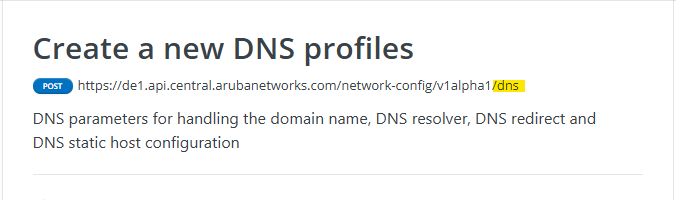
-
Determine the bulk key:
We refer to the bulk key in PyCentral as the key for the body object of the payload. Most often, the bulk key will simply be 'profile', however some APIs will use a unique identifier. In the example image for DNS we can see that the bulk key is 'profile'.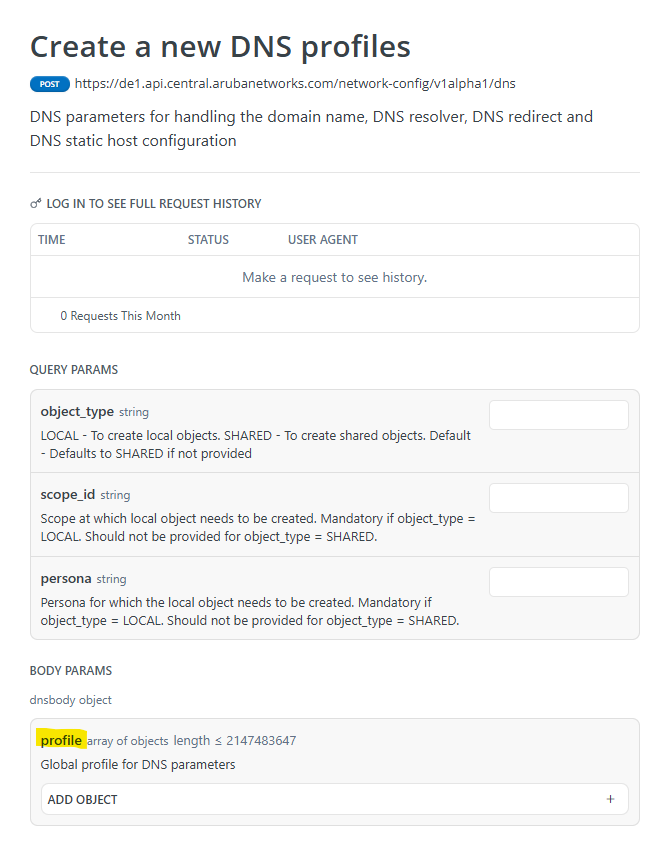
-
Profile configurations:
You can refer to the body object in the API reference to find valid configuration key/values to use for your own object with PyCentral. Here are some of the values for the DNS profile body object as an example.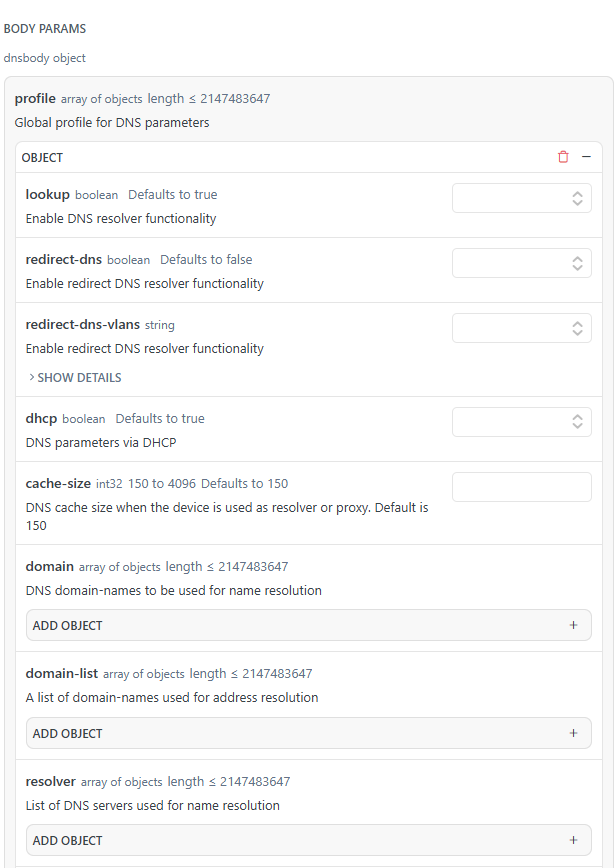
Example profile configuration dictionary in python that we use to create a DNS library profile with PyCentral:
dns_profile = {
    "name": "example-dns",
    "description": "example-dns description",
    "resolver": [
        {"vrf": "default", "name-server": [{"ip": "8.8.8.8", "priority": 1}]}
    ],
}
Pro TipAn easy way to get example configurations for a profile you are unfamiliar with is to create the profile using the web UI in Central, and then run a GET request for the profile with PyCentral.
Execution
This workflow is executed by the profile_operations.py script and demonstrates the use
of the following PyCentral modules and Central APIs:
- Connecting to Central with the PyCentral base object
- Individual profile module operations
- Create DNS - Create a new DNS profile
- Get DNS - Read existing DNS profile
- Update DNS - Modify DNS profile
- Delete DNS - Delete existing DNS profile
- Bulk Profile Operations
- Create VLAN - Create L2-VLAN
- Get all VLAN Profiles - Read L2-VLAN IDs
- Update VLAN - Update L2-VLAN
- Delete VLAN - Delete L2-VLAN
The workflow is executed by running the following command:
python profile_operations.pyOutput
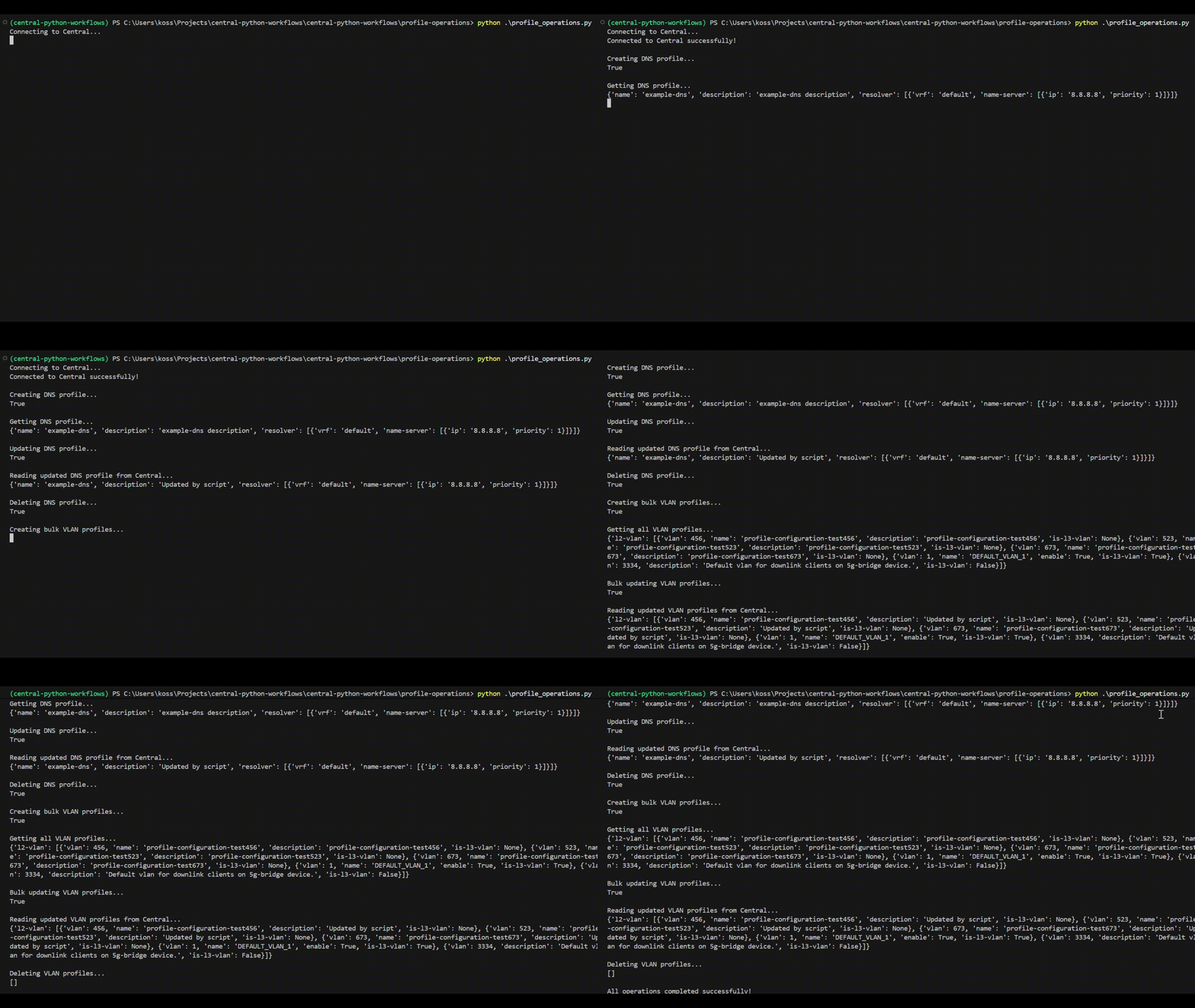
Output will be displayed in the terminal showing results of the profile module operations covered in the script:
Script Operations:
- Individual Operations (DNS Profile):
- Create a DNS profile
- Read the created profile
- Update the profile description
- Delete the profile
- Bulk Operations (VLAN Profiles):
- Create multiple VLAN profiles at once
- Read all VLAN profiles from Central library
- Update the description of all VLANS simultaneously
- Delete all profiles
If the script runs successfully, the terminal will show output similar to the following:
Troubleshooting
- Authentication / tokens: Ensure your token file is complete and has valid credentials for Central.
- SDK compatibility: If method calls fail unexpectedly, confirm the installed PyCentral version matches tested versions (v2.0a7) or update helpers accordingly.
Support
- Automation Team: [email protected]
- Workflow Issues: GitHub Issues
- PyCentral Library: PyCentral Issues
- GitHub Repository: Central Python Workflows
- Configuration reference: Central Configuration API Reference
- PyCentral quickstart guide: Getting Started with Pycentral
- Central API guide: Getting Started with Central APIs
Updated 3 months ago