
Hierarchy Visualizer
Source CodeYou can find the full source code and documentation for this workflow on GitHub: Hierarchy Visualizer
This workflow reports the Hierarchy in Central, which defines a vertical, parent-child structure used for configuration and scope-based operations. The hierarchy follows the same scope model in Central.
 to learn more](https://files.readme.io/dc710140702aad51fe0d31378c26f832f50ea546ebd5e1c1cfa73adb4e7f8543-hierarchy_central.png)
Check out the Multi Level Hierarchy Guide to learn more
Using APIs, the workflow retrieves hierarchy relationships and required configuration attributes (such as scope_id and persona) and renders them in both tabular and visual formats.
Outputs
- A terminal table for quick inspection
- A CSV file for offline analysis and reporting
- Hierarchy diagrams (static PNG + interactive HTML) for visual inspection of the network structure
An example hierarchy diagram generated by the script is shown below:
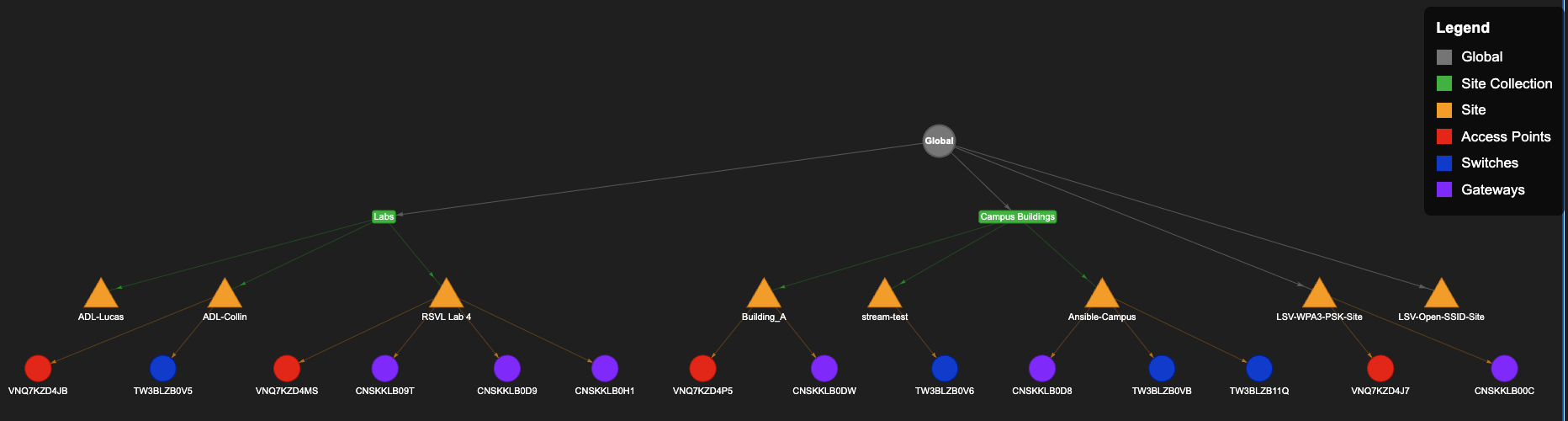
The generated diagram represents the following scopes within the Central Hierarchy:
- Global
- Site Collections
- Sites
- Devices (associated with Sites)
NoteThe diagrams do not include Device Groups and does not include devices in Central but are not associated with a site.
The diagram is intended as a quick validation tool, useful after deployments or configuration changes, to visually confirm that hierarchy is structured as expected.
Prerequisites
- Python 3.8 or higher
- API credentials for HPE Aruba Networking Central (JSON or YAML format)
- There should be atleast 1 site created in the account to get new Central configuration attributes
Installation
Set up a Python virtual environment, activate it, and install dependencies from requirements.txt.
- Clone the repository and navigate to this workflow folder
git clone -b v2 https://github.com/aruba/central-python-workflows.git
cd central-python-workflows/hierarchy-visualizer- Create and activate a virtual environment, then install dependencies
python3 -m venv venv
source venv/bin/activate  # On Windows use: venv\Scripts\activate
pip install -r requirements.txt
This workflow is tested on the pycentral SDK (version: 2.0a13). Please check compatibility before executing on older/newer versions as there may be changes
- Install GraphViz (for diagram generation):
The script generates diagrams which requires GraphViz:
- macOS (using Homebrew):
brew install graphviz- Ubuntu/Debian:
sudo apt-get install graphviz- Windows: Download and install from graphviz.org
Configuration
For API operations in new Central:
new_central:
    cluster_name: <cluster-name>  # or base_url: <central-api-base-url>
    client_id: <new-central-client-id>
    client_secret: <new-central-client-secret>
Sample Input: See account_credentials.yaml in this repository for an example credential file.
Important Links
Execution
Describe how to run the workflow. Include command-line examples or API usage.
python hierarchy_visualizer.py -c account_credentials.yamlCommand Line Options
| Name | Type | Description | Required |
|---|---|---|---|
-c, --credentials | string | Credentials file for New Central API (JSON or YAML format) | Yes |
Output
The script generates configuration hierarchy information and saves all outputs to a timestamped directory in the format results_YYYY-MM-DD_HH-MM-SS/. This ensures that each run has its own isolated output folder, preventing file overwrites.
Output Files
For each run, the following files are generated in the timestamped directory:
-
CSV Report (
hierarchy_report.csv): Complete hierarchical data in CSV format. Each row in the output represents a scope component in your Central configuration hierarchy. The table contains the following columns:- Type: The hierarchical level - Global (top-level), Site Collection, Site, Device, or Device Group
- Name: The display name of the scope element as it appears in Central
- Scope-ID: The ID of the scope element. This is the unique identifier needed to identify the scope element for any new Central APIs.
- Serial: Device serial number (only for Devices)
- Device Function (Persona): Role of the device along with it's configuration persona in parentheses, which is needed for new Central APIs (only for Devices)
-
Static Diagram (
hierarchy_diagram.png): GraphViz visualization of the hierarchy -
Interactive Diagram (
hierarchy_interactive.html): Pyvis web-based visualization with drag/pan/zoom capabilities

Workflow Execution Overview
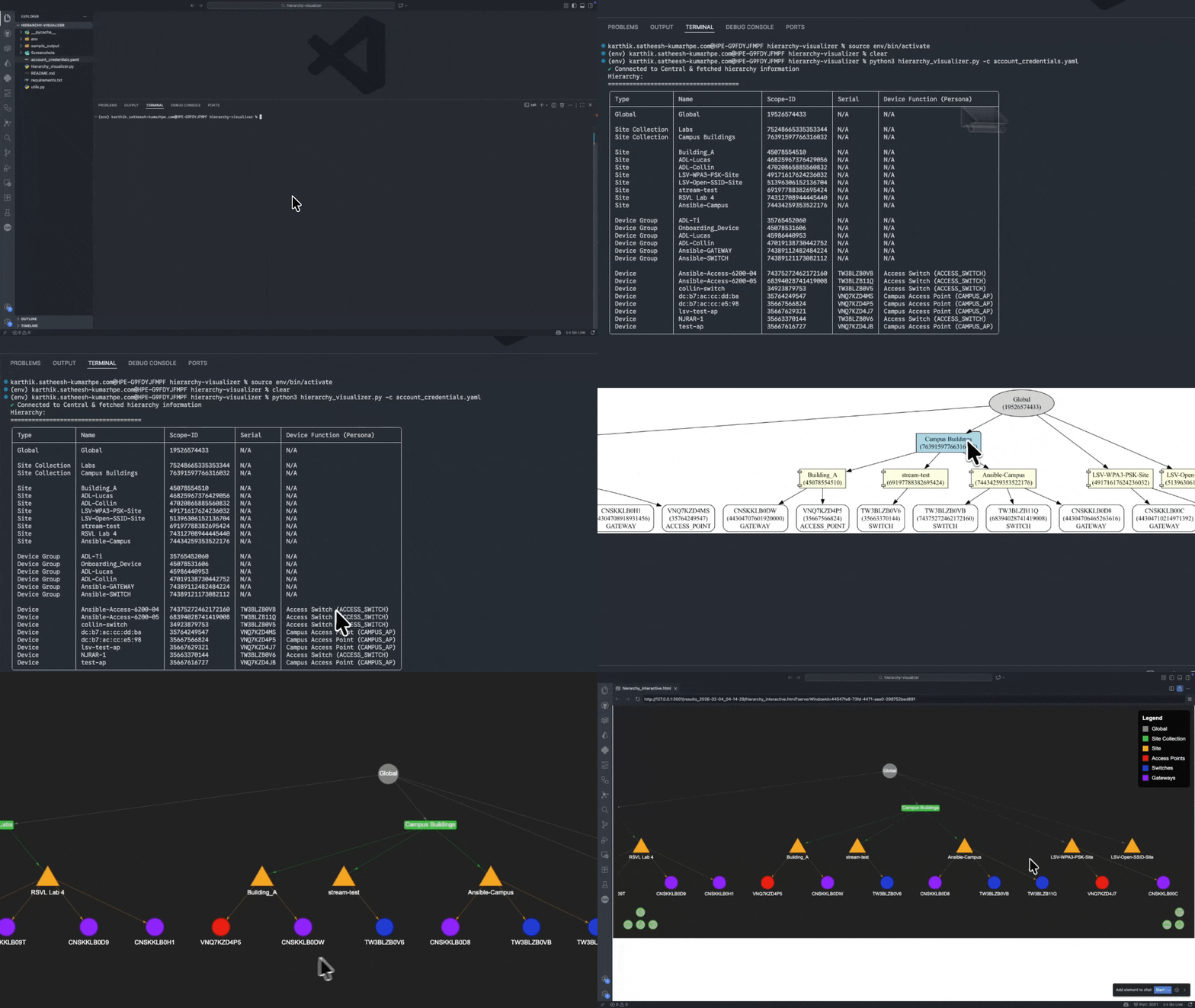
Workflow execution flow showing command invocation and generated hierarchy output
Example Directory Structure
hierarchy-visualizer/
├── results_2026-02-02_10-30-45/
│   ├── hierarchy_report.csv
│   ├── hierarchy_diagram.png
│   └── hierarchy_interactive.html
├── results_2026-02-02_11-15-22/
│   ├── hierarchy_report.csv
│   ├── hierarchy_diagram.png
│   └── hierarchy_interactive.html
└── ...
Troubleshooting
- Ensure your credentials file is valid and in JSON or YAML format.
- Make sure all required dependencies are installed (
pip install -r requirements.txt). - If you encounter diagram generation errors, verify GraphViz is properly installed by reviewing the steps in Installation
- If you encounter other issues, please reach out to Aruba Automation
Support
- Automation Team: [email protected]
- Workflow Issues: GitHub Issues
- PyCentral Library: PyCentral Issues
Updated 3 months ago