
Getting Started with Streaming APIs
NoteStreaming APIs are available only for devices with an Advance Tier Central Subscription.
Overview of Streaming APIs
Streaming APIs allow a continuous real-time data stream to be sent to a client from a server. Unlike traditional REST APIs that require clients to repeatedly poll for updates, Streaming APIs use a publish-subscribe model utilizing WebSocket connections where subscribed clients receive events instantly as they occur.
Streaming APIs are built on WebSocket technology which provides features such as low latency real-time event delivery, persistent connections between clients and the platform, full-duplex communication, and efficient data transfer compared to a traditional REST API. These features help mitigate common issues in other methods such as polling overhead, multiple explicit server requests required to push data, and the higher overhead of the HTTP request/response cycle. Central's Streaming API is perfect for cases where real-time event driven monitoring is required.
Some common use cases for Central's Streaming API are event-driven architectures requiring immediate notification of state changes, real-time monitoring dashboards, live system health and performance tracking, or automated alerting and incident response systems.
Central Streaming API Components
There are several components to understanding how to work with Central's Streaming API.
WebSocket Connection Management
In general, to connect to a Streaming API you will need to initiate a WebSocket request. Central's Streaming API establishes WebSocket Secure connections (WSS) between clients and the Stream Gateway. Connections remain open for continuous event delivery until access token expiry or disconnection.
Stream Decoding
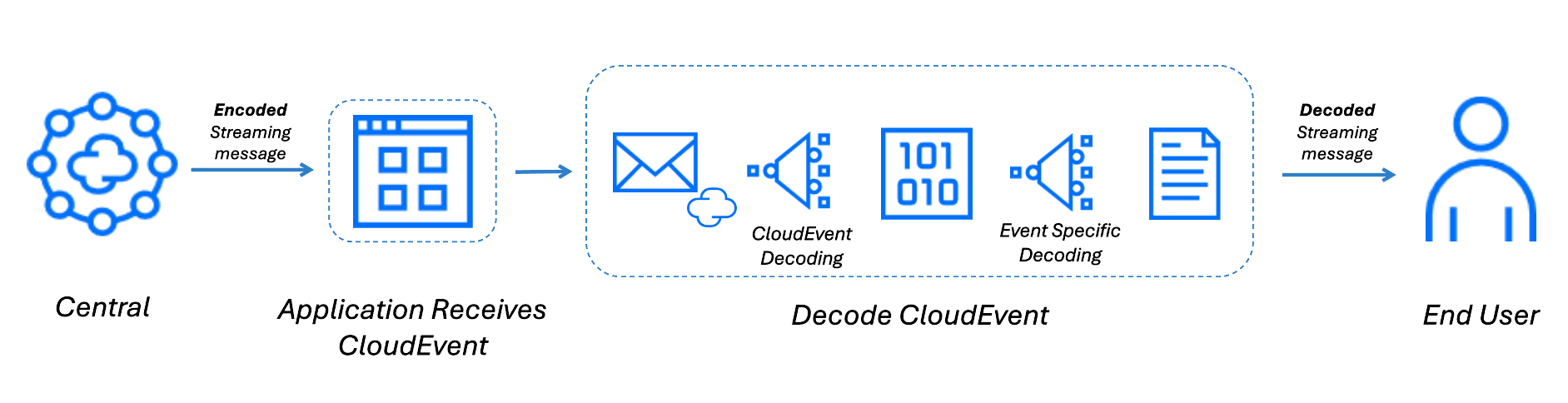
Central Streaming APIs deliver messages as CloudEvents encoded using Google protobuf. Decoding a streaming message is a two step process.
- Decode the CloudEvents envelope using the CloudEvents protobuf definition. This step parses the CloudEvent metadata and extracts the encoded data payload.
- Decode the extracted data payload using the protobuf definition for the specific streaming Event. Each streaming event has its own protobuf file, which is documented in its respective guide.
If only the CloudEvent envelope is decoded, the event payload will remain encoded. The payload must be decoded using the event specific protobuf to access the actual event fields.
Events
Events are types of messages that the Streaming API supports. All Streaming API events are delivered as CloudEvents with each event having it's own guide for usage. The following streaming event are currently supported in Central's Streaming API:
Each event has it's own endpoint which is mapped to one or more event types. Event types specify what data is sent from the server to the client. For example the Audit Trail event includes event types such as device monitoring, configuration, alert management. These event types allow the application to subscribe to specific occurrences to filter responses from the API.
Event ConfigurationNo event configuration is required in the UI in order to use streaming in Central. This is a change from Classic Central which requires event topics to be enabled in the Streaming section of the API Gateway UI before being able to subscribe to their respective event endpoints.
Authentication Requirements
Central's Streaming API uses the same authentication mechanism as other Central REST APIs.
A valid OAuth 2.0 access token is required and must be provided in the Authorization header as Bearer <access-token>.
Obtaining an Access Token
Access tokens can be obtained through the standard OAuth 2.0 client credentials flow or authorization code flow used by HPE GreenLake Platform. Refer to the Authentication Guide for detailed instructions.
Token Validity
Access tokens have a limited lifespan (2 hours). When a token expires, the WebSocket connection will be closed. Clients must implement token refresh logic and reconnection handling.
Connection Authentication
When establishing a WebSocket connection, include the access token in the initial HTTP upgrade request via the Authorization header:
Authorization: Bearer <your-access-token>
WebSocket KeyCentral has no extra authentication or key requirements for the Streaming API. Simply use the same Central access token that is used for other REST APIs. This is a change from Classic Central which requires the management of a separate WebSocket key for Streaming API.
Connection Examples
For an easy onramp to see Central's Streaming API in action please see our guides below which include detailed connection examples:
- Postman provides a pre configured Streaming API collection that allows you to quickly connect to Central, subscribe to streaming events, and view live streaming events directly in the Postman UI without writing any code.
- PyCentral, our Python SDK, simplifies Streaming API usage by managing connections and automatically decoding streaming payloads, enabling you to build real time streaming applications with minimal setup and code.
Updated 4 months ago