
Setup: Claude Desktop
Connect the Central MCP Server to Claude Desktop to monitor your HPE Aruba Networking Central through natural language conversation on macOS or Windows.
Before You Begin
Complete Find Your Base URL & API Credentials from the main setup guide first.
Open the Config File
Claude Desktop has a built-in shortcut to open the config file:
- Open Claude Desktop
- macOS: Click Claude in the menu bar → Settings
Windows: Click the hamburger menu or profile icon → Settings - Click the Developer tab
- Click Edit Config — this opens
claude_desktop_config.jsonin your default text editor
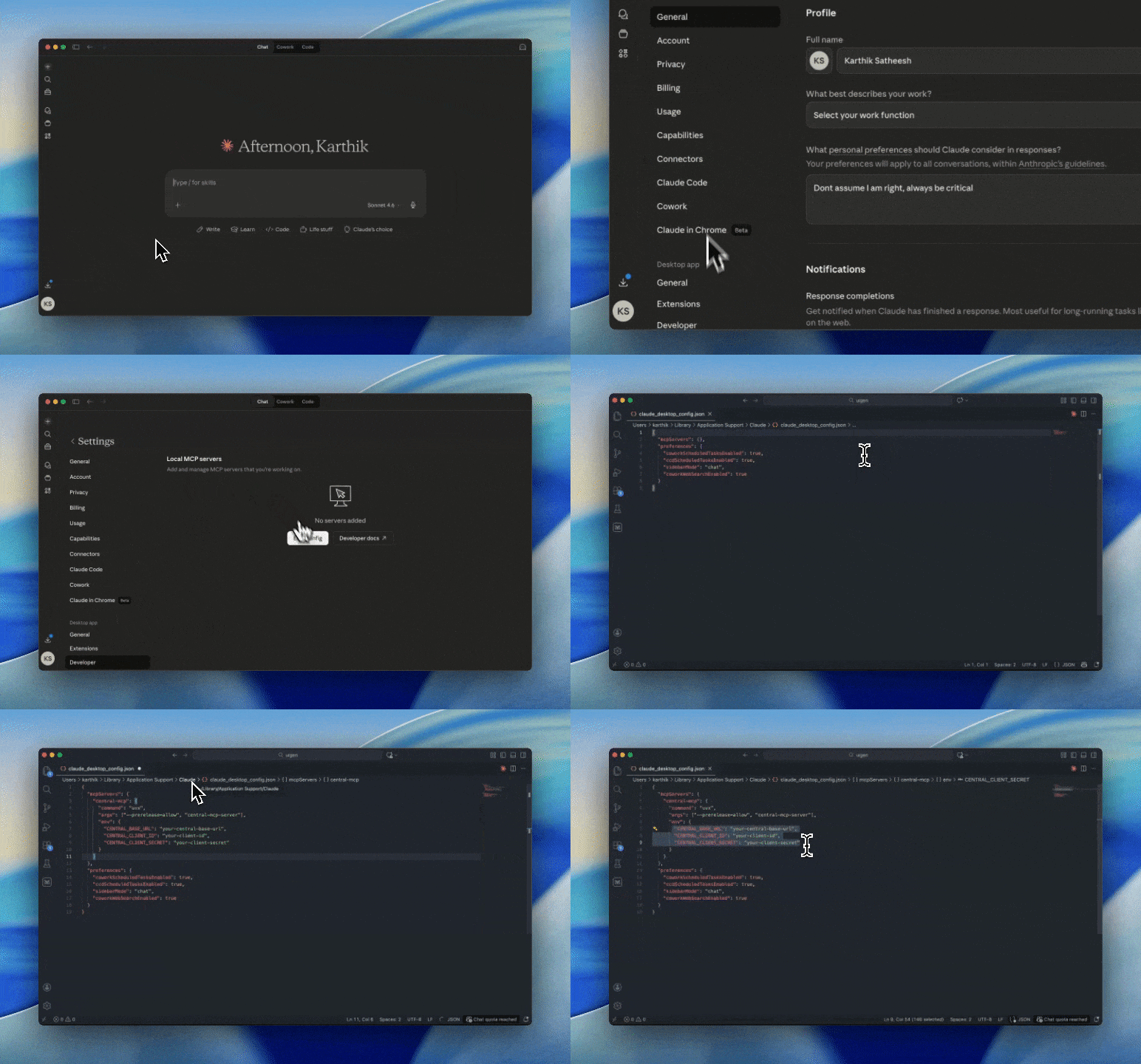
Config file locationIf you prefer to open the file directly:
- macOS:
~/Library/Application Support/Claude/claude_desktop_config.json- Windows:
%APPDATA%\Claude\claude_desktop_config.json
Add the central-mcp entry under mcpServers:
{
  "mcpServers": {
    "central-mcp": {
      "command": "uvx",
      "args": ["--prerelease=allow", "central-mcp-server"],
      "env": {
        "CENTRAL_BASE_URL": "your-central-base-url",
        "CENTRAL_CLIENT_ID": "your-client-id",
        "CENTRAL_CLIENT_SECRET": "your-client-secret"
      }
    }
  }
}
Replace all placeholder values with your actual credentials.
Credential security
Optional: Code Mode (DYNAMIC_TOOLS)
DYNAMIC_TOOLS)DYNAMIC_TOOLS is an optional environment variable that changes how the server exposes tools to Claude Desktop:
- Not set (default): The server exposes all 14 tools from the tool catalog directly.
- Set to
true: The server starts in Code Mode and exposes three meta-tools (Search,GetSchemas,Execute) instead of the full catalog.
Code Mode is recommended when you have multiple MCP servers running, as it reduces the number of tools in your context window. If central-mcp is your only MCP server, leave this unset.
Note: The variable name is strict — use
DYNAMIC_TOOLS(plural).DYNAMIC_TOOLis silently ignored.
To enable Code Mode, add DYNAMIC_TOOLS to the env block:
{
  "mcpServers": {
    "central-mcp": {
      "command": "uvx",
      "args": ["--prerelease=allow", "central-mcp-server"],
      "env": {
        "CENTRAL_BASE_URL": "your-central-base-url",
        "CENTRAL_CLIENT_ID": "your-client-id",
        "CENTRAL_CLIENT_SECRET": "your-client-secret",
        "DYNAMIC_TOOLS": "true"
      }
    }
  }
}
JSON syntax errors will prevent Claude Desktop from starting
Any invalid JSON — a missing comma, trailing comma, or mismatched brace — will cause Claude Desktop to fail on launch with no visible error. Before saving, validate the file using a linter or jsonlint.com. If Claude Desktop stops starting after an edit, reopen the config file, fix the syntax error, and relaunch.
After saving, fully quit and relaunch Claude Desktop. The changes are only picked up on a fresh start.
Verify the Connection
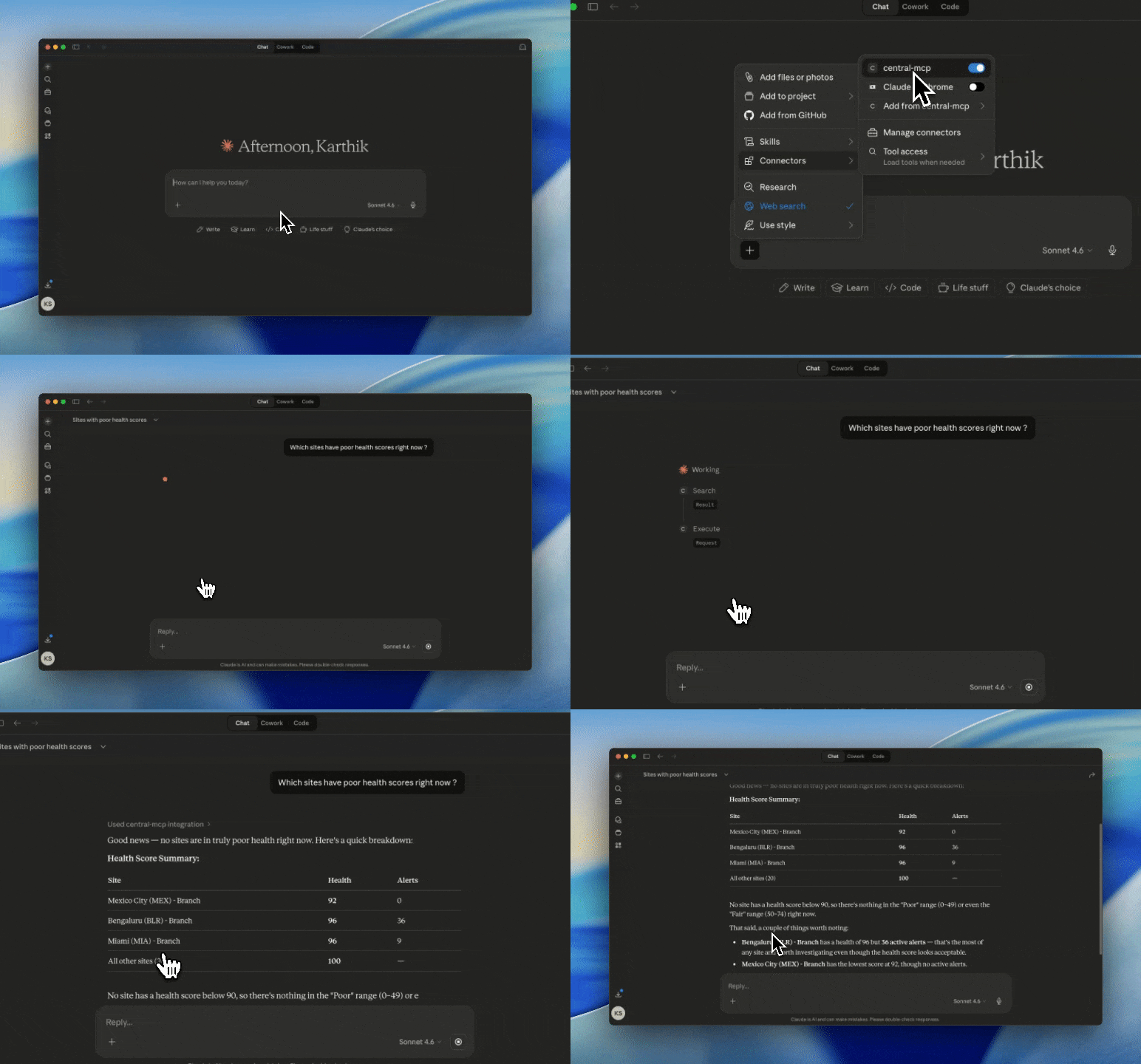
Click the + icon in the chat input bar, then select Connectors. The central-mcp server should appear in the list.
If Code Mode is disabled, Claude Desktop can use all 14 central_* tools directly. If Code Mode is enabled, it will use the Search, GetSchemas, and Execute meta-tools instead.
Run Your First Query
In the Claude Desktop chat, ask:
Which sites have poor health scores right now?A successful response retrieves live site data from your Central instance and returns health scores. If you see tool call activity followed by a structured response, the connection is working.
Updated 4 months ago