
MSP Automation
Version NoteThis guide applies to PyCentral
v2.0a19and above. If you are on an earlier version, see Upgrading from PyCentral v1 to v2.
PyCentral's MSPBase class is built for Managed Servicer Provider(MSP) mode in HPE GreenLake Platform(GLP) & Central. It handles the access token lifecycle by generating MSP tokens, exchanging them for tenant-scoped tokens, refreshing on expiry, and caching tenant sessions. This ensures that your script can focus on the actual workflow across customer workspaces.
Features
- Single credential — one set of API credentials drive the entire workflow, at both MSP and tenant level
- MSP-level API access — make Central and GLP calls directly from the MSP workspace
- Automatic token exchange — step into any tenant scope without writing the exchange flow yourself
- Tenant-level API access — make Central and GLP calls scoped to a specific tenant
- Per-tenant connection caching — each tenant connection is cached and reused, avoiding repeated round token exchanges
- Automatic token refresh — expired MSP and tenant tokens are renewed and retried transparently
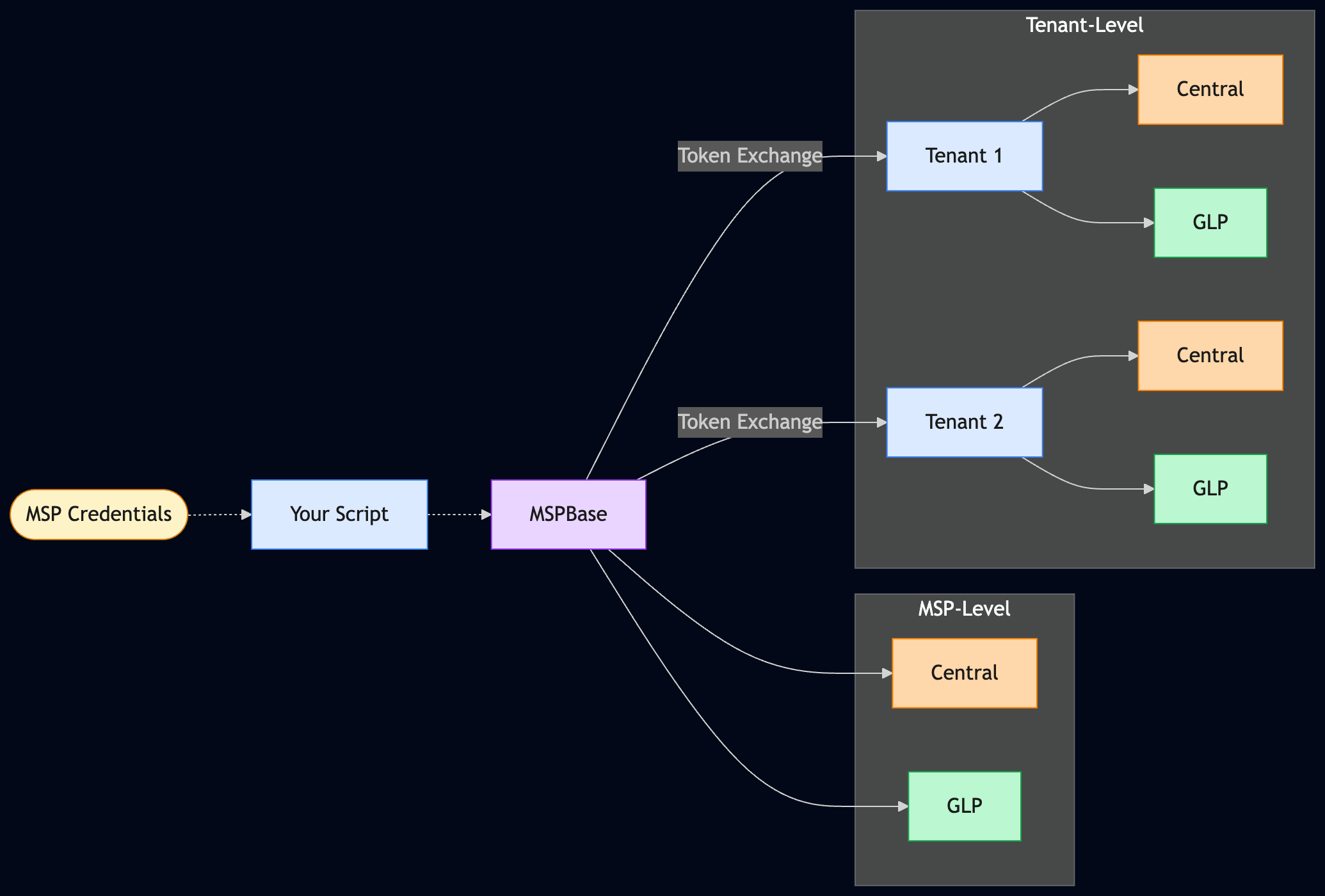
Prerequisites
Credentials
MSPBase requires the unified credential format. You need to provide GLP API credentials from the MSP workspace. Please see Token Exchange guide for more details.
unified:
  client_id: <your-glp-client-id>
  client_secret: <your-glp-client-secret>
  workspace_id: <your-msp-workspace-id>
  base_url: <your-central-api-base-url>
  # cluster_name: <your-cluster-name>  # alternative to base_url
To learn more about unified credentials, please check see Authentication.
How MSPBase Works
MSPBase WorksMSPBase extends NewCentralBase, PyCentral's connection class for New Central and GLP APIs, adding MSP-specific token exchange and tenant management on top. When you instantiate it, the SDK generates an MSP-scoped token from your credentials. From that point, it manages the full token lifecycle automatically.
Note
- Use
MSPBaseas a context manager with thewithstatement. This ensures the MSP and all tenant HTTP clients are closed cleanly when your script exits, regardless of whether it completes successfully or raises an exception.- The same
command()pattern works for both MSP-level and tenant-scoped operations. The main difference is whether you call it on theMSPBaseinstance or on a connection returned byget_tenant_connection().
MSP-Level Operations
Use the MSPBase instance directly for operations in the MSP workspace like listing tenants, managing MSP-level inventory, or calling GLP & Central APIs.
from pycentral import MSPBase

with MSPBase(token_info="token.yaml", log_level="ERROR") as msp_conn:
    print("Successfully authenticated with MSPBase. Now making API calls...")

    print("\nListing tenants from Central API:")
    # List tenants from Central
    central_response = msp_conn.command(
        api_method="GET",
        api_path="network-msp/v1/list-tenants",
        api_params={"limit": 100, "next": 1},
    )

    if central_response["code"] == 200:
        for tenant in central_response["msg"].get("items", []):
            print(f'Central Tenant ID: {tenant.get("tenantId")}, Tenant Name: {tenant.get("tenantName")}')
    print()
    print("\nListing devices from GLP API:")
    # List devices from GLP
    glp_response = msp_conn.command(
        api_method="GET",
        api_path="devices/v1/devices",
        app_name="glp",  # routes the request to GLP instead of Central
    )

    if glp_response["code"] == 200:
        for device in glp_response["msg"].get("items", []):
            print(f'GLP Device ID: {device.get("id")}, Device Serial Number: {device.get("serialNumber")}')
Tenant-Scoped Operations
To act inside a tenant workspace, call get_tenant_connection(). This performs the MSP-to-tenant token exchange and returns a connection object that behaves like NewCentralBase.
You can identify the tenant by either:
tenant_workspace_id— GLP Workspace ID of Tenanttenant_name— Name of Tenant
Tenant-scoped Central API call
from pycentral import MSPBase

with MSPBase(token_info="token.yaml", log_level="ERROR") as msp_conn:
    # Update tenant_name to match an actual tenant in your account
    tenant_conn = msp_conn.get_tenant_connection(tenant_name="Example Tenant Name")

    # Fetch devices in tenant's Central instance
    response = tenant_conn.command(
        api_method="GET",
        api_path="network-monitoring/v1/device-inventory",
    )
    print("Fetching devices in tenant...")
    if response["code"] == 200:
        for device in response["msg"].get("items", []):
            print(f'Serial Number: {device.get("serialNumber")}, Name: {device.get("deviceName")}')
Tenant-scoped GLP API call
from pycentral import MSPBase

with MSPBase(token_info="token.yaml", log_level="ERROR") as msp_conn:
    # Update tenant_name to match an actual tenant in your account
    tenant_conn = msp_conn.get_tenant_connection(tenant_name="Example Tenant Name")

    glp_response = tenant_conn.command(
        api_method="GET",
        api_path="audit-log/v1/logs",
        app_name="glp",  # routes the request to GLP instead of Central
    )

    if glp_response["code"] == 200:
        print(f"Successfully retrieved audit logs from GLP API. Total logs: {len(glp_response['msg'].get('items', []))}")
        for log in glp_response["msg"].get("items", []):
            print(f'Log ID: {log.get("id")}, Description: {log.get("description")}, Category: {log.get("category")}')
Token Lifecycle
What happens during tenant token exchange
When you call get_tenant_connection(), the SDK runs through the same steps as the manual token exchange flow:
- Start with the current MSP token.
- Resolve the tenant workspace ID if only a name was provided.
- Normalize the workspace ID for the exchange endpoint.
- Exchange the MSP token for a tenant-scoped token.
- Return a connection object scoped to that tenant.
For the detailed sequence, see the MSP token exchange guide.
Automatic token renewal
The SDK renews tokens automatically. You do not need to build expiry checks around your API calls.
| Scenario | SDK behavior |
|---|---|
| MSP token expires during an MSP API call | Generates a fresh MSP token and retries |
| MSP token expires during tenant token exchange | Refreshes the MSP token and retries the exchange |
| Tenant token expires during a tenant API call | Refreshes the MSP token, re-exchanges for a new tenant token, and retries |
Tenant connection caching
MSPBase caches tenant connections by tenant_workspace_id. The first call to a tenant performs the full exchange. Later calls for the same tenant reuse the cached connection, avoiding unnecessary round trips.
This is especially useful in loops that revisit tenants for monitoring, inventory checks, or staged configuration tasks.
Example: Iterate Across All Tenants
The pattern below covers the most common MSP automation scenario like fetching the tenant list once, then run a tenant-scoped operation for each.
from pycentral import MSPBase
from pycentral.new_monitoring import MonitoringDevices

with MSPBase(token_info="token.yaml", log_level="ERROR") as msp_conn:
    tenants_response = msp_conn.command(
        api_method="GET",
        api_path="workspaces/v1/msp-tenants",
        app_name="glp",
    )
    if tenants_response["code"] != 200:
        raise RuntimeError(tenants_response["msg"])

    for tenant in tenants_response["msg"].get("items", []):
        tenant_conn = msp_conn.get_tenant_connection(
            tenant_workspace_id=tenant.get("id")
        )
        print("Connected to tenant:", tenant.get("workspaceName"))
        tenant_devices = MonitoringDevices.get_all_device_inventory(central_conn=tenant_conn)
        if tenant_devices:
            for device in tenant_devices:
                print(f'Device Serial Number: {device.get("serialNumber")}, Device Status: {device.get("status")}')
        else:
            print("No devices found for this tenant.")
        print()
The patterns in this guide cover the most common scenarios: MSP-level operations in Central & GLP; tenant-scoped operations in Central & GLP, & iterating across all tenants in MSP workspace. From here, the MSP module documentation is the next stop for the full method signatures and any parameters not covered by the example above.
Why This Helps Automation
MSP module(MSPBase) is designed for multi-tenant automation where the same script needs to work across many customer workspaces without manually managing tokens.
Instead of writing custom logic to generate an MSP token, exchange it for a tenant token, retry when tokens expire, and reuse tenant sessions safely, you can let the SDK handle those steps for you.
- One credential model — use a single
unifiedcredential for MSP-level and tenant-scoped workflows - Less token-handling code —
get_tenant_connection()performs the tenant token exchange for you - Built-in retry path — expired MSP or tenant tokens are renewed automatically during API calls
- Reusable tenant sessions — repeated connections to the same tenant are served from cache instead of repeating the full exchange flow
- Consistent API usage — use the same
command()pattern for MSP and tenant operations
What MSPBase automates
MSPBase automatesMSPBase extends NewCentralBase with MSP-specific behavior:
- It generates an MSP-scoped GLP token from your
unifiedcredentials. - It lets you run MSP-level GLP and Central API calls from the same connection.
- It exchanges the MSP token for a tenant-scoped token when you call
get_tenant_connection(). - It refreshes expired MSP and tenant tokens automatically during API calls.
- It caches tenant connections so repeated calls for the same tenant do not repeat the exchange flow unnecessarily.
For the full API surface, see the MSP module reference.
Updated 4 months ago
What’s Next
Learn more about the MSPBase and TenantBase modules