
MSP Onboarding
Reference implementation for creating MSP tenants, adding devices to inventory, and assigning devices and subscriptions with PyCentral
Source CodeYou can find the full source code and documentation for this workflow on GitHub: MSP Onboarding
Automate the three most common MSP onboarding workflows using MSP API Credentials:
- Create tenants: Create new MSP tenants and provision a Central service in each.
- Assign devices to tenants: Assign MSP-owned devices in an existing tenant's Central application and attach the subscription each device needs.
- Add devices to inventory: Add new devices (serial number and MAC address) to the MSP workspace inventory.
Devices and tenants details can be entered individually or uploaded in bulk via CSVs. It ships in two forms: a guided web workflow and a Python CLI (onboarding.py) for scripted, manifest-driven runs.
NoteThis is a proof of concept for getting started with the MSP onboarding APIs in GreenLake and Central. It is not optimized for large-scale production use. Use it as a reference for your own MSP integrations.
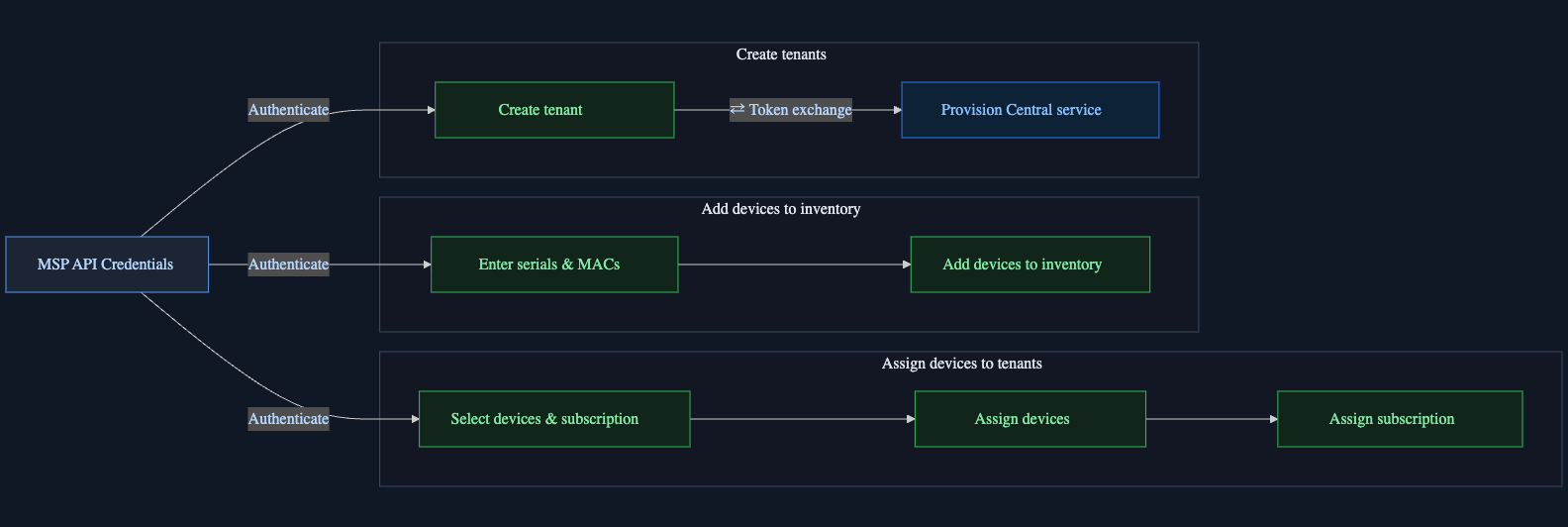
Legend — 🟩 green: MSP context (MSP credential) · 🟦 blue: tenant context (token exchanged into the tenant).
Features
- Create tenants: create one or more new MSP tenants and provision a Central service in each, in the region you choose.
- Add devices to inventory: add devices to the MSP workspace by serial number and MAC address, in batches of five, with per-device results; devices already in inventory are reported rather than re-added.
- Assign devices to tenants: for each MSP-owned device, pick the tenant, the Central application within it, and the subscription to attach, the workflow submits the device assignment and the seat assignment together.
- CSV upload: bulk-load tenants to create, devices to add, or devices with their tenant and subscription mapping, from a CSV file. Rows are validated and errors are reported per row before anything is submitted.
- Bulk seat assignment: apply one subscription key to every eligible device of a type, with the key's expiry shown first.
- Demo mode: a deterministic catalog for exploring both journeys without credentials.
The flow has three stages: discover tenants and services at the MSP level, exchange into a tenant to provision a service, then assign devices and seats from the MSP workspace. It maps directly onto the pycentral MSPBase feature:
A copy-pasteable sketch of the same flow:
from pycentral import MSPBase

msp = MSPBase(client_id=..., client_secret=..., workspace_id=MSP_WORKSPACE_ID)

# 1. Discover tenants at the MSP level
tenants = msp.command("GET", "workspaces/v1/msp-tenants", app_name="glp")

# 2. Exchange into one tenant and provision a Central service there
tenant = msp.get_tenant_connection(tenant_workspace_id=TENANT_ID)
tenant.command(
    "POST", "service-catalog/v1/service-manager-provisions", app_name="glp",
    data={"serviceManagerId": SERVICE_MANAGER_ID, "region": REGION},
)

# 3. Assign devices to that tenant and service (MSP-scoped, batched at five)
msp.command(
    "PATCH", "devices/v1/devices", app_name="glp", params={"id": DEVICE_IDS},
    data={
        "application": {"id": SERVICE_MANAGER_ID},
        "region": REGION,
        "tenantPlatformCustomerId": TENANT_ID,
    },
)

# 4. Assign a subscription to the same devices
msp.command(
    "PATCH", "devices/v1/devices", app_name="glp", params={"id": DEVICE_IDS},
    data={"subscription": [{"id": SUBSCRIPTION_ID}]},
)
API Calls
All calls go to the GreenLake Platform (GLP) API. Read calls run during discovery and preflight; write calls run only after the operator confirms. Both tracks start by listing tenants with the MSP credential.
Create tenants
| Step | Service | Method | Endpoint | Description |
|---|---|---|---|---|
| 1 | GLP | GET | workspaces/v1/msp-tenants | Lists managed tenants (exact-name check before creating) |
| 2 | GLP | GET | service-catalog/v1/service-managers | Lists Central services available to provision |
| 3 | GLP | GET | service-catalog/v1/per-region-service-managers | Lists regions each service can be provisioned in |
| 4 | GLP | POST | workspaces/v1/msp-tenants | Creates the tenant |
| 5 | GLP | POST | {base_url}/{workspace_id}/token | Token exchange (MSP token → tenant-scoped token) |
| 6 | GLP | POST | service-catalog/v1/service-manager-provisions | Provisions the Central service in the new tenant |
Assign devices to tenants
| Step | Service | Method | Endpoint | Description |
|---|---|---|---|---|
| 1 | GLP | GET | workspaces/v1/msp-tenants | Lists managed tenants |
| 2 | GLP | POST | {base_url}/{workspace_id}/token | Token exchange (MSP token → tenant-scoped token) |
| 3 | GLP | GET | service-catalog/v1/service-manager-provisions | Central applications provisioned in the tenant |
| 4 | GLP | GET | devices/v1/devices | MSP-owned device inventory (by serial or ID) |
| 5 | GLP | GET | subscriptions/v1/subscriptions | Subscription keys, capacity, and expiry |
| 6 | GLP | PATCH | devices/v1/devices | Assigns devices to the tenant's Central application (batches of five) |
| 7 | GLP | PATCH | devices/v1/devices | Assigns the subscription to those devices (batches of five) |
| 8 | GLP | GET | devices/v1/async-operations/{transaction_id} | Polls each write to completion (up to 2 minutes) |
Add devices to inventory
| Step | Service | Method | Endpoint | Description |
|---|---|---|---|---|
| 1 | GLP | GET | devices/v1/devices | Checks which serials are already in the MSP inventory |
| 2 | GLP | POST | devices/v1/devices | Adds devices to the MSP inventory (batches of five) |
| 3 | GLP | GET | devices/v1/async-operations/{transaction_id} | Polls each add to completion |
Prerequisites
- uv — the workflow requires Python 3.10+, which uv installs on demand
- An HPE GreenLake MSP workspace with an API client credential
Installation
-
Clone the repository and enter the workflow:
git clone -b v2 https://github.com/aruba/central-python-workflows.git cd central-python-workflows/msp-onboarding -
Create the environment and install the dependencies:
uv venv --python 3.12
uv pip install -r requirements.txt
Configuration
Credentials
The sign-in screen asks for three values:
- Client ID and Client secret — a GreenLake API client credential created at the MSP workspace level
- Workspace ID — the ID of the MSP workspace itself, not a tenant's
TipThe MSP token exchange guide covers how to create an API credential and finding your MSP workspace ID.
The CLI reads the same values from a token.yaml in the current directory (same unified GLP format as msp-tenant-monitoring/token.yaml.example).
Demo Mode (No Credentials)
Choose Use demo mode on the sign-in screen for a deterministic catalog — two tenants, eligible and ineligible services, and subscriptions covering valid, insufficient-capacity, and expired cases. Scenarios select the failure the run exercises:
| Scenario | Exercises |
|---|---|
success | Every write completes |
partial-device-write | One device in a batch fails |
ambiguous-write | An ambiguous response is re-observed inline before retrying |
bulk-success / bulk-partial | Multi-tenant runs, all or partially successful |
tenant-name-conflict | A new tenant's name already exists |
tenant-creation-systemic | Tenant creation fails for every tenant |
Execution
uv run python server.py
# open http://127.0.0.1:8000/
A run walks through:
- Sign in — live credentials, or demo mode
- Choose a journey — onboard new tenants, add devices to inventory, or add devices to existing tenants
- Setup, Devices, Review — pick tenants and services, map every device to a tenant and subscription key, then review the read-only preflight
- Confirm once — the job starts, and the Review screen switches to live per-device and per-tenant results
- Stop safely if needed — the in-flight batch finishes, the rest is skipped, nothing is rolled back
CautionOutside demo mode, a confirmed run performs real writes against real tenants. The read-only preflight and the single confirmation gate exist for that reason — review the preflight before confirming.
Drafts are stored only in the browser and restore an in-progress journey after a refresh; Discard draft removes the local draft.
Command Line Options
| Flag | Description | Default |
|---|---|---|
--port | Port to serve on | 8000 |
--host | Interface to bind | 127.0.0.1 |
The same workflow runs from the terminal via onboarding.py, driven by a YAML manifest:
uv run python onboarding.py --demo list tenants        # also: services, devices, subscriptions
uv run python onboarding.py --demo plan samples/new_tenant.yaml
uv run python onboarding.py --demo run JOB_ID --yes    # also: resume JOB_ID
Drop --demo for live runs. Sample manifests live in samples/.
Output
On-Screen Output
The web UI supports all the onboarding workflows defined above:
- Add Devices – add devices to the GreenLake inventory.
- Create Tenants – create MSP tenant workspaces.
- Assign Devices to Tenants – Assign available devices and subscriptions to selected tenants.
The following walkthrough focuses on Assign Devices to Tenants. The Add Devices and Create Tenants workflows follow a similar experience.
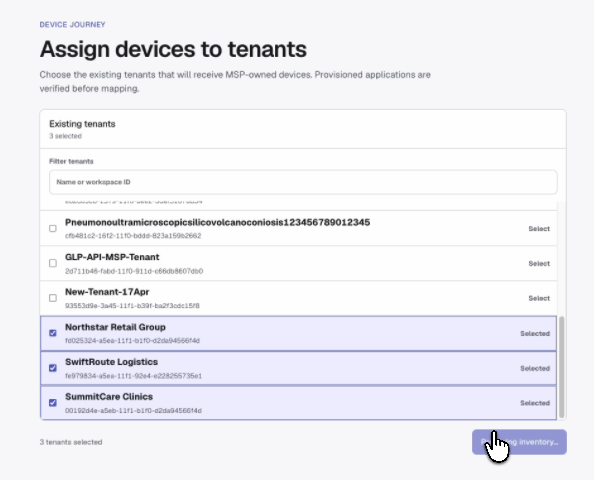
1. Select Tenants
Select one or more tenants that you want to include in the assignment.
The tool discovers the applicable service and region for each tenant and identifies any tenants that are not eligible for assignment.
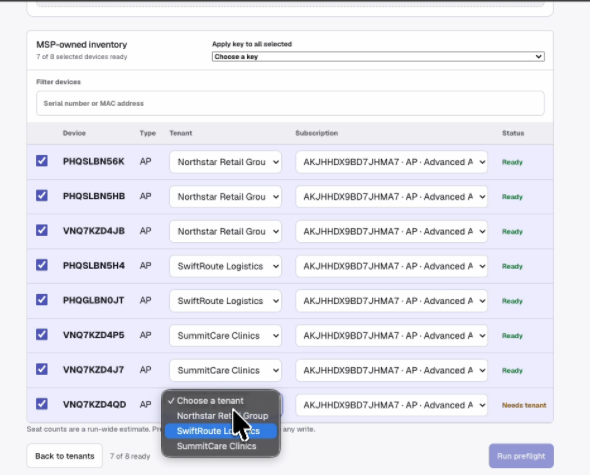
2. Select Devices and Subscriptions
Select the devices to assign and map each device to its destination tenant and subscription.
The UI displays the available device inventory and subscription information, including capacity and expiration details, to help build the assignment plan.
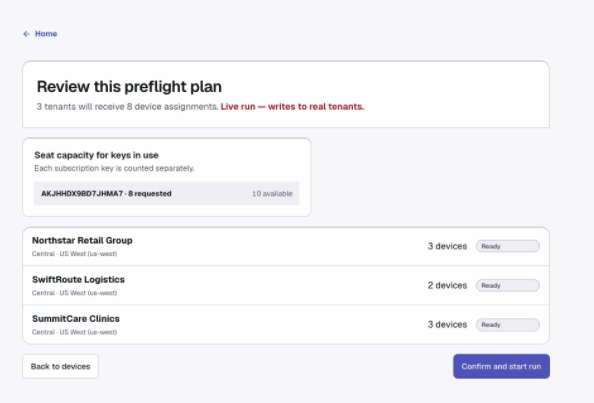
3. Pre-flight Review
Before making any changes, the tool validates the complete assignment plan.
Any validation issues are surfaced before the operation begins so that they can be corrected without making changes.
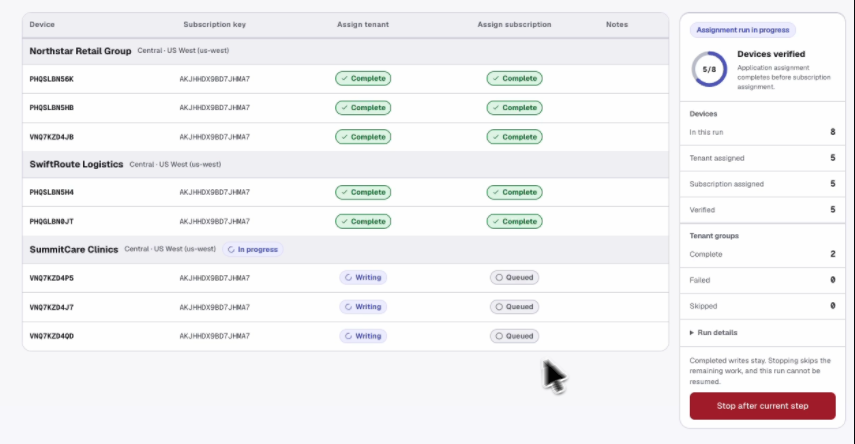
4. Live Run
After the pre-flight review passes, start the assignment.
The UI transitions from the review into a live execution view, showing progress and status for each device as the assignments are processed.
Results are displayed per device, including completed, already satisfied, and failed operations.
Other Web UI Workflows
Add Devices
Add devices to the GreenLake inventory individually or through CSV import. The UI validates device information before the operation and displays the result for each device.
Create Tenants
Create one or more tenants through the web UI. Tenant information is validated before creation, with individual results displayed as the operation completes.
The CLI prints the same plan and per-step results as tables, and masks subscription keys in list subscriptions.
Report Files
GET /api/jobs/{id}/manifest: exports the confirmed job as a YAML manifest (including subscription keys) that the CLI canplanandrunagain- CLI
planandrunwrite no files; runs are session-only and are re-run from the manifest after a server restart
Troubleshooting
| Problem | Fix |
|---|---|
| Sign-in fails | Check the client ID, client secret, and that the workspace ID is the MSP workspace's, not a tenant's |
| Port 8000 already in use | Start the server with --port, e.g. uv run python server.py --port 8001 |
| A job disappears after a server restart | Runs are session-only by design; re-run the manifest, whose pre-write validation absorbs completed work as already satisfied |
| A step shows "Already satisfied" instead of "Complete" | The write was re-observed as already in the desired state — usually because a previous run had applied it, or an async operation finished after polling ended |
| UI returns 503 | The static/ build is missing from your checkout; restore it from the repository (it is committed) |
Support
- Automation Team: [email protected]
- Workflow Issues: GitHub Issues
- PyCentral Library: PyCentral Issues
Updated about 2 months ago