
Working With Port Profiles
This section of our configuration guide assumes general knowledge of configuring ethernet interfaces for networking devices. In Central, interfaces can be configured in two ways. The first is through the use of reusable mapping of Port Profiles to device interfaces. The second is configuring individual ethernet interfaces directly on a device. In general, the recommended approach is to create Port Profiles and apply them to the appropriate areas of the Central Hierarchy. However, directly modifying a specific interface on a device may be necessary in some circumstances and can be done in these cases.
Port Profiles
Port Profiles allows users to define a set of common attributes that can be applied to multiple interfaces on a device. It speeds up provisioning for both access and uplink ports, reduces configuration errors, and enforces uniform policies across the network. Port Profiles can be created for switches, access points, gateways, and bridge devices. Port profiles work hand-in-hand with Interface Profiles to apply the configuration to the designated ports.
Creating with Central API
To create a port profile with Central API reference the Interfaces category of endpoints. There are individual API endpoints for creating a Port Profile for the following device types:
Each Profile type has a variety of configurable options. please refer to the API reference for full configuration and requirement options. Here is an example switch Port Profile body object as created from the default setting from the Central UI
{
      "profile-name": "switch-test-profile",
      "port-security": {},
      "mode": "AUTO",
      "enable": true,
      "routing": false,
      "speed-duplex": "AUTO",
      "mtu": 1500,
      "dpi-enable": true,
      "switchport": {
        "interface-mode": "ACCESS",
        "access-vlan": 1
      },
      "cdp": {
        "enable": true
      },
      "udld": {
        "enable": false
      },
      "stp": {
        "enable": true,
        "bpdu-filter": false,
        "bpdu-guard": false,
        "loop-guard": false,
        "root-guard": false,
        "rpvst-filter": false,
        "rpvst-guard": false,
        "tcn-guard": false,
        "admin-edge-port": false
      },
      "poe": {
        "enabled": true,
        "allocation-method": "USAGE",
        "priority": "LOW",
        "pre-std-detect": false
      },
      "lldp": {
        "mode": "TX_RX"
      },
      "flow-telemetry": {
        "enable": true,
        "exporters": [
          {
            "exporter-name": "sys_cx_exporter_local_default",
            "exporter-type": "COLLECTOR_LOCAL"
          }
        ]
      }
    }
Interface Profiles
The Interface Profile helps configure and manage interface level configurations for a large number of devices, based on the deployment type, model, and number of ports in SKUs. It uses port profiles within Interface Profiles to configure individual interfaces and apply Link Aggregation Group (LAG) configurations. When creating an Interface Profile, a Port Profile is referenced to apply it's configuration to multiple designated interfaces.
Creating with Central API
Unlike Port Profiles, Creating an Interface Profile with Central API uses a single unified API for each variety of device types. The API to Create Interface Profiles can be referenced here. While the API reference itself doesn't contain any required values other than a profile name, there are separate requirements per device type for proper configuration of the Interface Profile payload.
Requirements
Device Type
For a successful Interface Profile creation you will need to set the applicable device-type body value for the profile type you are attempting to create:
| Device Type | Description |
|---|---|
| AOS_S_SWITCH_CHASSIS_AUTOMATIC | Interface Profile for AOS-S Standalone chassis switches such as 5406R and 5412R for automatic workflow |
| AOS_S_SWITCH_CHASSIS_CUSTOM | Interface Profile for AOS-S VSF stack chassis switches made using 5406R and 5412R for custom workflow |
| AOS_S_SWITCH_FLEXMODULE | Interface Profile for AOS-S flexible modules for modular switches |
| AOS_S_SWITCH_LINECARD | Interface Profile for AOS-S linecards for chassis switches |
| AOS_S_SWITCH_MEMBER | Interface Profile for AOS-S Stack member switches |
| AOS_S_SWITCH_MODULAR_AUTOMATIC | Interface Profile for AOS-S standalone modular switches such as 3810M and 2930M for automatic workflow |
| AOS_S_SWITCH_MODULAR_CUSTOM | Interface Profile for AOS-S standalone modular switches such as 3810M and 2930M for custom workflow |
| AOS_S_SWITCH_STACK_AUTOMATIC | Interface Profile for AOS-S Stack switches for automatic workflow |
| AOS_S_SWITCH_STACK_CUSTOM | Interface Profile for AOS-S Stack switches for custom workflow |
| AOS_S_SWITCH_STANDALONE | Interface Profile for AOS-S Standalone switches such as 2530YA, 2530YB, 2540 and 2930F |
| AP | AP |
| BRIDGE | BRIDGE |
| GW | GW |
| PVOS_SWITCH_CHASSIS_AUTOMATIC | Interface Profile for AOSS Standalone chassis switches such as 5406R and 5412R for automatic workflow |
| PVOS_SWITCH_CHASSIS_CUSTOM | Interface Profile for AOSS VSF stack chassis switches made using 5406R and 5412R for custom workflow |
| PVOS_SWITCH_FLEXMODULE | Interface Profile for AOSS flexible modules for modular switches |
| PVOS_SWITCH_LINECARD | Interface Profile for AOSS linecards for chassis switches |
| PVOS_SWITCH_MEMBER | Interface Profile for AOSS Stack member switches |
| PVOS_SWITCH_MODULAR_AUTOMATIC | Interface Profile for AOSS standalone modular switches such as 3810M and 2930M for automatic workflow |
| PVOS_SWITCH_MODULAR_CUSTOM | Interface Profile for AOSS standalone modular switches such as 3810M and 2930M for custom workflow |
| PVOS_SWITCH_STACK_AUTOMATIC | Interface Profile for AOSS Stack switches for automatic workflow |
| PVOS_SWITCH_STACK_CUSTOM | Interface Profile for AOSS Stack switches for custom workflow |
| PVOS_SWITCH_STANDALONE | Interface Profile for AOSS Standalone switches such as 2530YA, 2530YB, 2540 and 2930F |
| SWITCH_LINECARD | Line card interface profile used for Modular custom/automatic |
| SWITCH_MODULAR_AUTOMATIC | Includes profiles added to line-card module supported switches |
| SWITCH_MODULAR_CUSTOM | Includes custom interface profiles added to line-card module supported switches |
| SWITCH_STACK_AUTOMATIC | Includes stack profiles applied for all members |
| SWITCH_STACK_CUSTOM | Includes custom profiles applied to each stack member |
| SWITCH_STANDALONE | Includes standalone |
| SWITCH_VSX_MODULAR | Interface Profile for Modular VSX supported switches |
| SWITCH_VSX_STANDALONE | Interface Profile for Standalone VSX supported switches |
Device Type Object
Following, each device type has it's own unique body object that will need to be populated with configuration information for creating an Interface Profile.
| Device | Requirements |
|---|---|
| AOS-S | device model, port-type/number of ports |
| AOS-CX | device model, port-type/number of ports |
| Access Point | none |
| Gateway | device model |
| Bridge | none |
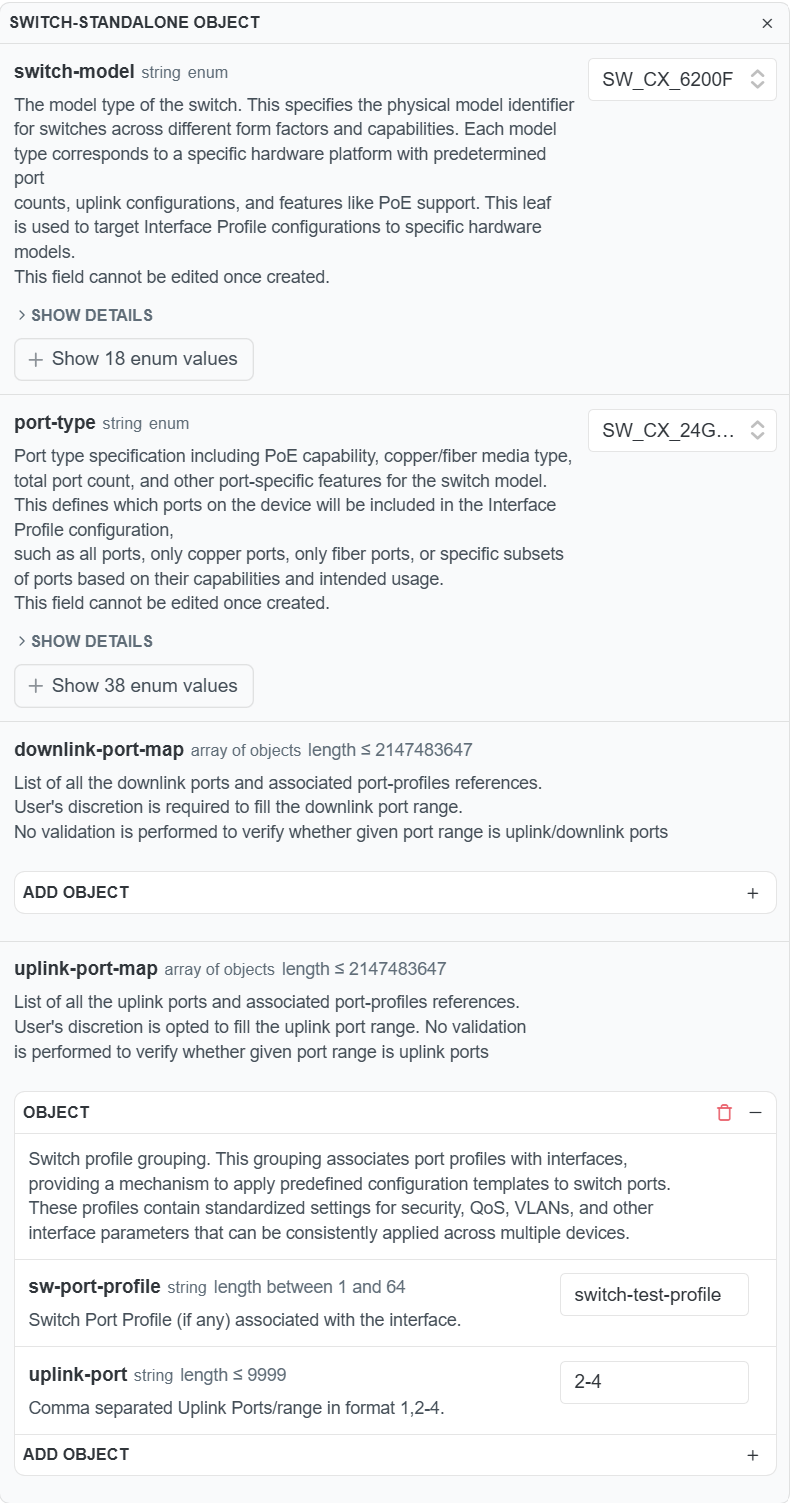
Depending on the device, it is required to designate the switch-model and/or port-type for successful configuration of a Port Profile to Interface Profile mapping and application. Here is an example image showing the body object of a standalone AOS-CX switch:
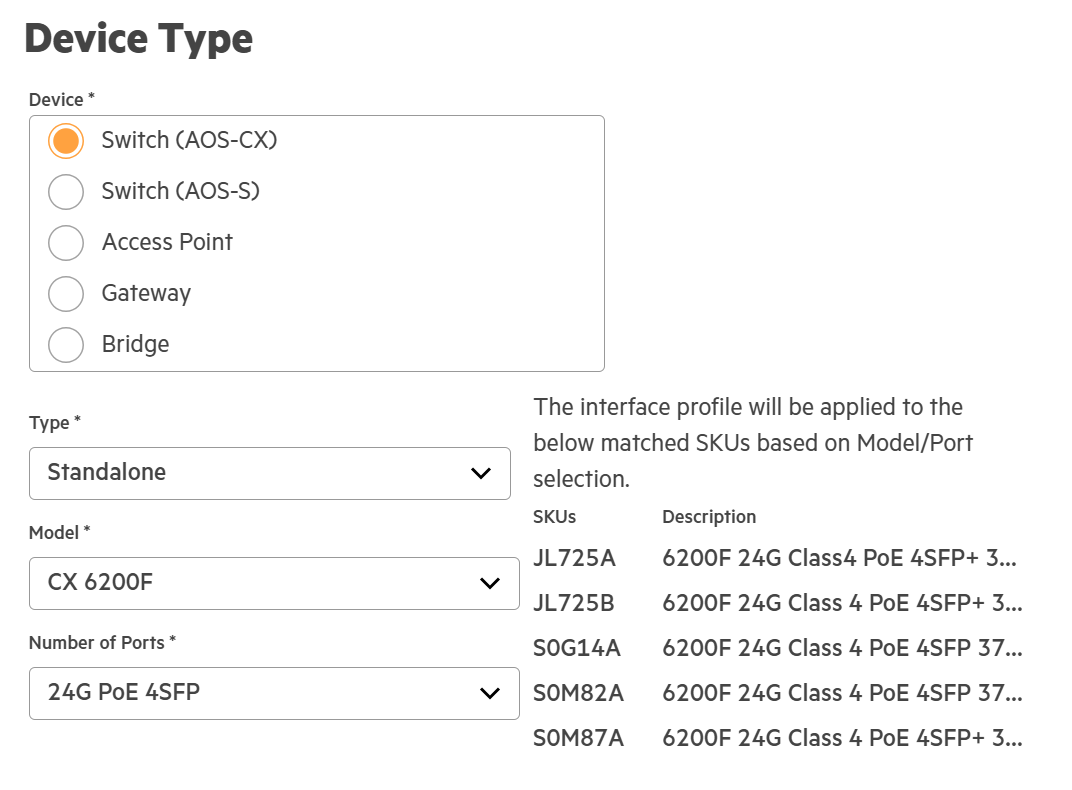
Port TypeUsers can reference the Central UI in the Interface Profile wizard to determine the correct port type if unsure. Select the correct model then select the number of ports option to search for the applicable SKU.
Example Request
Here is an example request to create an interface profile mapping my port profile "switch-port-profile" as uplink ports for interfaces 2-4 on my AOS-CX 6200F standalone switch.
curl --request POST \
     --url https://internal.api.central.arubanetworks.com/network-config/v1alpha1/interface-profiles/name \
     --header 'accept: application/json' \
     --header 'authorization: Bearer {token} \
     --header 'content-type: application/json' \
     --data '
{
  "device-type": "SWITCH_STANDALONE",
  "switch-standalone": {
    "switch-model": "SW_CX_6200F",
    "port-type": "SW_CX_24G_PoE_4SFP",
    "uplink-port-map": [
      {
        "sw-port-profile": "switch-test-profile",
        "uplink-port": "2-4"
      }
    ]
  }
}
'
Assigning the Interface Profile
Once the profile has been created it will need to be assigned to a scope on the hierarchy to take effect. Using our example as a reference, once assigned the port profile "switch-test-profile" would be applied to all 6200F devices at the assigned scope for ports 2-4. This can be done through the UI or API. Please reference the Working with Library Profiles guide for more information.
Ethernet Interfaces
Ethernet Interface Profiles are direct to interface configurations at the device level.
Creating with Central API
To create an ethernet interface profile with Central API, reference Create Ethernet Interface. Unlike Port Profiles, there is a single unified API for all device types: Each interface profile instance represents a single physical port on the device. Each interface is uniquely identified by its name (e.g., 0/0/1, enet0, usb0). These profiles need to be created at the local device level, and take the highest priority on the hierarchy overwriting any other interface configurations.
Common Use Cases
Disable/Enable an Interface
Disabling a particular interface is a common operation. Most commonly an interface may need to be disabled on a specific device. To disable an interface only on a particular device designate the following query parameters: object-type as LOCAL, scope-id of the target device, and applicable device-function. If there are currently no ethernet interface instances on that port, one will have to be created first, else use the Ethernet Interfaces API. To disable the interface set the enable body parameter to false.
Example curl targeting the 1/1/5 interface:
curl --request POST \
     --url 'https://internal.api.central.arubanetworks.com/network-config/v1alpha1/ethernet-interfaces/1%2F1%2F5?object-type=LOCAL&scope-id=1233456&device-function=ACCESS_SWITCH' \
     --header 'accept: application/json' \
     --header 'authorization: Bearer token' \
     --header 'content-type: application/json' \
     --data '{"enable":false}'
Updated 9 days ago