
Route Redistribution Maps
Best Practice: Redistribution Maps in Global Template
Apply to all EC – only active if selected on appliance. (E.g. all route maps should be in ONE template)
Below are the recommended default “starting” maps to prevent loops.
Apply to all appliances; so, they are in the “drop downs” for route maps to use when needed.
When configuring route redistribution maps in your global template, always use "Replace" for route map templates to prevent configuration drift.
Preventing route loops is critical to the stability of your SD-WAN network. This guide provides best practices for configuring route redistribution maps in your global template.
If you expect to have a lot of route redistribution rules, start the priority numbers at 2000 or 3000. This will give you room to add more rules without having to reorder the rules each time.
IMPORTANT NOTE: Route maps created locally on devices or any route map NOT starting with "default_" will be overwritten when you apply Route Redistribution Maps template.This applies to existing accounts that may have custom route maps on every appliance.
Example: The below will not be overwritten and is safe to deploy templates.

Supported: LE and GE values in Maps
The default for prefix match criteria is exact-match + greater-than
For equals value use both LE and GE, example: LE 24 GE 24
Examples:192.168.0.0/16 GE 24
192.168.0.0/16 LE 16 GE 16
192.168.0.0/24 LE 24 GE 28,192.168.1.0/16 GE 24,
- Primary will redistribute into the protocol with a metric/MED of 50. This is the number we use for preferred routes due to legacy configurations.
- Secondary will redistribute into the protocol with a metric/MED of 70. This is the number we use for backup routes due to legacy configurations.
- In the OSPF map set the tag for the redistributed routes to 111 then added a deny for that tag in the Subnet Sharing map. This will prevent a LAN side loop in HA environments with OSPF.
- BGP Outbound maps are configured with the assumption that the peers are eBGP peers and both appliances are using the same ASN, per recommended BGP HA configuration.
- BGP Inbound Primary/Secondary are only useful if you want to prefer a certain LAN side BGP peer over another advertising the same prefixes.
- If using Peer-Priority feature - Fabric-OUT primary and secondary Metric will be set the the same Metric on HUB and head end appliances.
-
Expand the screen captures below and review the comments for detailed information.
BGP
Applied in BGP Peer configuration.
- BGP-PE Out-Primary
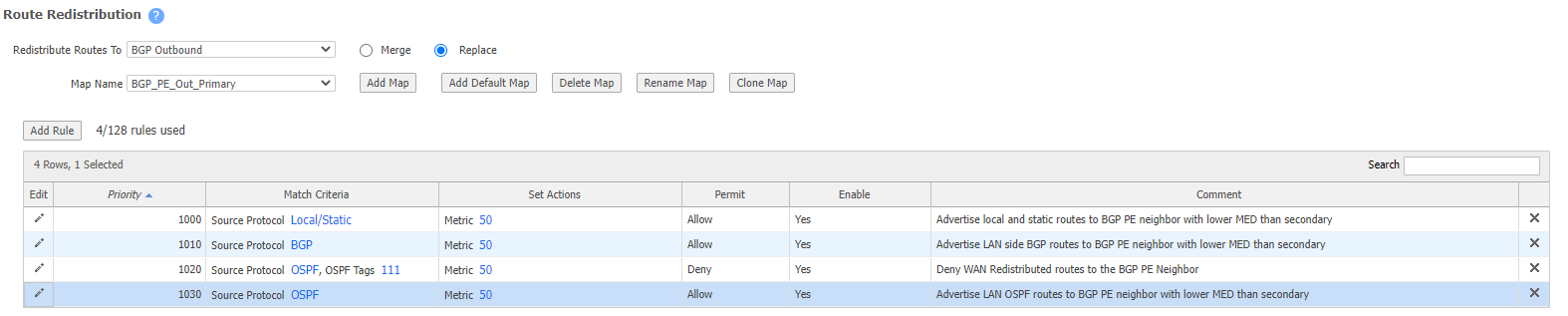
- BGP-PE-Out-Secondary
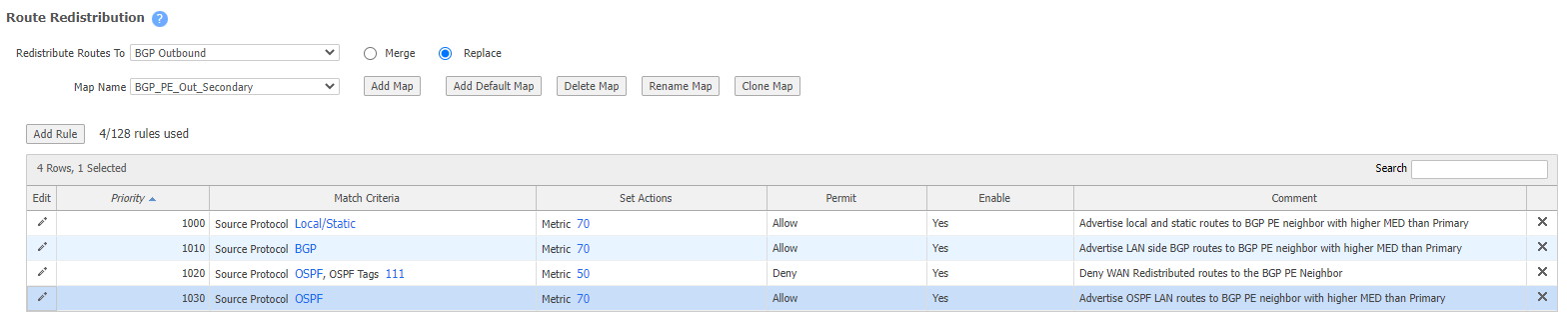
- BGP-Branch-Out-Primary

- BGP-Branch-Out-Secondary

- BGP IN DENY

- BGP IN Primary (Traditional or Edge HA)(HUB)

- BGP IN Secondary (Traditional or Edge HA)(HUB)

- BGP OUT DENY

Fabric
Applied in Routes >local static > edit > "Redistribute routes to SD-WAN fabric"

- FABRIC-OUT-DENY (prevent route advertising to other Edge Connects via SDWAN tunnels)

- FABRIC-OUT-PRIMARY (Traditional or Edge HA)(Spoke/Branch)
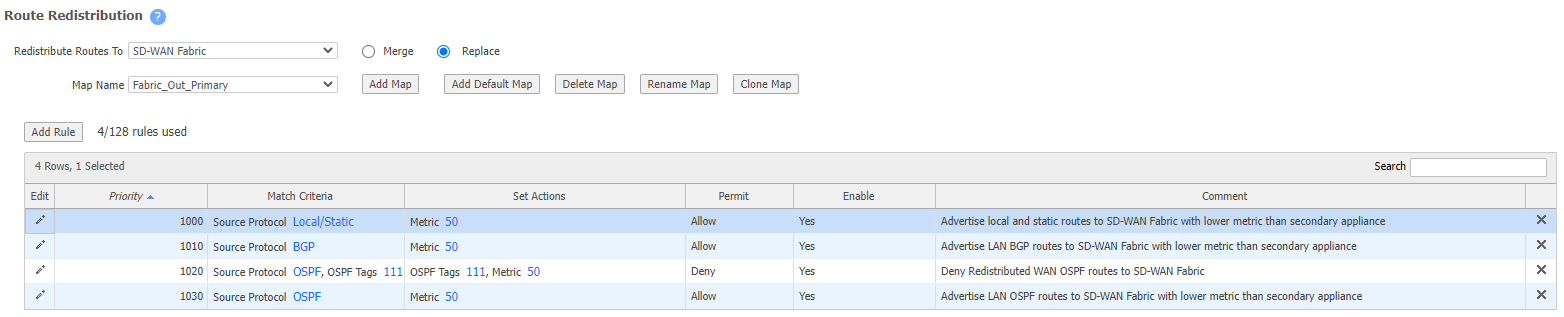
- FABRIC-OUT-SECONDARY (Traditional or Edge HA)(Spoke/Branch)
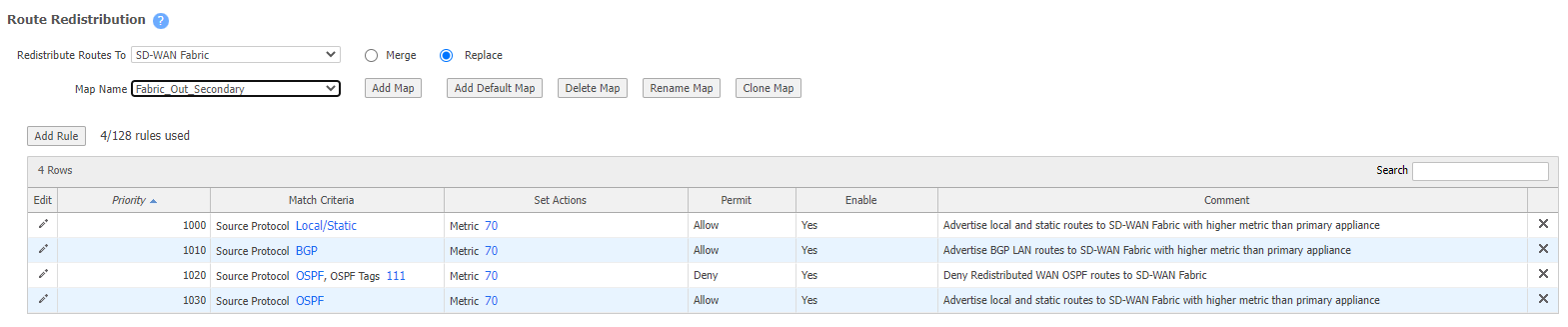
Generally you will need a seperate FABRIC-OUT-HUB set for HUB/DC/Head End appliances, routing at these is generally more complex than spoke locations.
OSPF
Applied in OSPF configuration page.
- OSPF DENY

- OSPF PRIMARY (Traditional or Edge HA)(Spoke/Branch)
- Tags OSPF route 111 in this example
- Traditional HA deployment must deny 111 routes on the secondary

- OSPF SECONDARY (Traditional or Edge HA)(Spoke/Branch)
- Tags OSPF route 111 in this example
- Traditional HA deployment must deny 111 routes on the Primary

Generally you will need a separate OSFP-HUB set for HUB/DC/Head End appliances, routing at these is generally more complex than spoke locations.
Updated 4 months ago