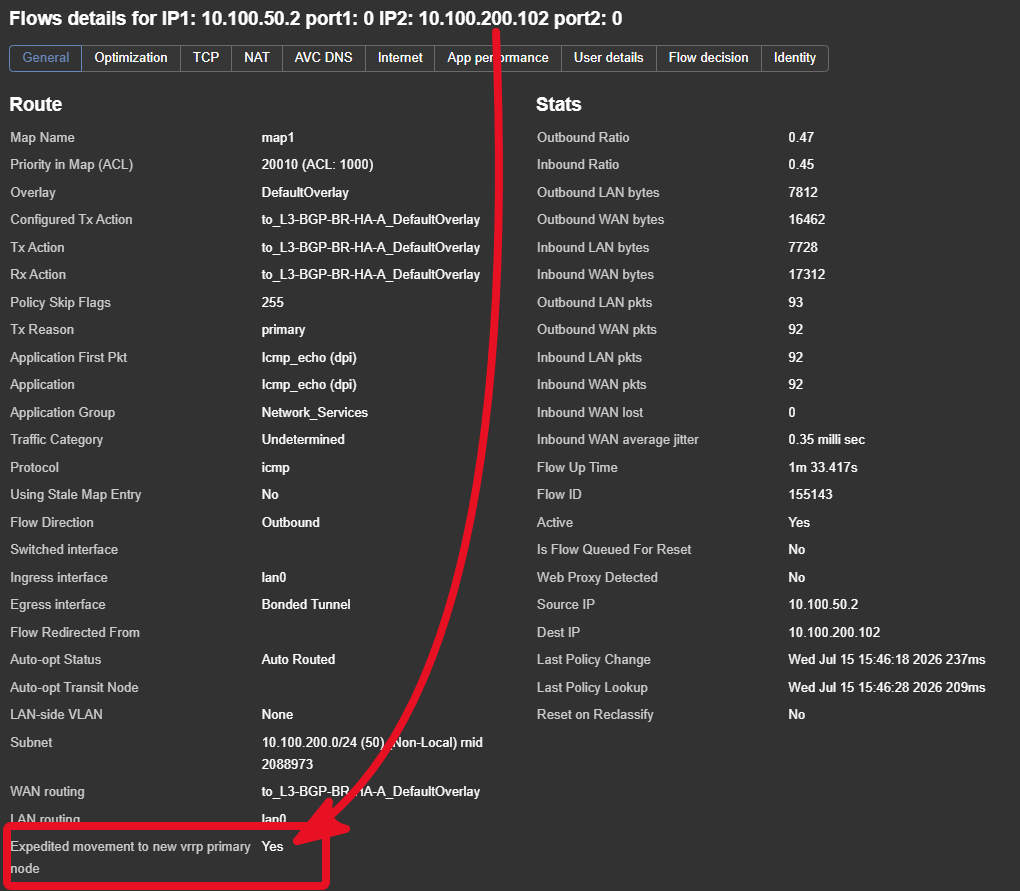
VRRP Tracking influences traffic inbound to the site.
We no longer need IP-SLA rules to monitor VRRP and modify the metric - use equal SS metric and use VRRP tracking instance's vrrp master/backup state to pick the active device on both directions.
It works with any remote site (hub or spoke) that is running supported code
Peer Priority (PP) influences outbound traffic from a site - so PP and VRRP tracking are orthogonal (independent)
🚀
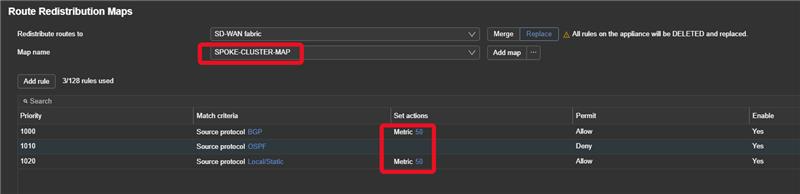
Best Practice: Set the metric to be equal on all ECs and let VRRP state pick the active EC on both directions.
IP SLA is not needed to track VRRP state and modify the metric.
🤔
Fabric Route redistribution maps can be simplified from the Primary/Secondary to a Cluster map applied to both Spoke devices in most cases.
Route redistribution MAP example
VRRP is now breaking the Tie and not metric. (see below route selection reference)
📘
When enabled Routes are Tagged with "P" for primary and "B" for backup
Because of the route selection order The P routes will always win.
Edge Connect route selection
Pre-9.6 (9.5,9.4 etc.)
Longest Prefix
AD (Lowest)
Metric (Lowest)
Peer Priority (Lowest, default 1024)
Random - ECMP
9.6.2.x and later
Longest Prefix
AD (Lowest)
Metric (Lowest)
VRRP State Tracking (P) <<<<<NEW
Peer Priority (Lowest, default 1024)
BGP AS-Path Length (Shortest) <<<<<NEW
Random - ECMP
NOTE: Route priority last updated/verified 15JUL2026