
Orch Tips and Tricks
What are the common tabs for troubleshooting?
- Flows "Active and recent flows"
- Tunnels
- Routes
- IP SLA Summary
- Monitoring trends (loss, latency, etc.)
- Audit Logs
- DHCP Leases
- Dashboard
- Interfaces
- Broadcast CLI (ARP table commands: “show arp” or “show neighbor”)
- Deployment
- Pin your favorite tabs! (note: Orchy upgrade will reset the pins)
Right Click and select “pin tab.”
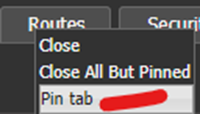
Pin Tab option
- Click hold and drag tabs to a convenient order!
Colums
Many Display tables can display more columns.
You may drag and drop the columns in any order.
- Example: Flows tab Right click on header
- Select Data fields you want from this list.
- Recommend starting fields checked here.
- Sort table on most headers – Example: recommend “start time” for flows table.
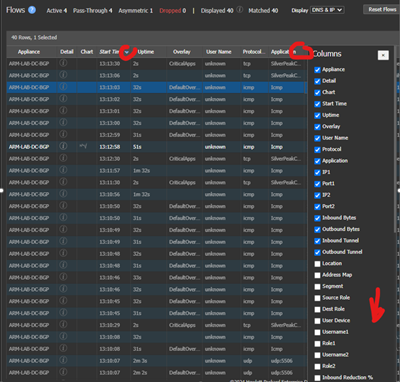
- Depending on your setup others will be useful.
- “to zone” & “from zone”
- “segment” & “roles”
- “DSCP” for verifying QOS
Updated 4 months ago
Did this page help you?