
Initial Templates and settings
Creating all these templates will set your deployment for success!
Best practice - Template everything
- Day 0 – review default template group
- Configure what applies to your environment,
- All global items in default template group
- subset template group (limit as much possible)
- for example: time settings, Peer Priority, ZBFW (non-seg only)
- Suggested templates, even if not needed better to setup now so it is not forgotten if needs arise to setup later.
When you complete the steps in this document, your default/global template will look similar to the one shown here. While all of the settings may not be needed at this time—or ever—we recommend setting them up so they are ready to go if a requirement comes up in the future.
Here are the default templates on a new Orch.
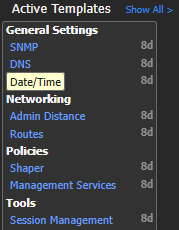
Templates in Default Template group on new Orch (9.4.3.x)
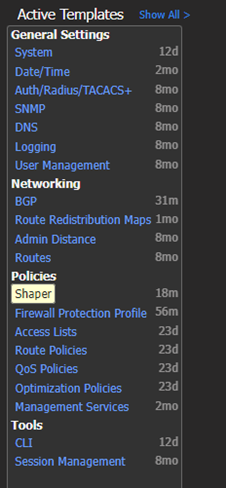
These are individual templet's you insert into template groups
The following subsections will explain this in detail.
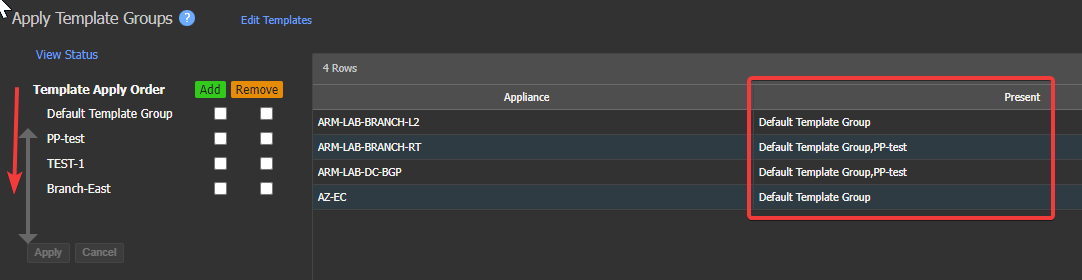
Template application: Templates are applied top down like ACL's.
-
If for example: "Default template group" below contains active template "Date/Time" and you apply another template group with "Branch-East" with active template "Date/time"
- The section in the higher template group is removed and the values in the lower template group are applied
-
Only overlapping templates within groups are overwritten. This allows Stacking of templates with groups
-
Because the data is removed and then re-added, this can cause a interruption in traffic flow. Therefore, it is important to understand the potential impact of template changes on traffic flow.
-
-
Present - shows the template group(s) applied to the selected appliances
-
Click, hold, and Drag template groups to reorder
-
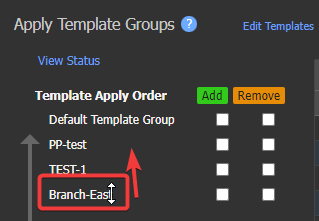
You can drag "Branch-East" above "PP-test" For example.
-
-
Updated 4 months ago