
Labels
Information on labels and some getting started suggestions
Labels separated into WAN and LAN
Recommend “Starter” labels. (any WAN label can apply to any WAN interface and LAN to any LAN interface; however, symmetry is easier to manage!)
- Keep names short for readability.
- Use all CAPS so they stand out.
Label examples
| WAN | LAN |
|---|---|
| WAN0 | DATA |
| INET1 | VOIP |
| INET2 | MGMT |
| LTE (hub and spoke) | WIFI |
| MPLS1 | PRINTERS |
| MPLS2 | CAMERA |
| LEO | SECURITY |
| BR_W0 | LOOPBACK |
| BR_W1 | DATACENTER |
| DC_ISP_1G | AZ/AWS |
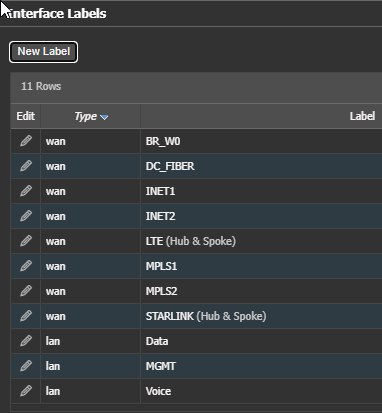
WAN Labels can override MESH BIO and function only as Hub and Spoke by selecting the option when creating the label. This is useful for CG-NAT circuits in a MESH environment. See BIO section for information.
WAN Labels build tunnels between WAN labels according to Business Intent Overlays configuration, covered later.LAN labels are currently just identify lan side interfaces and subinterfaces.
LAN labels can be use to ID interfaces for use in firewall rules and other areas of Orch.
For example a "Guest" network that has a different VLAN at location. Using a LAN label "GUEST" can quickly reference all these interfaces. Simplifying Rules.
There are a couple way to approach labels
- Set all labels the same at both HUB/data center and remote/branch locations.
- Requires less labels
- Requires a few cross connections in the BIO
- Looses readability in charts
- 2nd and 3rd circuits remote/branch will still require their own label and cross connection
- IPSEC and encryption settings are easier
- Define labels for Each HUB/Data center connection and each Branch interface.
- Requires more labels
- Requires a lot of BIO cross connections
- Helps Chart readability
- IPSEC and encryption setting take more time to change
- Increases total tunnel count
Each Edge Connect, Including Edge HA pairs, can only have one of each WAN label. If you put the same label on two interfaces, deployment will not allow save or an alarm is raised and tunnels will not build.
After creating a new WAN label you must return to Tunnel Settings and configure the label settings.
Updated 4 months ago
Did this page help you?