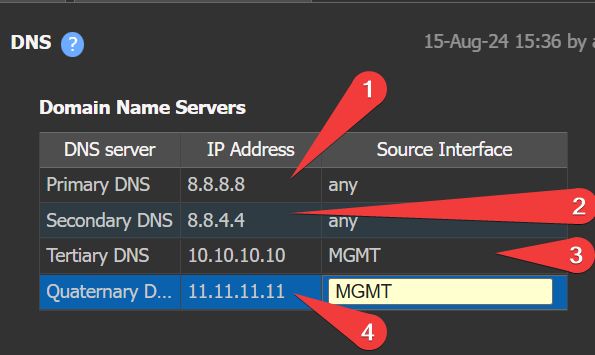
DNS servers are used only for EC self-generated traffic, such as:
Portal lookups
Orchestrator lookups
📘
EdgeConnect does NOT use DNS to populate the Flows table or identify applications.
Uses DNS Snooping for those functions.
🚀
Best Practice:
#1 to #4 below are the four Domain Name Server slots, not the numbered list above: #1 Primary, #2 Secondary, #3 Tertiary, #4 Quaternary.
Configure external DNS for #1 and #2 (Primary and Secondary)
Configure internal for #3 and #4 (Tertiary and Quaternary)
For #3 and #4 - set port to LAN or a loopback, (e.g. "MGMT" is the loopback label.)
Firewall rule will be needed to allow DNS ZONE to ZONE if you have followed this guide and "MGMT" is in a dedicated zone.
DNS Config example
🚧
TIP: For #1 and #2: Source interface = "any" to prevent device isolation.
❗️
Exception: AIR-GAP or topologies without internet access. #1 and #2 should be a RFC-1918 DNS that can be reached without tunnels, and/or use only IP in these environments.
Air-GAP should change the default Template away from the 8.8.8.8 & 8.8.4.4 Default settings.
🚧
IF EC cannot resolve DNS, it will be isolated and unable to reach portal/orchestrator.
Quick Checklist
DNS is only for EC self-generated traffic.
External DNS for Primary and Secondary; internal for Tertiary and Quaternary.
Source interface for Primary and Secondary = “any”.
Air-Gap: Use only (internal) RFC-1918 DNS Server or IP Only Configuration for Orchestrator and Portal