
IPSLA- updated!
IPSLA Best practice
2025 IPSLA UPDATE
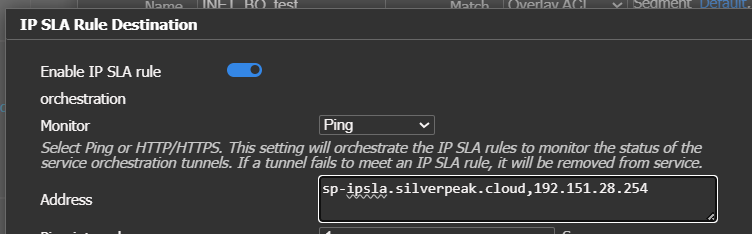
IPSLA configuration
Best Practice: Update IPSLA targets to HPE owned endpoints.
- Example above is one target to URL "SP-IPSLA" and one IP target to "SP-IPSLA2" IP
Primary IPSLA
Best Practice: Use 1 DNS and one IP targetMore than two targets may be used, however data usage on all breakouts will increase, this is only a problem for very low bandwidth connections or data limited connections like LTE or satellite.
This configuration prevents EC isolation and breakout traffic failure if DNS fails.
- sp-ipsla.silverpeak.cloud
- IPV4 only
- Global ANYCAST
- AWS Global Accelerator IP
- IP-ADDRESS - Regional dependent
- sp-ipsla2.silverpeak.cloud
- IPV4 and IPV6
- Global ANYCAST
- HPE owned IPs
- 192.151.28.254
- 192.151.29.254
- 2600:9000:a70d:506e:85a8:bd96:7482:16
- 2600:9000:a60f:6c50:ca04:acb1:b183:9524
ALL IPSLA targets must be down for IPSLA to be marked down
IPV6 and Mixed environments
Simply add the IPV6 addresses to the "Address options"

IPSLA example with IPV4 and IPV6
IPV6 IPSLA requires Orch 9.6. or later!
IPLSA for SSE and 3rd Party suggested IPSLA targets
Breakout and SSE IPSLA are separate, you must configure both!!
- Breakout IPSLA does not affect SSE IPSLA
- SSE IPSLA does not affect breakout IPSLA
Configuration > Cloud Services > select the service you are using and then select the IPSLA button.

IPSLA Location in Cloud Services
HPE SSE

Zscaler

Netskope

Service Orchestration

IPSLA Settings
Best Practice: Configure IPSLA ASAP
- below are tested examples
- May need adjusted for YOUR environment
- Existing environment:
- Added LOSS first then added in latency
- you must know the expected latency
- Latency is measured to the IPSLA targets only
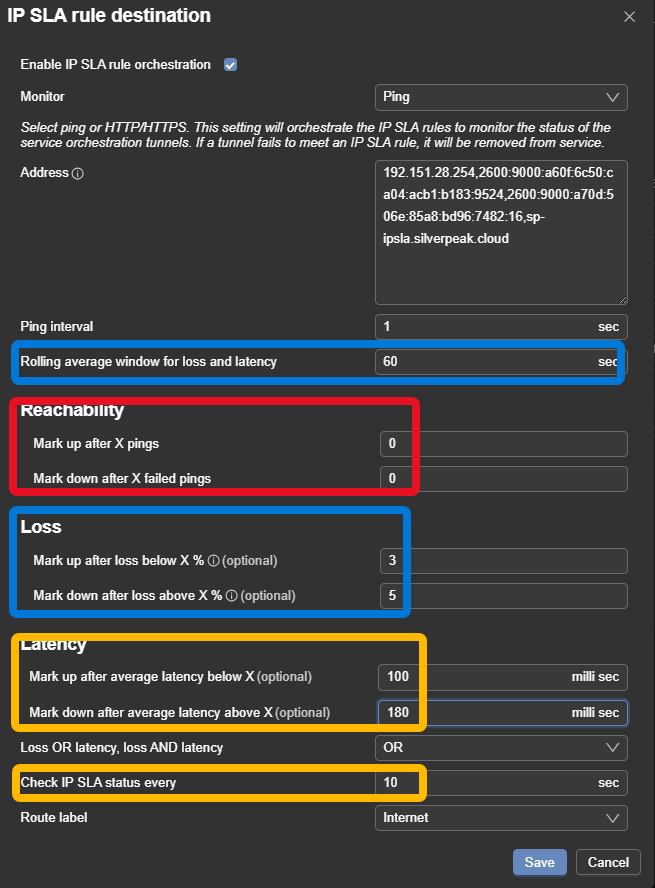
IPSLA starting example
Suggested IPSLA settingsReview and adjust IPSLA
Above is a starting point/Reference
Ping interval 1 second
Average rolling: 60
Zero "reachability"
Recommend using Loss
Use Latency with Caution
Start high and reduce over time to “dial in”
Ping can be set more aggressive than http/https increase interval number for http/http (see SSE)
Check IPSLA >= 10 – do not set below 10If high load Edge Connects exist 15 or 20 maybe better base setting here, if very fast reaction is required, offset by reducing "rolling average" to ~30 for example.
Overlays without breakout option will not have an IPSLA created by orch.
SSE IPSLA
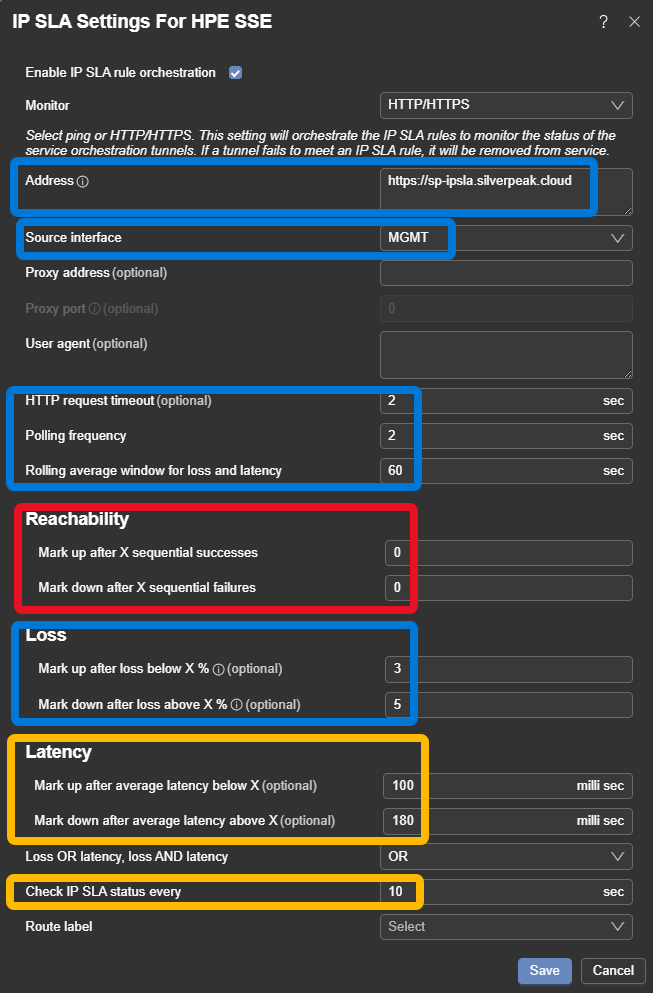
SSE IPSLA config
Suggested SSE IPSLA settingsReview and adjust the SLA
Above is a starting point/Reference
Address: This example tests through the SSE service, while testing to the service directly is valid, outages on the back of the service can cause traffic to bitbucket, this method helps ensure end to connectivity is healthy.
Source interface – Loopback for consistency & easier ZBFW rules
Reachability: zero this out
Recommend using Loss
Use Latency with Caution
Start high and reduce over time to “dial in”
Check IPSLA >= 10 – do not set below 10If high load Edge Connects exist 15 or 20 maybe better base setting here, if very fast reaction is required, offset by reducing "rolling average" to ~30 for example.
HTTP/S polling >= 2 – do not set below 2
On all IPSLA use the following to adjust reaction and sensitivity
- Rolling average window
- longer time for less reactive
- Check IPSLA every
- longer time for less reactive
Updated 4 months ago