
Application Tips and tricks
Best Practice: Make custom applicationsWhy? You will see this in the flows table, no need to remember what that traffic/ip/port is, and you can use these application throughout the system, customer app-groups, etc.
A good starter application is internal DNS, define with IP and port 53 app name "ORG-DNS" will show in the application column in flows table.
In maintenance windows you can easily search in the flow table with the application with out research again the above information.
Best Practice: Make applications as granular as possible.
Simply making an application only changes the application match "application" column in flows, no action is take on the traffic unless changing the application causes a no match condition in Firewall/BIO/ACL or if your new application matches and overrides an existing application that is referenced - yes it could break that traffic.For Example:
- A rule in ZBFW allowing traffic based on "https" application
- You make a new application called "WEB-Servers" for 10.0.0.0/24 destination IP, Destination port 443, this traffic will not match the "https" application any longer and will be blocked.
Best Practice: Client DNS request/response must pass through the EC. This allows EC to snoop DNS and is critical for the application engine to ID traffic on first packet.
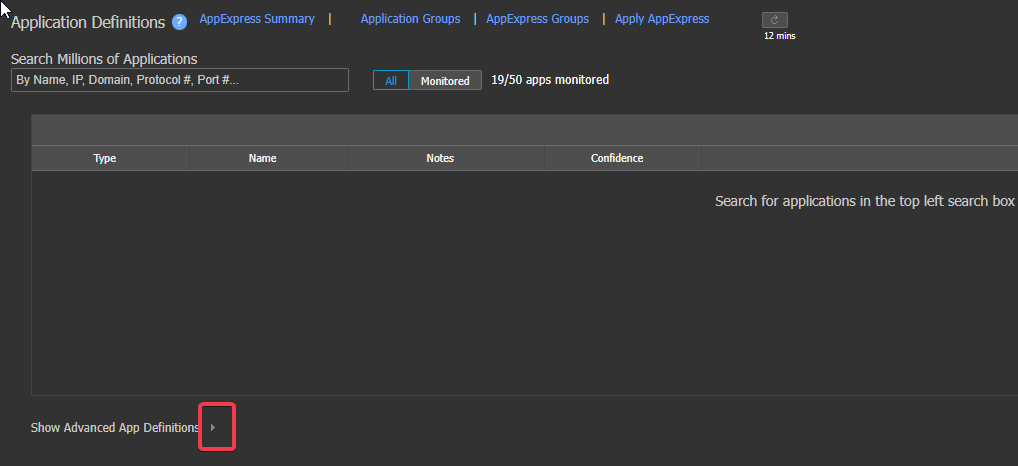
All applications with exact name are treated as the same applicationClick Arrow below to make/View custom application
Click to add new application
To view only ones you have added Click the modified filter on the right– Per Tab options – IP Protocol, UDP port, Etc.

- Select the type of application you want to setup
- This example is compound – if you do not need compound it will error to use a different type.
-
Forward thinking: the more information you put here – the less you need in a firewall rule, for example in the having "destination port 80|443" and "TCP" means in the firewall rule you do not need this information, same for GEO policy. Granularity is best for matching without overlapping other applications.Example: If the port is 8443 it will not match this application, and consequently not the firewall rule as well
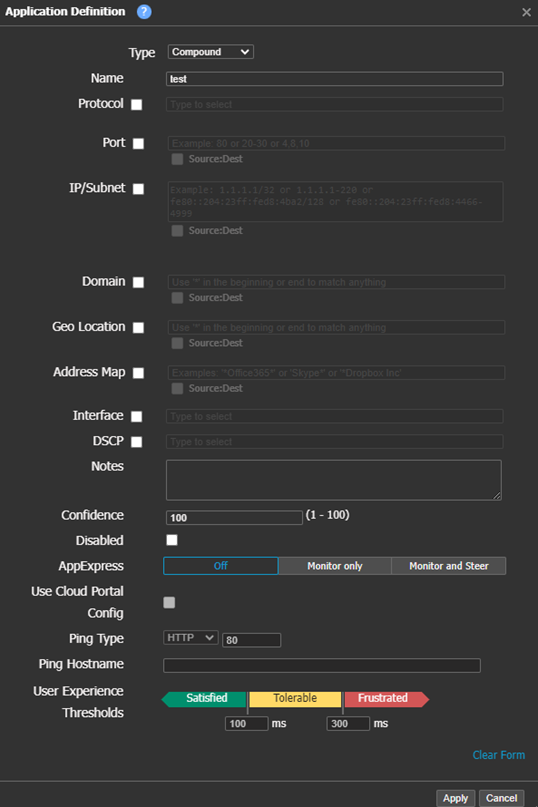
If a flow matches two or more applications it is a random choice on the application match, Following granularity best practices above will prevent this. Application Address/Port Maps are most common cause of multiple match scenarios.
Updated 4 months ago
Did this page help you?