
VRRP without tracking
9.5 prevous versions or 9.6 without tracking
Best Practice: (configure next section)
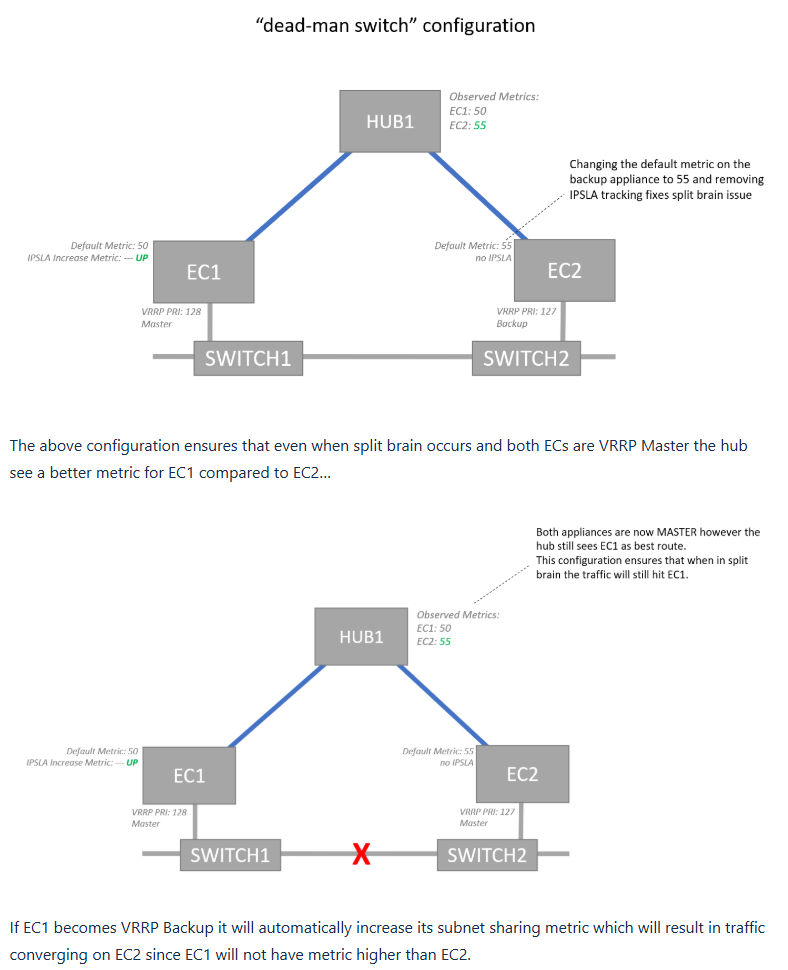
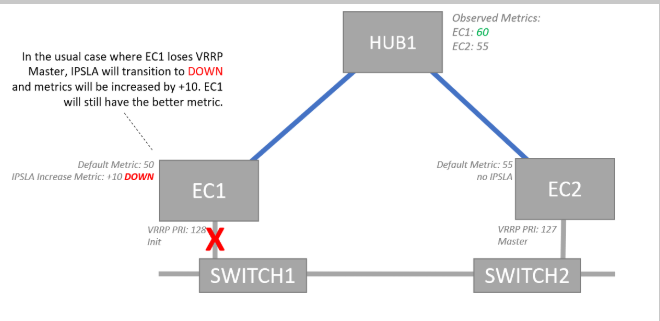
- Configure IPSLA VRRP rule only on EC1(Primary).
- Set IPSLA Metric change to +30 for the IPSLA rule. (+30 is needed for previous configured sections replace value as needed for your environment)
- Set EC1’s metric to 50. Route Redis Configuration should already be doing this for EC1 (primary) devices
- Do not configure IPSLA on EC2. Set EC2’s metric to 55(70).(Note: this should be 70 if you properly configured the Route Redis
LAN SIDE CONFIG
VRRP only supported on LAN interfaces
Spoke VRRP
VRRP HUB
For hubs the same method applies only Both EC1 and EC2 will have the same routing metric for Peer Priority.
Typically HUBs are BGP/OSFP type links and VRRP will not apply.
To keep things simple you can use the same +30 on EC1 Rule Below
VRRP IPSLA - EC1(Primary) only
Search IPSLA > click “IPSLA summary”.
- Click edit on any of the rows.
- Click ADD
- Select "VRRP Monitor"
- Select your LAN interface
- Setup per the screen grab below (Delta will be 30)
- Repeat for each Layer 2 VLAN
Updated 4 months ago
Did this page help you?