
SYSTEM
Adjust the values marked below
• Quiescent to 30 (1)
• UDP flow timeout 30 (2)
• NAT-T Keep alive 30 (should match Quiescent) (3)
Optional: Tunnel Alarm Aggregation Threshold (4)
This control determines how many alarms are generated and displayed in the Orchestrator. It does not affect traffic. To see all alarms, set the threshold high, such as 50. To condense alarms, set the threshold low, such as 5. If each branch circuit has 18 tunnels and you want to see all of them, set the threshold to 19.
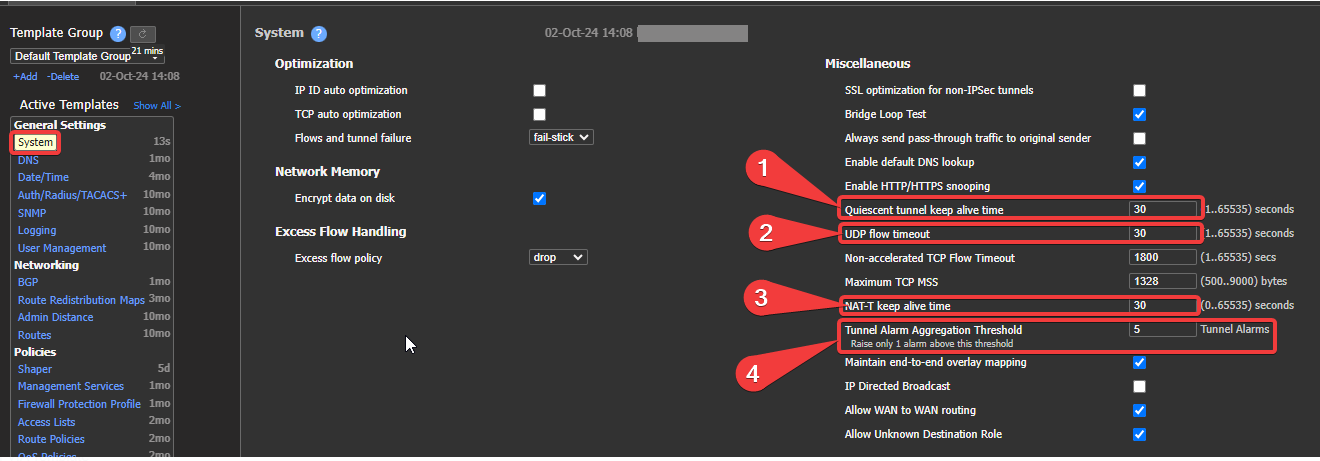
System settings Template
Updated 4 months ago
What’s Next
Did this page help you?