
Tunnel Settings

Orchestrator->Orchestrator Server -> Tools -> Tunnel settings
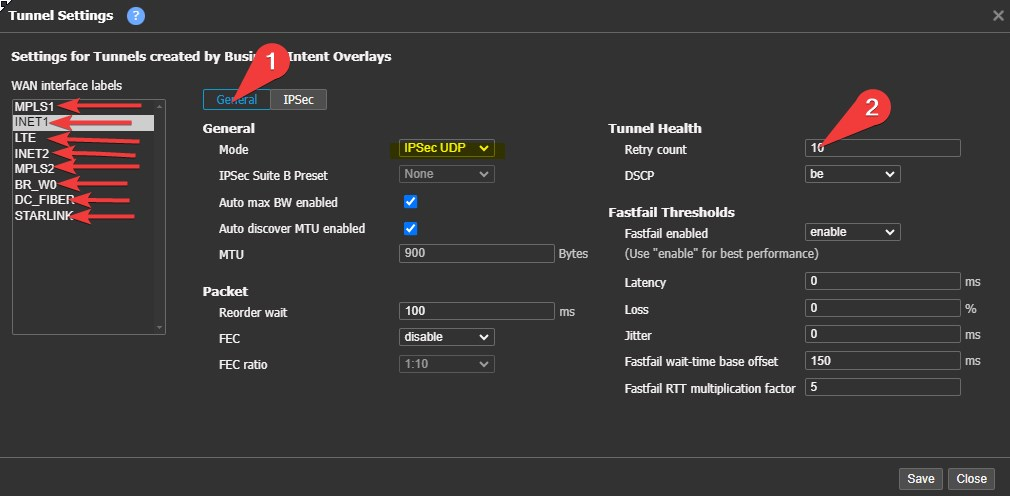
General Tab (1)
Adjust Tunnel Health Retry Count
Effects when learned routes from other ECs (SD-WAN routes) are pulled from the table and when tunnels show "down" in the GUI.Reduced Appliance Failover time
This a hard Failover timer, Soft Overlay failover is approximately 600ms
Per Label - Click on (1) and change on all labels (arrows)
• (2)Adjusted down (30 default)
• 5 for Cable,DIA, MPLS, LEO, Business Fiber.
• 30 for LTE and other unreliable underlays
Best Practice: MODE - IPSEC UDP (highlight)
IPSEC TAB(1)
Encryption
- Set all labels IPSEC encryption to AES-GCM-256
- Click "encryption algorithm FIRST, some options in "authentication algorithm" will gray out the Encryption options.
- when AES-GMC-256 is selected "authentication algorithm" will show "NA" like the below screen capture
- Set all labels Anti-replay window to 8192
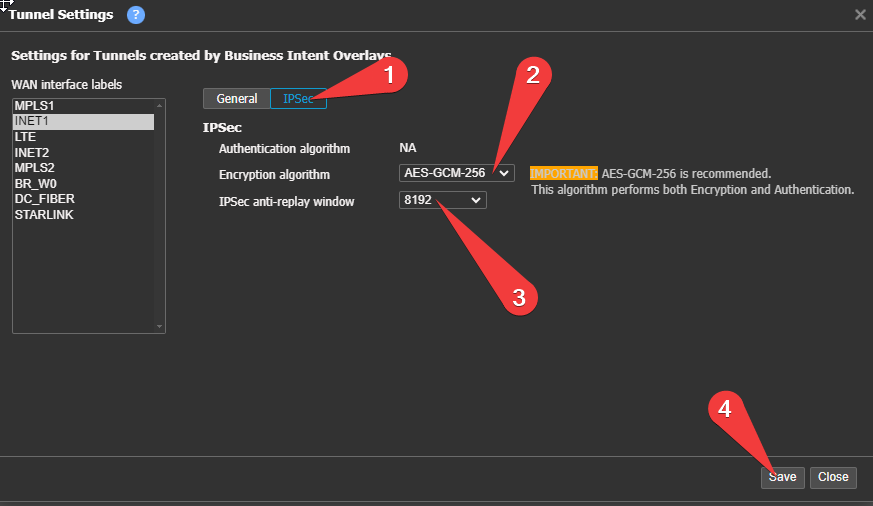
Select next label and repeat!
After creating a new label you must return to this screen and set up the label.
Updated 4 months ago
What’s Next
Did this page help you?