
Create MSP Tenants
Create tenant workspaces under your MSP account and provision Central in each one
Source CodeYou can find the full source code and documentation for this workflow on GitHub: MSP Workbench
Use the Onboard tenants task in MSP Workbench to create up to 50 tenants in one run. For each tenant, the workbench creates the workspace under your MSP account and provisions Central in the region you choose. Complete MSP Workbench Setup first.
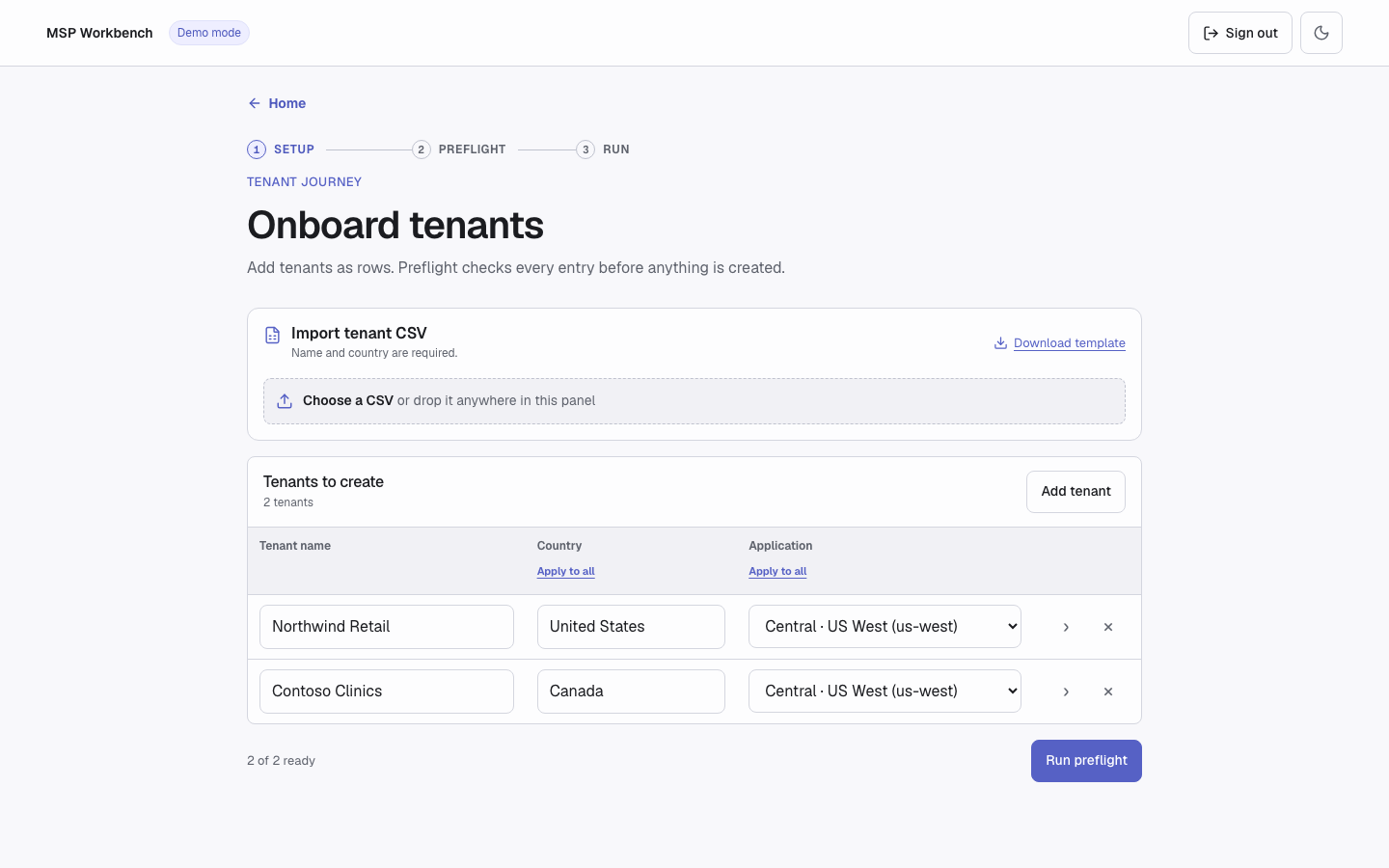
Onboard tenants
Input
Each tenant is one row. Tenant names must be unique within the run.
| Field | Required | Notes |
|---|---|---|
| Tenant name | Yes | Becomes the GreenLake workspace name. It counts as an existing tenant only on an exact, case-sensitive match. |
| Country | Yes | Pick a country by name. In a CSV or manifest, use the two-letter uppercase code, such as US. |
| Application | Yes | The Central application and region to provision, such as Central · US West (us-west). Only applications your MSP account can provision are listed. |
| Description, contact email, phone number, address | No | Open them with the › button at the end of the row. |
Apply to all in the Country and Application headers copies the first row's value to every row.
To load rows from a file, choose Download template in the Import tenant CSV panel, fill it in, then choose Choose a CSV or drop the file on the panel:
name,country,description,email,phone_number,street_address,street_address_complement,city,state_or_region,postal_code,application,region
Example workspace,US,,,,,,,,,HPE Aruba Networking Central,us-west
Only name and country are required. Fill application and region together, or leave both blank and choose the application in the table after import.
Try it in demo modeIn demo mode, enter the existing tenant name
Acme Corpto see a name conflict in the review.
Execution
Live runs write to real tenantsOutside demo mode, the workbench creates real tenants. If a run stops or fails, tenants already created are not removed.
1. Add Tenants
On the hub, choose Onboard tenants. Enter a name, country, and application for each tenant, or import a CSV. Use Add tenant to add rows and × to remove one. Then choose Run preflight.
2. Review and Confirm
The review checks that each name isn't already used under your MSP account and that each application can be provisioned in its region. Each tenant shows Ready or Will not run with the reason. Fix blocked rows with Back to tenants, then choose Create N tenants.
3. Watch the Run
For each tenant, the run shows Create workspace and Provision Central. Provisioning can take a few minutes per tenant. To stop the run or download the report, see Run a Job.
To retry, add only the failed tenants again. Tenants that were already created report name_conflict.
Command Line
Copy samples/new_tenant.yaml and replace service_manager_id and region with values from list services. The sample values work only in demo mode:
version: 2
mode: new
tenants:
  - name: Demo New Tenant
    country: US
    service:
      service_manager_id: bbbbbbbb-0001-0001-0001-000000000001
      region: us-west
devices: []uv run python workbench.py --demo list services
uv run python workbench.py --demo plan samples/new_tenant.yaml
uv run python workbench.py --demo run samples/new_tenant.yamlplan makes no changes. run asks for confirmation before it writes; pass --yes in scripts. If you leave out service and your account has exactly one eligible application, the workbench uses it. For global flags and exit codes, see Command Line.
Output
The run ends as Tenants created and provisioned, Tenant creation completed with errors, Tenant creation stopped, or Tenant creation failed. Each new tenant appears in your MSP tenant list with Central provisioned. Next, assign inventory to it.
Troubleshooting
For sign-in, server, and common run errors, see Troubleshooting and Run a Job.
| Error | Meaning | Fix |
|---|---|---|
name_conflict | "A tenant named '…' already exists" under your MSP account. | Choose a different name, or use the existing tenant. |
| Workspace name in use globally | "This workspace name is already in use globally across HPE GreenLake." The review can't detect this. | Rename the tenant and run it again. |
duplicate_tenant_name | Two rows in this run have the same name. | Rename or remove one of them. |
service_not_eligible | "Service '…' in region '…' is not eligible" for your MSP account. | Pick an application from the list, or copy an exact pair from list services. |
service_required | Command line only: the manifest has no service, and your account has more than one eligible application. | Add a service block to the tenant. |
service_not_found | "No eligible Central services found." | Check the MSP workspace's applications and subscriptions in the HPE GreenLake console. |
invalid_header, service_incomplete, other CSV errors | The CSV has an unsupported column, only one of application and region, or is not a readable UTF-8 CSV. | Start from Download template, keep its header, and save as CSV UTF-8. |
provisioning_failed, service_not_ready | The tenant was created, but Central provisioning failed or did not finish within about five minutes. | Provision Central for the tenant in the HPE GreenLake console. Running it again here reports name_conflict. |
API Calls
| Step | Service | Method | Endpoint | Description |
|---|---|---|---|---|
| 1 | GLP | GET | workspaces/v1/msp-tenants | Lists managed tenants (exact-name check before creating) |
| 2 | GLP | GET | service-catalog/v1/service-managers | Lists Central applications available to provision |
| 3 | GLP | GET | service-catalog/v1/per-region-service-managers | Lists the regions each application can be provisioned in |
| 4 | GLP | POST | workspaces/v1/msp-tenants | Creates the tenant |
| 5 | GLP | POST | {base_url}/{tenant_workspace_id}/token | Token exchange (MSP token → tenant token) |
| 6 | GLP | POST | service-catalog/v1/service-manager-provisions | Provisions Central in the new tenant |
| 7 | GLP | GET | service-catalog/v1/service-manager-provisions | Checks existing provisions, then polls until Central is provisioned |
Support
- Automation Team: [[email protected]](mailto:[email protected])
- Workflow Issues: GitHub Issues
- PyCentral Library: PyCentral Issues
Updated 21 days ago