
Subscription Burndown
See which devices lose their subscription each month, and which subscriptions need a decision
Source CodeYou can find the full source code and documentation for this workflow on GitHub: MSP Workbench
The Subscription burndown page in MSP Workbench shows, month by month, how many devices lose their subscription if nothing is renewed. It also lists unused and evaluation subscriptions. The page is read-only. Complete MSP Workbench Setup first.
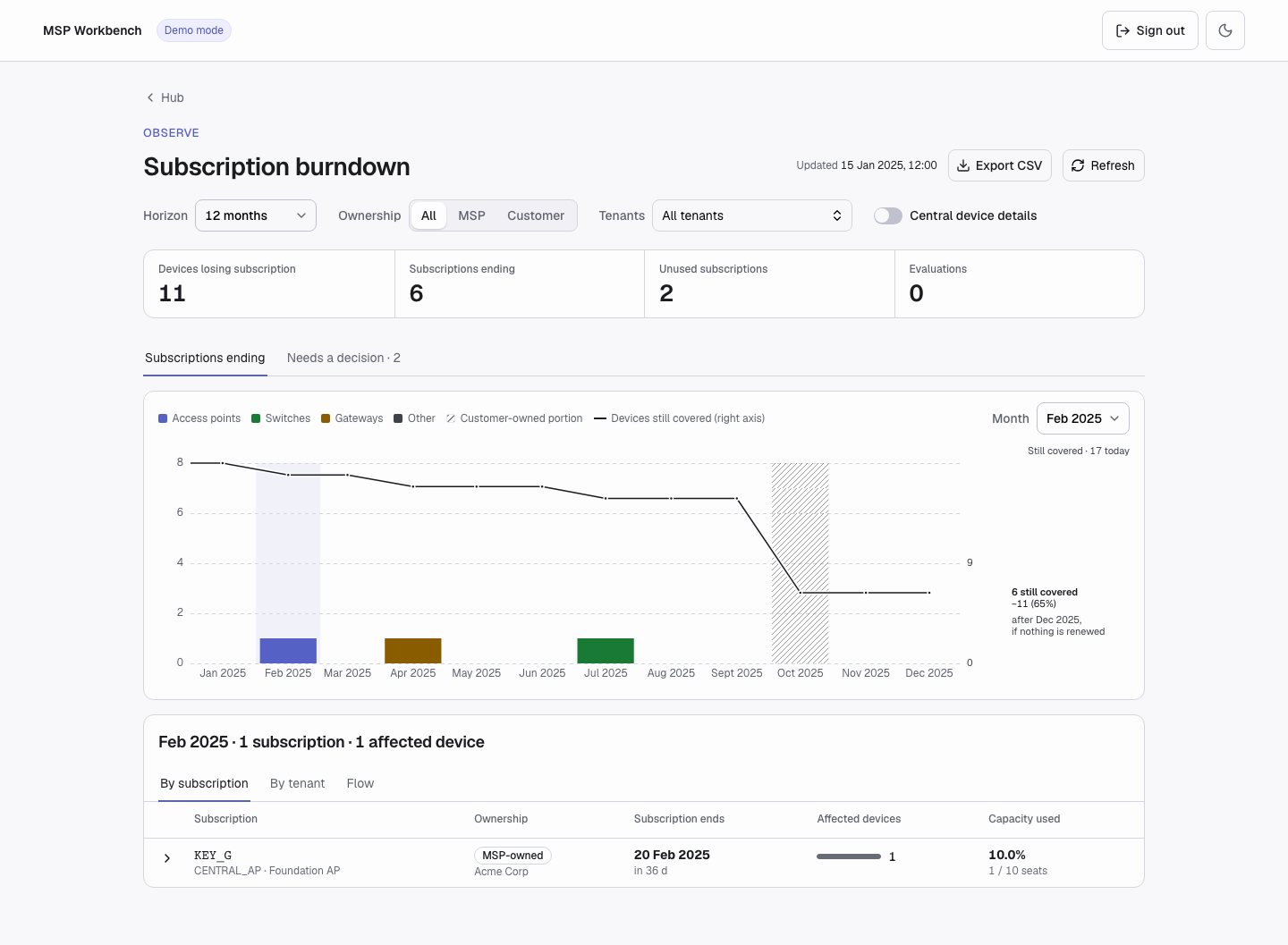
Subscription burndown
Input
There is no manifest or CSV. Set the view with these controls:
| Control | Values | Default |
|---|---|---|
| Horizon | 12, 24, 36, 48, or 60 months, starting with the current month | 12 months |
| Ownership | All, MSP (inventory your MSP workspace owns), Customer (inventory tenants own) | All |
| Tenants | Searchable multi-select | All tenants |
| Central device details | Adds each affected device's site and Central status | Off |
The page and its export include only current subscriptions.
Try it in demo modeIn demo mode, the page shows sample tenants and subscriptions.
Execution
1. Open the Page
On the hub, under Observe, open Subscription burndown. The page reads your tenants, subscriptions, and devices from GreenLake, with a progress bar.
Figures appear before the read finishes, marked Partial. Until the badge clears, the month tables are locked and Export CSV is disabled. Changing a filter does not read GreenLake again.
2. Filter and Pick a Month
Set Horizon, Ownership, and Tenants. Then pick a month with the Month selector or by clicking its bar. The card below the chart lists what ends that month:
- By subscription: each subscription ending, its end date, affected devices, and capacity used. Expand a row to see its devices.
- By tenant: each tenant losing cover that month. Expand a row to see its devices.
- Flow: subscriptions flowing to tenants, largest eight of each, the rest grouped as Other.
3. Turn On Central Device Details (Optional)
Switch on Central device details. The workbench reads the device inventory from every Central cluster it detected for your workspace. The tables gain Site and Status columns, a Sites affected figure appears, and a status ring shows how many of the month's devices are Online, Offline, No status, or Not found in Central. Click a status to filter the month to it.
4. Review, Export, and Refresh
Open Needs a decision to review:
- Unused subscriptions: every seat is available. Assign devices, or let them lapse.
- Evaluations: decide whether to convert them before their devices lose cover.
Click Export CSV to download the current tab. Click Refresh to read GreenLake and Central again.
Command Line
subscriptions burndown prints the same data from a complete read:
uv run python workbench.py --demo subscriptions burndown --scope msp --months 12
uv run python workbench.py --demo subscriptions burndown --scope tenant --tenant "Gamma Hospitality" --format csv --out gamma.csv
uv run python workbench.py --demo subscriptions burndown --view unused --lifecycle all| Flag | Values |
|---|---|
--view | losing_cover (default), unused, evaluations |
--scope | msp, tenant, tenants, all. Without it: msp, or tenant/tenants when you pass --tenant |
--tenant | Tenant name or workspace ID; repeatable |
--months | 12 (default), 24, 36, 48, 60 |
--month YYYY-MM | losing_cover only |
--search, --lifecycle current|expired|all | unused and evaluations only |
--format json|csv, --out PATH | Output format (default json) and file |
The command line does not read Central device details. For global flags and exit codes, see Command Line.
Output
The page shows Devices losing subscription, Subscriptions ending, Unused subscriptions, and Evaluations (plus Sites affected with Central device details on), the chart, and the month tables. Updated in the header shows when the data was read.
Each bar is the number of devices that lose cover that month, stacked by device type. With All ownership, the customer-owned part is hatched. The Devices still covered line drops by each month's losses; with Central device details on, a dashed line shows the same for devices online today.
Export CSV downloads subscription-burndown.csv, following the horizon, ownership, and tenant filters:
- Subscriptions ending: one row per affected device per month, with its subscription, tenant, serial, and MAC, plus site and status when Central device details is on.
- Needs a decision: one row per unused or evaluation subscription, with its seats and seats used.
Troubleshooting
For sign-in and server problems, see Troubleshooting.
| Error | Meaning | Fix |
|---|---|---|
| Partial badge; Export CSV disabled | The GreenLake read, or the Central read, is still running. | Wait for it to finish, or turn Central device details off to export GreenLake data only. |
snapshot_obsolete, inventory_obsolete | The data on screen was replaced, for example by a refresh or a new sign-in. | Click Refresh. |
| "Burndown data is unavailable" | The GreenLake read failed. | Click Refresh. |
no_cluster_answered, cluster_unreachable, no_central_provision, unmapped_region | No Central cluster was found for your workspace. | Click Retry next to Central device details. The GreenLake figures are unaffected. |
| "Central device details could not be read." | The Central inventory read failed. An earlier complete read stays on screen. | Click Retry. |
| Not found status | The device is in GreenLake but in no Central inventory the workbench could read. | Check that the device is onboarded to Central. |
usage_error (command line) | A flag does not fit the view, a tenant's ownership does not fit --scope, or a tenant name is ambiguous. | Fix the flags. For an MSP-owned tenant, use --scope msp or all. For an ambiguous name, use the workspace ID. |
not_found (command line) | A --tenant value matched no tenant. | Use the exact name from list tenants, or the workspace ID. |
API Calls
| Step | Service | Method | Endpoint | Description |
|---|---|---|---|---|
| 1 | GLP | GET | workspaces/v1/msp-tenants | Lists managed tenants |
| 2 | GLP | GET | subscriptions/v1/subscriptions | Subscriptions, seats, and end dates |
| 3 | GLP | GET | devices/v1/devices | Devices and the subscriptions they hold |
| 4 | Central | GET | network-msp/v1/device-inventory | Device site and status, only with Central device details on |
Support
- Automation Team: [[email protected]](mailto:[email protected])
- Workflow Issues: GitHub Issues
- PyCentral Library: PyCentral Issues
Updated 21 days ago